
Languages and translation (running a multilingual site)
Offer Traditional Chinese, English and Simplified Chinese, pick a default, and translate both the interface and your own page content — each language gets its own URL.
Settings → Languages & translation. This is where you choose which languages your site offers, which one is the default, and how each piece of text is translated.
Set up languages, step by step
Step 1: Choose the languages and the default
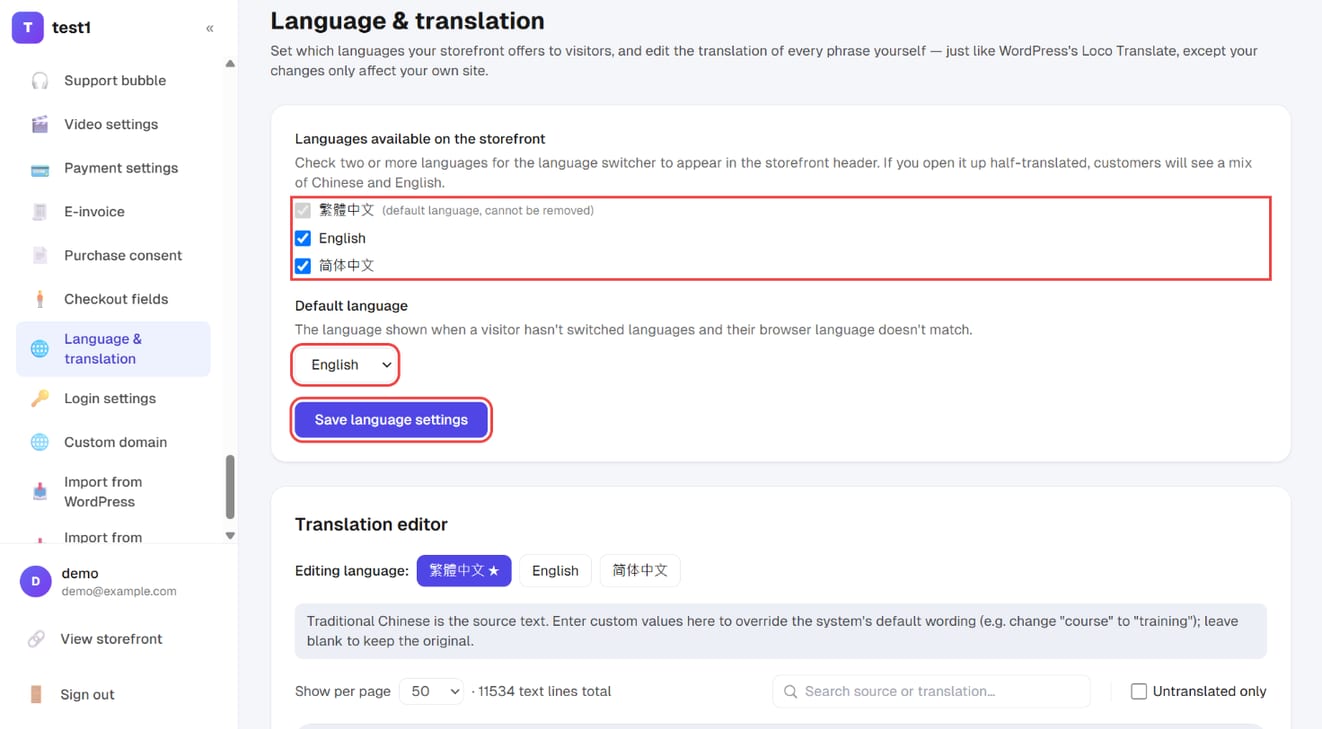
In the left menu, click "Settings → Language & translation". Tick the languages your storefront offers, pick the default language (shown when a visitor's browser language doesn't match), and click "Save language settings".
Step 2: Change any phrase in the translation editor
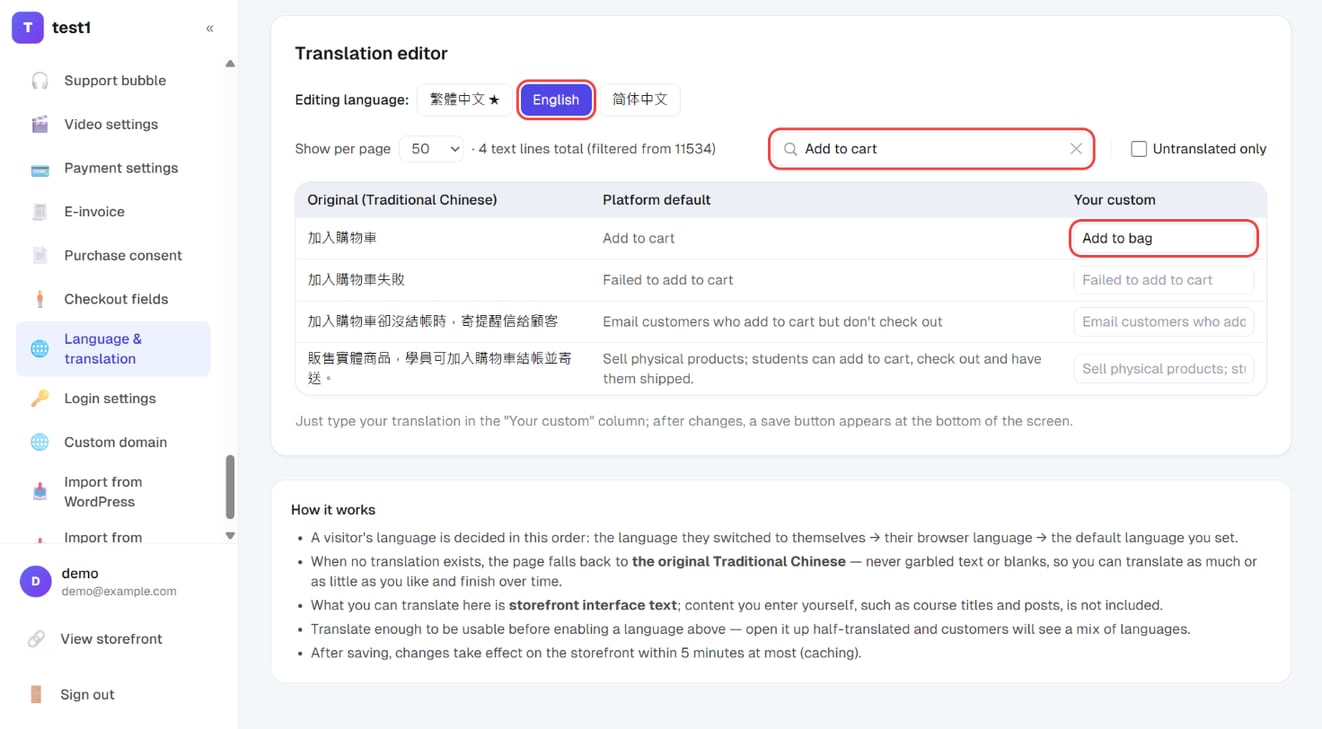
Under "Translation editor", pick the language (e.g. English), search for the phrase, and type your wording in the "Your custom" column — for example "Add to bag" instead of "Add to cart". A save button appears at the bottom once you change something.
Which languages you can offer
Three, fixed by the platform: Traditional Chinese, English and Simplified Chinese. Tick the ones you want visitors to see, then pick one default language.
- The default is always in the list and can't be unticked — otherwise your own default language would be the one visitors can't select.
- One language only = a single-language site, and no language switcher appears in the header. It shows up once two or more are ticked.
- Advice: translate first, publish the language second. A half-translated site mixing two languages looks worse than one clean language.
What the URLs look like
The default language has no prefix; every other language gets one. Say your default is English:
| Language | URL |
|---|---|
| English (default) | /about |
| Traditional Chinese | /zh-tw/about |
| Simplified Chinese | /zh-cn/about |
Switch the default to Traditional Chinese and it flips: /about becomes the Chinese version and /en/about the English one. The shortest URL always belongs to your main audience.
- This exists for search engines: Google indexes URLs, so a language without its own URL effectively doesn't exist.
- A prefix for a language you haven't enabled returns 404. Spelling out the default language (
/en/abouton an English site) redirects back to the clean URL, so the same content never sits at two addresses. - ⚠️
en,zh-twandzh-cncan't be used as page slugs — they're read as language prefixes. All three are reserved, not just the ones you've enabled.
Which language does a visitor get? In order: the URL prefix → whatever they last switched to → their browser language → your default. Always clamped to the languages you've enabled, so if you later turn one off, people who had switched to it land back on a version you still maintain.
Two different things to translate
1. Interface text (buttons, field labels, "Add to cart" and friends) That's the translation editor in the lower half of this page. Edit it line by line; it only affects your own site. Anything you haven't translated falls back to the original text — never a blank or a raw code — so you can translate as much or as little as you like. Clearing a field restores the platform default. Changes reach the front end within five minutes.
2. Your own content (page titles and layouts) Not here — in the page builder. Open any page and the editor toolbar has language tabs: the default language is marked as the source, with one tab per additional language, ticked once translated.
Course names, course descriptions and blog posts currently exist in one version only and look the same in every language. Translation today covers interface text and custom pages.
Translations layer over one page — they aren't page copies
A page exists once: its URL, its place in the menu, its order, whether it's published — all single, shared across languages. Only the title and the content blocks exist per language.
Both sides of that:
- Upside: change a URL, reorder the menu, unpublish a page — do it once, and there's no "we forgot to unpublish the English one".
- Cost: layouts don't sync automatically (next section).
- A language with no translation doesn't go blank — it shows the default-language version.
Editing the source doesn't update the other languages
That's deliberate. Rework your English layout and the Chinese version stays exactly as you translated it until you touch it yourself.
The reason: multilingual sites usually need different images per language — text baked into graphics, localised key visuals. Auto-copying the source layout would make that impossible.
When you do want to sync, tick "Sync with the source language" on that language's tab: you'll get a confirmation, and then the source's last saved title and content are copied over wholesale. Each language keeps its own revision history and a version is stored before the overwrite, so a bad sync can be rolled back.
Next to it is 🤖 AI translate: it translates the source's last saved content into that language and hands you the result without saving — review, adjust, then save. It runs on your own AI writing key (Settings → AI writing key), billed to your AI account. "Revert to source" deletes that language's translation, after which visitors switching to it see the default-language content.
⚠️ When you change the default language, every page's source is moved across: a language you'd already translated is promoted to the new source, the old source is demoted to a translation of the old language (nothing is lost), and untouched system and legal pages are swapped for the platform's built-in version in the new language. Any page whose title or body you edited yourself is left alone.
Which language do notification emails use?
The recipient's, not yours. When a student signs in, registers, checks out or uses the language switcher, the language they were viewing is recorded on their account, and later emails to them use it — even ones triggered by a schedule or by someone else's action.
- No language on record (a freshly imported student who hasn't signed in) → your site default.
- Emails to you or your instructors (a new order, a submitted assignment) → always your site default.
- Newsletter subscribers keep the language they were viewing when they subscribed.
- System emails are platform copy and use the platform's own translations — they don't pick up edits you made in the translation editor.
FAQ
Do I have to duplicate the whole site to add English? No. One site, one set of pages, with a translation layer on top. URLs, menus and publish state stay shared.
I've only translated a few pages. What about the rest? Visitors switching language see the default-language content on untranslated pages — never a blank page or a 404. Fill them in at your own pace.
Can each language have different images and layouts? Yes, and that's exactly why syncing isn't automatic. Layouts are independent per language, down to dropping a section entirely.
I edited the source — why is the other language still old? It never follows automatically. Open that language's tab and either tick "sync with the source" or run the AI translation again.
Can I translate courses and blog posts? Not yet — there's one version and every language sees it. In practice, sites that need this create separate courses and separate posts, then split the entry points by menu or landing page.
Do I need a separate domain per language? No. Prefixes on one domain are enough, and search engines understand them — the cross-language tags are emitted for you. See Tracking and SEO.