
Checkout fields (what buyers fill in)
Decide what buyers fill in at checkout: show or require name, phone and order notes, and add your own questions. Answers are stored on the order.
Settings → Checkout fields. This page decides what a buyer is asked to fill in after they hit checkout. Whatever they enter is stored on that order, and a buyer who isn't signed in becomes a member at the same time.
Set up checkout fields, step by step
Step 1: Adjust the basic fields
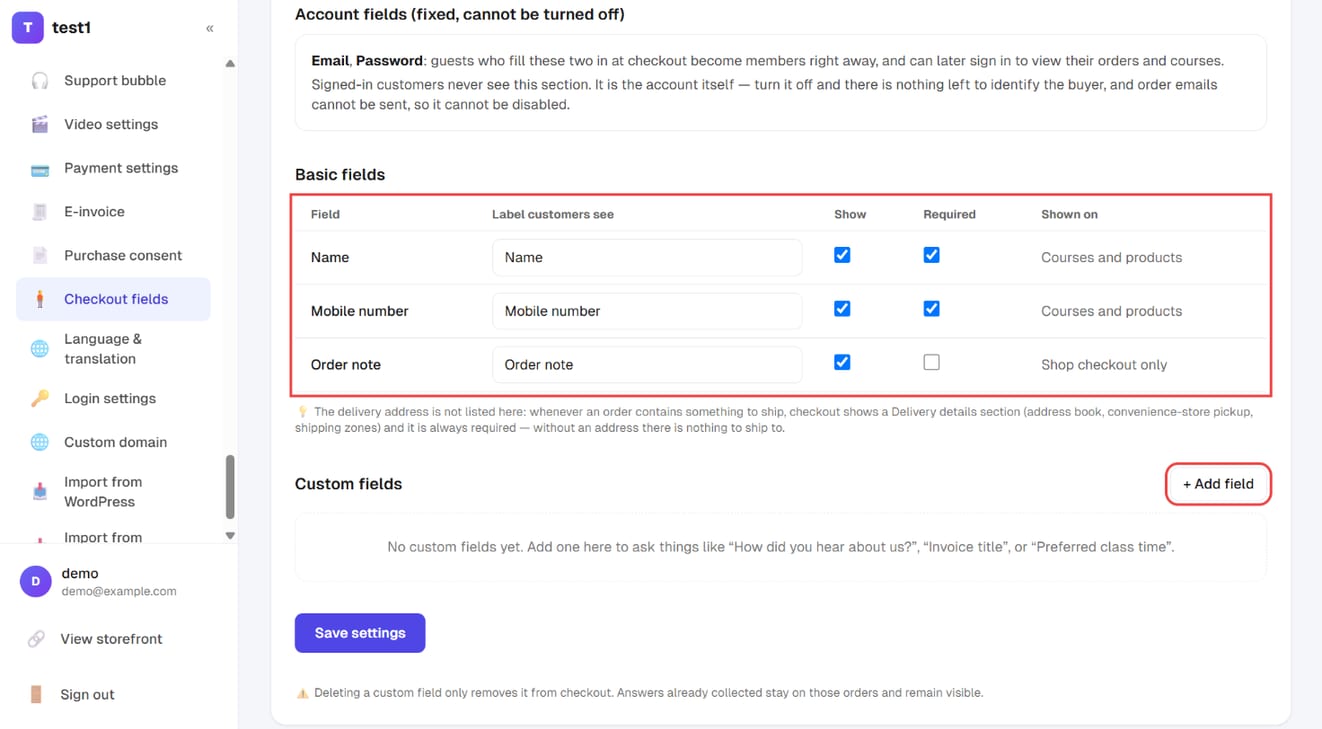
In the left menu, click "Settings → Checkout fields". Under "Basic fields", each of the three built-in fields (name, mobile number, order note) can be relabelled, shown or hidden, and made required.
Step 2: Add a custom field
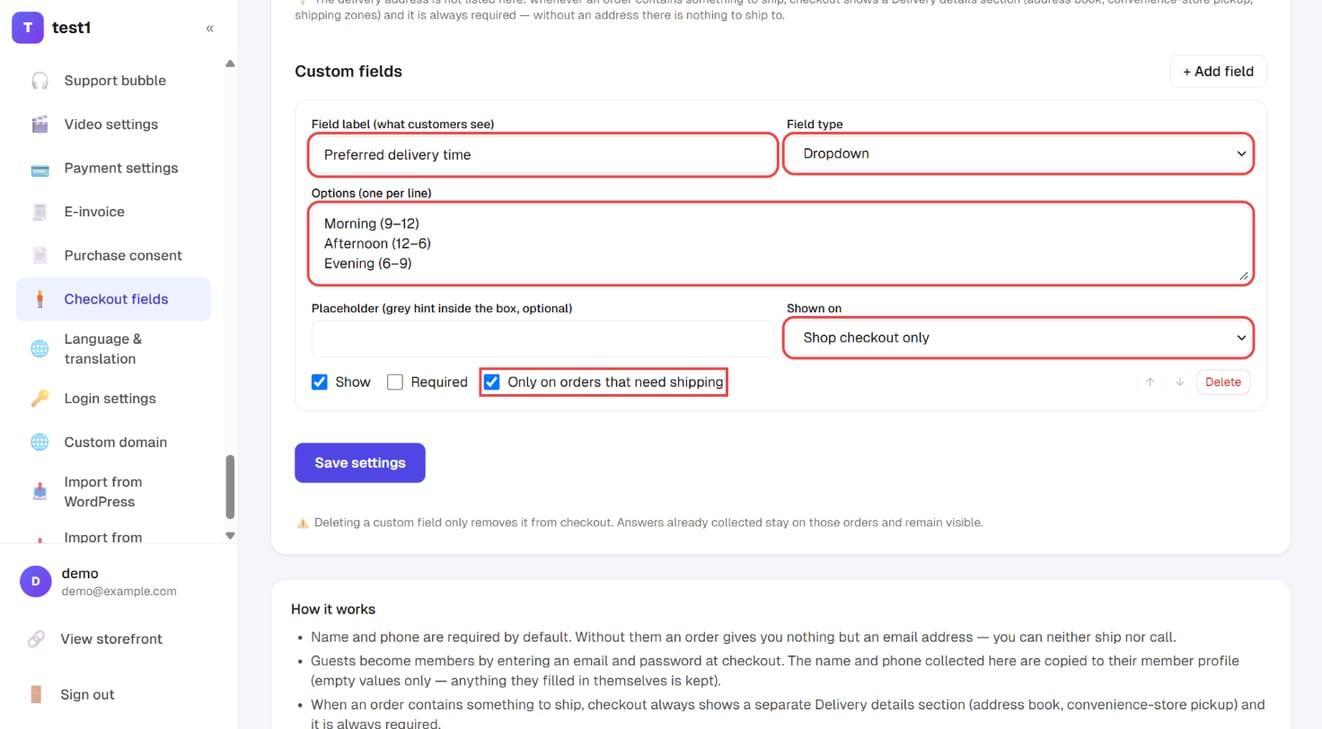
Click "+ Add field" under "Custom fields", then set the field label, the field type (text, phone, dropdown, checkbox…), the options for a dropdown (one per line), and shown on (courses and products / course checkout only / shop checkout only). Tick "Only on orders that need shipping" for delivery questions. Click "Save settings".
The three built-in fields
| Field | Default | Appears in |
|---|---|---|
| Name | Shown, required | Course and product checkout |
| Phone | Shown, required | Course and product checkout |
| Order note (multi-line) | Shown, optional | Product checkout only |
For each of the three you can change three things: the label the customer sees, shown / hidden, and required / optional. Hide a field and the "required" box greys out — a field nobody sees obviously can't be required.
Name and phone are required by default for a reason. Turn them off and every order you receive is just an email address: no way to ship, notify or follow up. Unless you sell purely digital products and handle everything by email, leave them on.
"Appears in" is fixed and can't be changed. The order note is product-only because that's where "deliver after the 5th" and "please gift-wrap it" belong; course checkout never had the field. If you want to ask something on course checkout, add a multi-line custom field below.
Custom fields
Click Add field. Each one has:
- Label — what the customer sees (required; a field with no label won't save)
- Type — single line, multi-line, phone, email, dropdown, or checkbox
- Options — dropdowns only, one per line
- Placeholder — the grey example text inside the box (optional)
- Appears in — both, course checkout only, or product checkout only
- Shown and Required
- Only on orders that ship — the field appears only when that order actually contains something physical (e.g. "preferred delivery window")
- Arrows to reorder, and a delete button
Up to 30 custom fields — beyond that nobody finishes the form. If you pick "dropdown" and forget the options, it falls back to a single-line text box rather than trapping buyers in a required field with nothing to pick.
Two things you deliberately can't change
Buyers of the platform always ask, so here it is up front.
1. Email and password can't be switched off. Those aren't data, they're the account. A buyer who isn't signed in becomes a member by filling those two boxes, which is how they later sign in, see their orders and open the course. Remove them and there's nothing to identify the buyer, order confirmation emails have nowhere to go, and they can never reach what they paid for. So that block is always shown and always required. Buyers who are already signed in never see it.
2. The shipping address isn't on this page. Whenever an order contains something physical, checkout shows its own delivery details block, always required — no address, no shipment. It isn't a plain text field: it's wired to the member's saved addresses, convenience-store pickup points and shipping-zone pricing, so the system owns it. If the whole cart is digital, it simply doesn't appear.
What to ask, and what not to
Every extra field costs you sales. That's not superstition, it's the rule of checkout pages: the buyer has already decided to pay, and each remaining box is another chance to reconsider — especially on a phone.
Worth asking (you can't do your job without it):
- Name and phone — shipping, notifications and support all need them
- Anything you genuinely can't ship without: size, variant, delivery preference
- Details you must record: company name, tax ID (if it's only for the invoice, let e-invoicing handle it instead of asking twice)
- For in-person sessions: dietary needs, number of attendees
Not worth asking (move it elsewhere):
- "How did you hear about us?", "Why this course?" — put surveys on the thank-you page or in the first email. Response rates are higher and nothing blocks the payment
- Anything you already know: which course, the amount, the referring link — all recorded automatically
- Marketing interest categories — use a lead form or a post-purchase survey instead
A useful test: list everything you'd like to ask, then go through it one by one asking "if this is blank, can I still do my job today?" Every "yes" becomes optional, or leaves the checkout page entirely.
Where the answers show up
- Name / phone / note — open any order under Orders, in the buyer and payment block
- Custom field answers — the checkout details block further down the same order page
- Export — the Export CSV button on the course orders list carries the custom field answers with it (the product orders list has no export button yet)
- Member record — the name and phone entered at checkout are copied onto the member's profile, but only into blanks; anything they filled in themselves is left alone. See Students and orders
- Auto-filled next time — invoice details and custom field answers are saved to the buyer's own account and filled in at their next checkout. Buyers can also enter them in advance under "Account settings → Invoice and checkout details" on your site, and you can view or change them under "Students → Edit account". Again only blanks are filled, and checkboxes aren't remembered
Orders store a snapshot of the label. Rename a field later, or delete it entirely, and old orders still show what was asked and what was answered.
FAQ
Can I ask for the email address only? Yes — hide name and phone (email and password can't be hidden). But then every order is just an email address, with no way to ship or call. Only sensible for purely digital, email-delivered products.
Do changes affect existing orders? No. Settings only apply to future checkouts. Existing orders keep what was entered and the field names used at the time.
If I delete a custom field, do I lose the answers? No. Deleting just stops it appearing at checkout. Answers already collected stay on those orders and still export.
Is "required" enforced, or can someone bypass the page? Enforced. Beyond the message on the page, the server re-checks the same settings before creating the order and rejects any blank required field.
Should I add a field for the tax ID so I can issue invoices? No. Switch on e-invoicing and checkout shows a proper invoice block (personal or company, carriers, donation) — far more reliable than a loose text box.
Is the terms checkbox added here too? No, that's a separate feature — see Purchase terms. A custom checkbox can't store a snapshot of the terms text the way that one does.