
Subscription plans (recurring payments)
Charge students automatically every week, month or year: membership or per-course plans, what recurring billing can and can't do, cancellations and failed charges.
Subscription plans let you charge students automatically every week, month or year. You'll find them under Subscriptions (🔁) in the sidebar, available from the mid-tier plan upwards.
When a subscription makes sense
Subscriptions are paid for by retention, not by the sale. They're worth it in three cases: the content keeps growing (new courses, live sessions or templates every month), there's a human element (a community, Q&A, feedback on assignments), or buying outright is too big a jump ($400 up front becomes $40 a month, which far more people will try).
The opposite case: a course you filmed once and will never touch again. Students finish it in three months and cancel, and you've traded a clean sale for churn and support email.
Set up a subscription plan, step by step
Step 1: Open Subscription plans
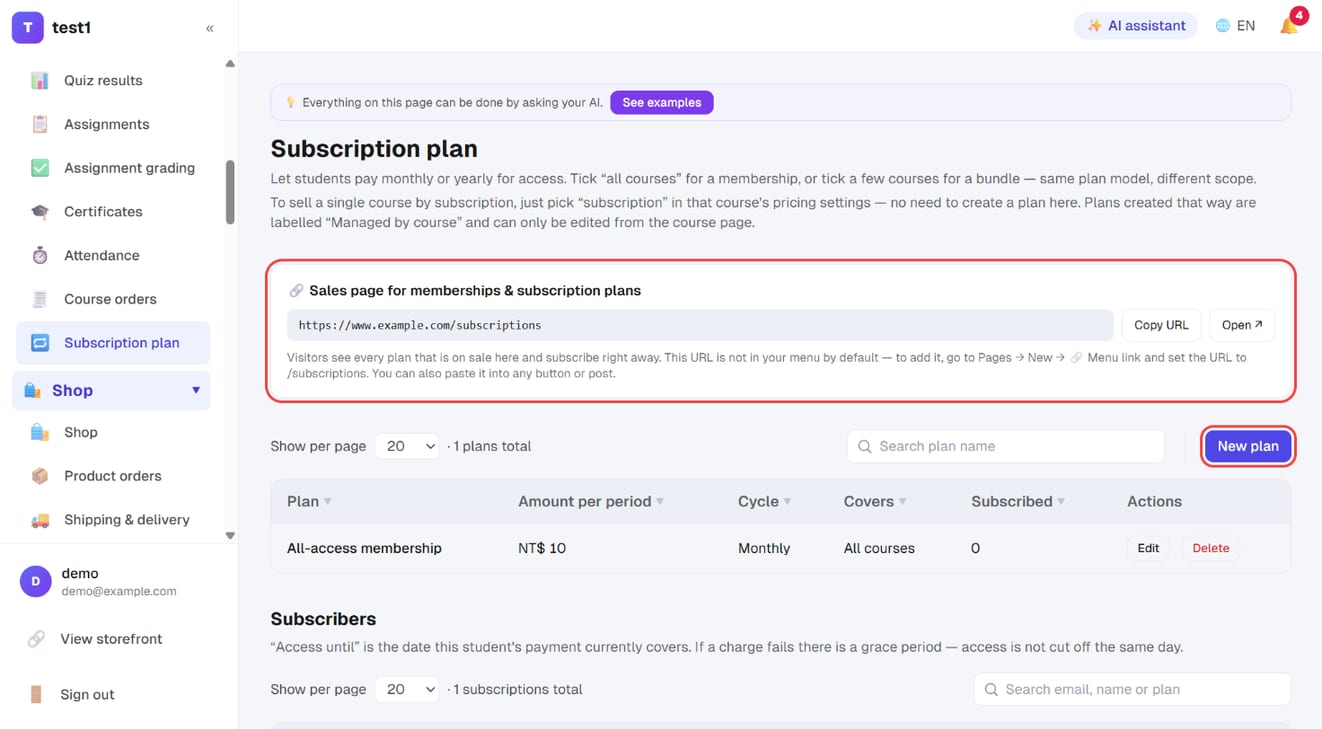
In the left menu, click "Teaching → Subscription plan". The "Sales page for memberships & subscription plans" at the top shows your /subscriptions URL, with "Copy URL" and "Open". Click "New plan" on the right.
Step 2: Fill in the plan and save
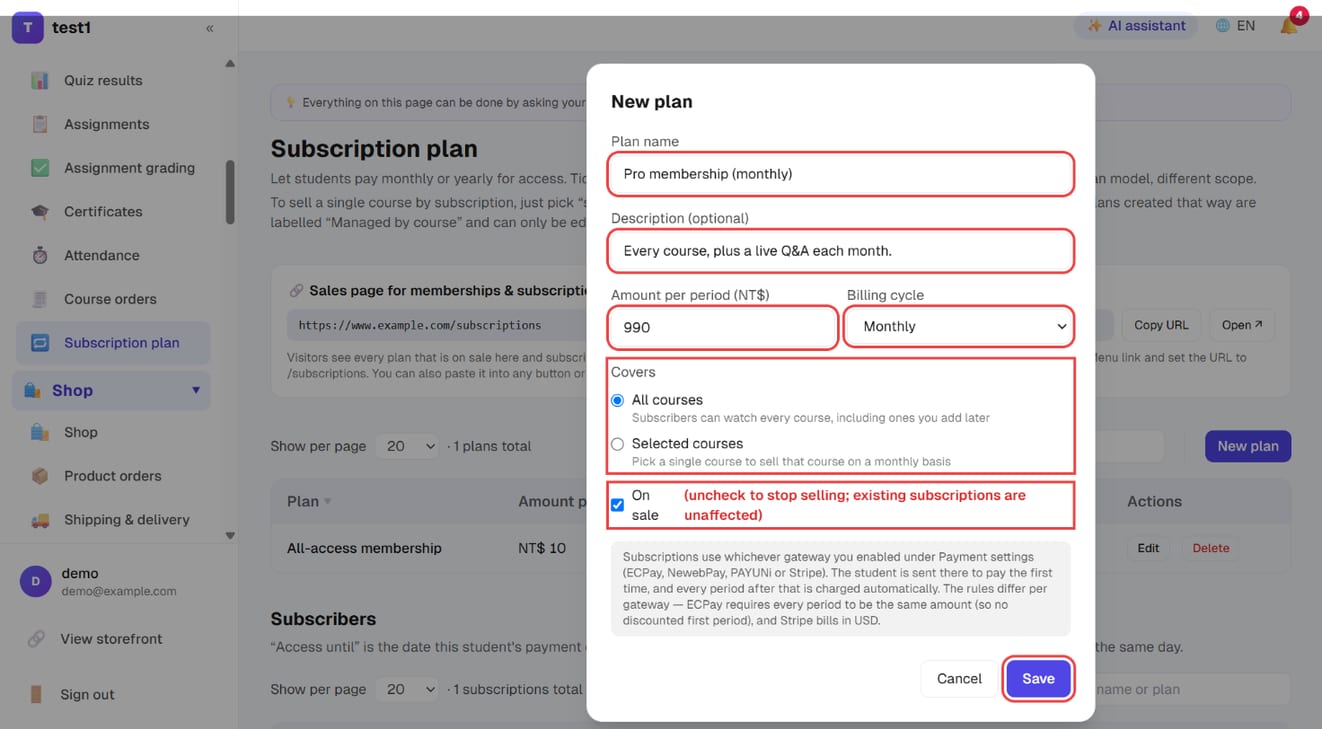
- Plan name and Description (optional)
- Amount per period and Billing cycle (monthly / yearly / weekly)
- Covers: "All courses" (an all-access membership that includes courses you add later) or "Selected courses"
- On sale: untick to stop selling — existing subscriptions are unaffected
Click "Save".
Step 3: Keep an eye on your subscribers
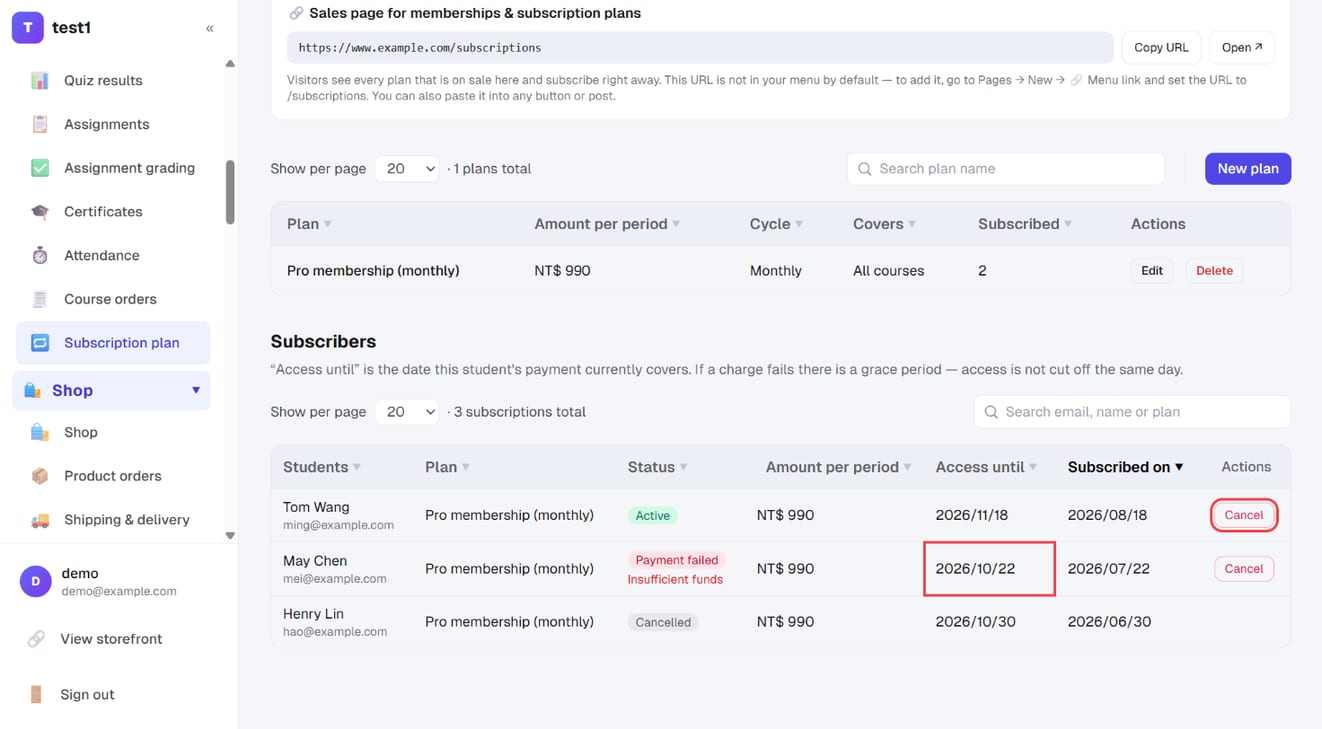
Further down, "Subscribers" lists everyone who signed up: their status (active / payment failed / cancelled), the amount per period, and Access until — the date their payment currently covers. "Cancel" ends a subscription on the student's behalf.
Two ways to create one
1. A membership or bundle — go to Subscription plan → New plan, give it a name, a price per period and a billing cycle, then choose what it covers:
- All courses — an all-access pass that automatically includes courses you publish later, with nothing to do for existing subscribers
- Selected courses — tick as many as you like, which is how you build a "starter bundle" or "pro bundle"
2. A single course billed monthly — don't create a plan here. Open that course, set How it's priced to Subscription, and fill in the amount, cycle, billing day and period cap. A plan is created and bound to the course automatically; it shows up on this page marked Managed by course and can only be edited from the course itself. (Editing it in two places would give you two sources of truth — and deleting it would leave a course that nobody can buy.)
🚨 A plan with no entry point sells nothing. The sales page lives at
/subscriptionson your domain and is not in the menu by default. Add it under Pages → New → 🔗 Menu link, or paste the URL into any button or article.
What recurring billing can and can't do
Recurring billing is handled by your payment provider, not by us: the student authorises their card once, and from then on the provider runs the schedule and tells us the result of each charge. That model has consequences worth knowing before you price anything:
| Behaviour | |
|---|---|
| Cycles | Weekly, monthly or yearly |
| Billing day | With some providers you can pin it (the 5th of the month, every Tuesday); with others it simply follows the sign-up date |
| Period cap | Optional "stop after N charges" — useful for pay-in-instalments. Some providers cap how many periods they'll accept; Stripe has no cap and no limit to set |
| Currency | Stripe charges in USD, converted using the exchange rate you set |
| Discounted first period | Not supported. Every charge in a subscription must be the same amount, and coupons don't apply at subscription checkout |
| PayPal | Doesn't support subscriptions here |
Whichever provider you use, the recurring service usually has to be enabled on their side first — an account that can take one-off card payments is not automatically allowed to run a recurring schedule, and if it isn't enabled the student's card is simply declined. The Subscriptions page shows exactly what to apply for. See Payment setup.
The student's side
The first payment sends them to the provider's page to authorise the card (people who aren't signed in can create an account with an email and password right there). Every period after that, the provider charges them and notifies us, and only then do we extend access. Until the first charge succeeds, the student has no access.
Under My subscriptions (/dashboard/subscriptions on your domain) they can see the amount, the cycle, the date access runs to, and cancel by themselves. After cancelling:
- No further charges
- Access is kept until the end of the period they already paid for — nothing is cut off mid-month
- Coming back means subscribing again
The same plan can't be subscribed to twice (that would create two schedules and charge them twice), but different plans can run side by side.
There is no "pause" — only cancel. Someone who wants a few months off cancels and subscribes again later.
Cancelling on a student's behalf
The lower half of the Subscriptions page is the subscriber list (searchable, sortable, paginated) showing the student, plan, status, amount per period and the date access runs to. Live subscriptions have a Cancel button.
It terminates the schedule at the provider first and only then marks it cancelled here — never the other way round, because marking it locally while the provider's schedule keeps running means the card keeps getting charged.
⚠️ Cancelling does not refund anything. Money already taken stays taken; to refund a period, open that order and refund it — see Students and orders.
Occasionally the provider refuses the termination. The screen says so plainly and you get an email: go into the provider's dashboard and stop that schedule by hand, or the next period will still be charged.
When a charge fails
Expired cards and insufficient limits are routine. When one fails, the row turns red with Payment failed and the reason the provider gave, and the student sees a note under My subscriptions asking them to check their card.
🚨 Access is not cut that day: there's a short grace period, and only if it passes without a successful charge does access end. That's deliberate — replacing a card takes a few days, and locking people out instantly only generates support email from people who fully intend to pay.
Subscription vs one-off, how to choose
| One-off purchase | Subscription | |
|---|---|---|
| Revenue | One payment, then back to zero | Every period, and it stacks |
| What it asks of you | Done when it sells | Keep producing — stop, and churn follows |
| The buyer | Decides once | Lower barrier, but re-decides every period |
| Fits | A course that's finished and static | Growing content, community, cohort coaching |
The combination that works in practice is a few one-off courses as the front door plus one all-access membership: the one-off sale gets a first payment out of someone, the membership keeps them.
FAQ
Can I offer a discounted first month? No — every charge in a subscription has to be the same amount, and coupons don't apply at subscription checkout. To run a promotion, price the whole plan low during launch and raise it afterwards; a price change only affects subscriptions created from then on.
If I change the price or cycle, do current subscribers change too? No. The schedule lives at the payment provider, so edits only affect future subscriptions. Moving an existing subscriber to a new price means they cancel and subscribe again.
I can't delete a plan. Deleting is blocked while anyone is still subscribed, because the provider's schedule would keep charging for a plan that no longer defines what it unlocks. Untick Available for sale instead — existing subscriptions are untouched, nobody new can buy.
Are receipts issued for each period? Yes, if you've connected an invoicing provider — see Invoicing.
Does a student lose their history when they cancel? No. Account, progress and certificates all stay. When access lapses they just can't open the lessons; resubscribing picks up where they left off.
What is an "Awaiting payment" subscription? Someone started the checkout but the provider never confirmed a first successful charge — they probably abandoned the card form. It carries no access at all, nothing was charged, and you can leave it alone.