
Email Delivery Setup
Connect your own email provider, and why notifications and bulk email use two separate connections.
Email & newsletters → Email settings. This is probably the most-skipped setting on the platform, and the one that causes the most trouble.
First: what the platform sends for you
| Type of email | Before you set this up |
|---|---|
| System notifications (password resets, registration confirmations, order notices) | Sent by the platform — works out of the box |
| Newsletters and sequences | Not sent at all |
Bulk email has to go out on your own domain and sending reputation. That isn't an arbitrary restriction: one marketing email that gets reported drags down deliverability for everyone sharing a sender, so the platform doesn't send that category on your behalf.
Supported providers
Resend / SendGrid / Mailgun / Amazon SES / Gmail
With no strong preference, Resend is usually the least work: clean interface, a clear domain-verification flow, and a free tier that covers a site that's just starting out.
Set up sending, step by step
Step 1: Pick a provider and enter your key and sender address
In the left menu, click "Email & newsletters → Email settings". In the first section, "① Notification email sending":
- Email service provider: pick the one you use (Resend in the screenshot)
- API Key: paste the key you created in your provider's dashboard
- Sender address (your domain): for example
news@yourbrand.com— the domain must be verified with your provider - Sender name: the name recipients see, usually your brand
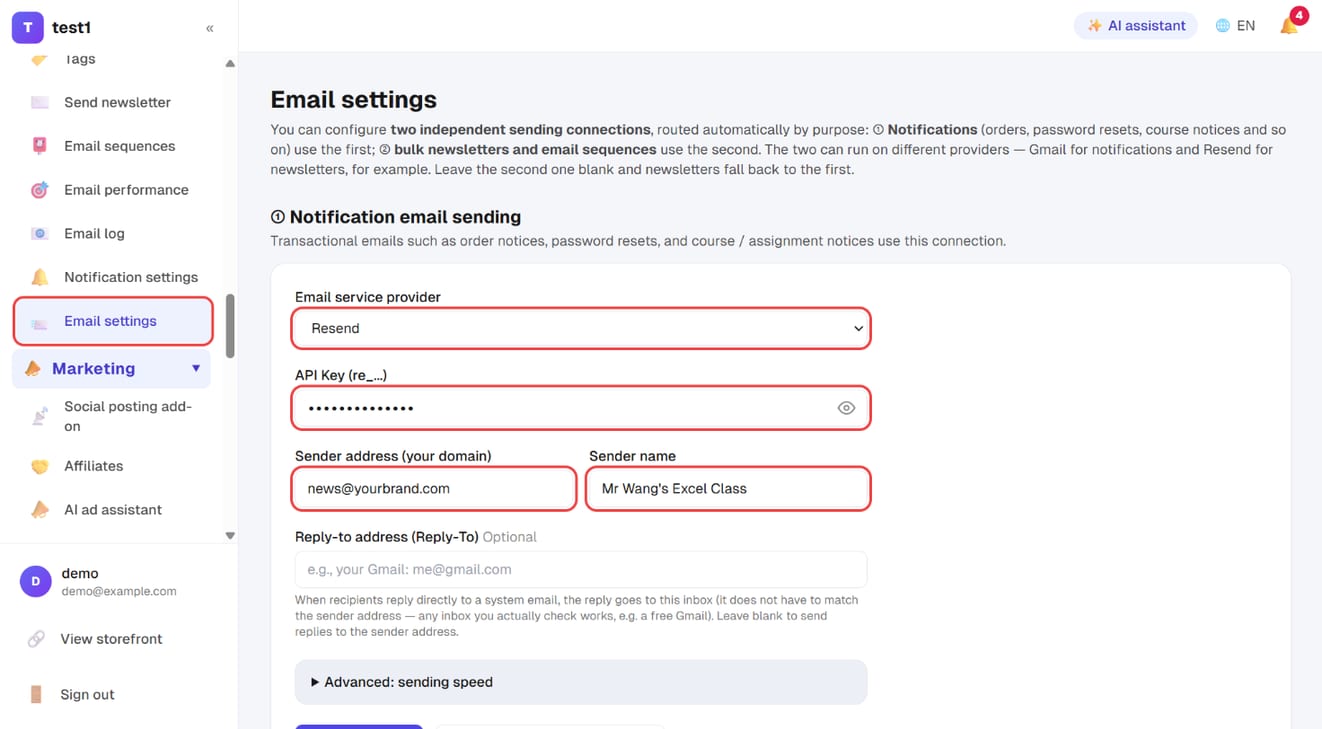
Reply-to address is optional: when someone replies directly to a system email, the reply goes here. It can be any inbox you actually read (a free Gmail is fine).
Step 2: Follow the guide, verify your domain, then send a test
Once you pick a provider, a "Setup tutorial" for that provider opens below, showing where to get the key and how to verify your domain. When you've done that:
- Click "Save settings"
- Click "Send a test email to yourself" and make sure it arrives — and isn't in spam
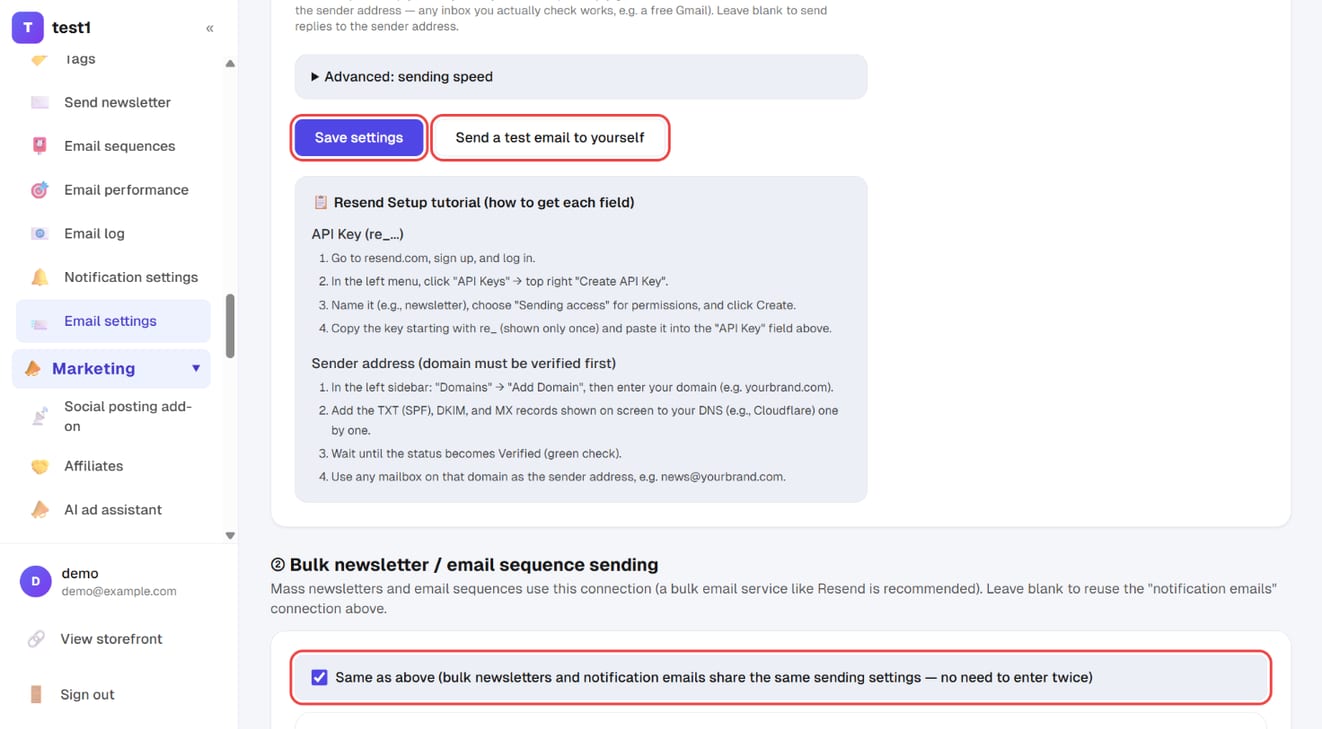
⚠️ Always verify your sending domain (add the SPF / DKIM records from the tutorial to your DNS). Skipping this doesn't mean "email fails to send". It means email sends and lands in spam — the hardest kind of failure to notice, because your dashboard says delivered.
⚠️ A specific gotcha with Amazon SES: new accounts start in sandbox mode and can only send to addresses you've already verified. You have to request production access from AWS before real use.
Step 3: Decide whether newsletters use a separate connection
Section "② Bulk newsletter / email sequence sending" has "Same as above" ticked by default — broadcasts go out through the connection above.
Untick it to give broadcasts their own provider — for example Gmail for notifications (low volume, easy setup) and Resend for newsletters (bulk sending, statistics). The most practical benefit is protecting your transactional mail: if a campaign ever gets a wave of spam complaints and that sender's reputation drops, your password-reset emails don't go down with it.
Step 4: Choose how newsletters are tracked
Section "③ Newsletter tracking & inbox tab" has two checkboxes that only affect newsletters and sequences:
- Open tracking (suggested: off): adds a hidden image to record opens. Apple Mail loads images automatically, so open rates are unreliable anyway — turning it off costs little
- Click tracking (suggested: keep on): records who clicked which link — a genuine interest signal that funnels and segments also use
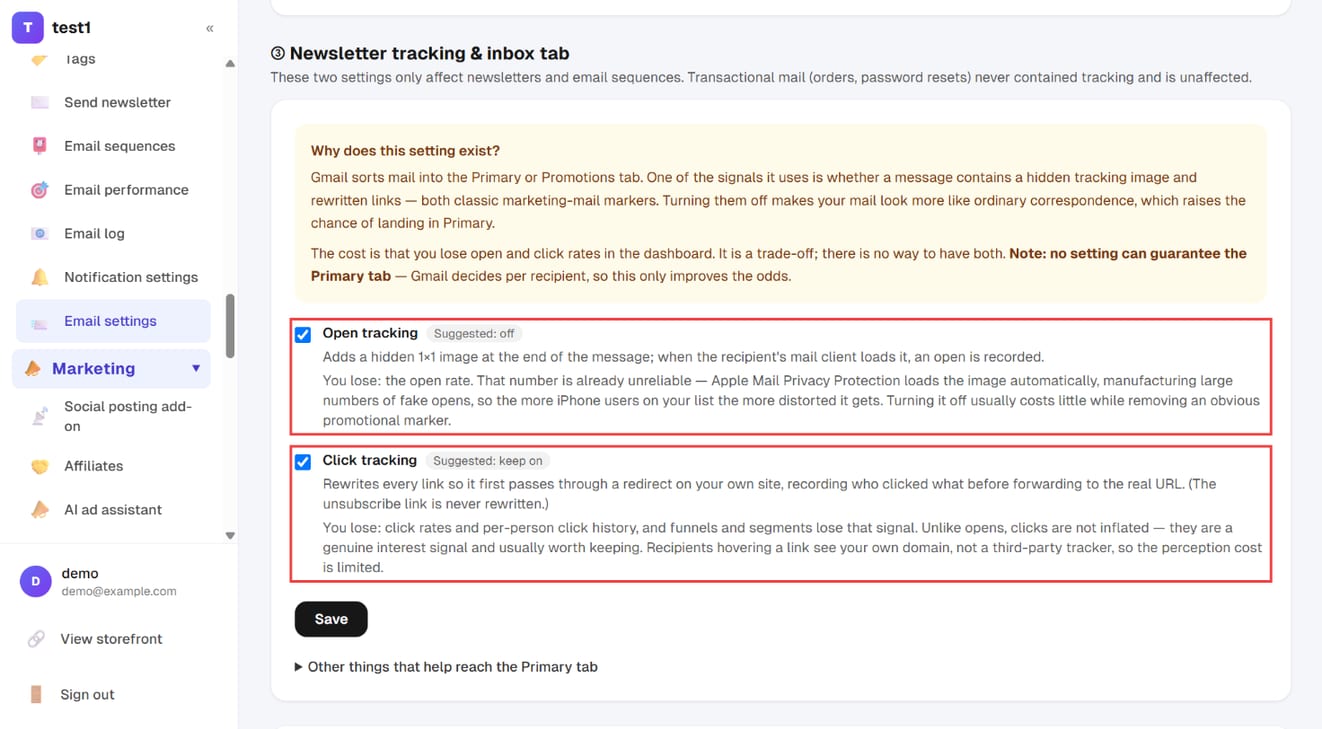
With tracking off, your mail looks more like ordinary correspondence and is more likely to land in Gmail's Primary tab; the trade-off is losing those numbers in your dashboard. Click this section's "Save" when you're done.
Further down the same page you can also "add your own message" to order emails — a community link or next-step instructions, for example.
After you send
Every email sent is recorded under Email & newsletters → Email log, including failure reasons. Start troubleshooting there.
FAQ
My emails land in spam. Nine times out of ten, domain verification is incomplete. Go back to your provider and check the domain shows as Verified.
Can I send newsletters through my own Gmail? Technically yes, but don't: Gmail has daily sending limits, and a personal account flagged for bulk sending is a risk you don't want. Move to a dedicated sending service once your list is more than a few hundred people.
Do unsubscribed people still receive mail? No. Unsubscribes and hard bounces are excluded from every future send automatically — you don't maintain a suppression list.
What if I leave both empty? Notifications still work (the platform sends them). Newsletters and sequences won't send at all.