
Checkout consent & e-signature
Require agreement at checkout and lock the exact text they agreed to into the order — with an optional signature step for larger purchases.
Settings → Purchase consent. It solves one very specific headache: the customer who later says "I never saw that, I never agreed to it."
Switch it on and checkout requires a tick box. At the moment the order is placed, the system stores the full text of your terms, verbatim, inside that order. If a dispute comes up later, the order detail shows exactly which version they agreed to, when, and from which IP.
Set up purchase consent, step by step
Step 1: Switch it on and set the wording
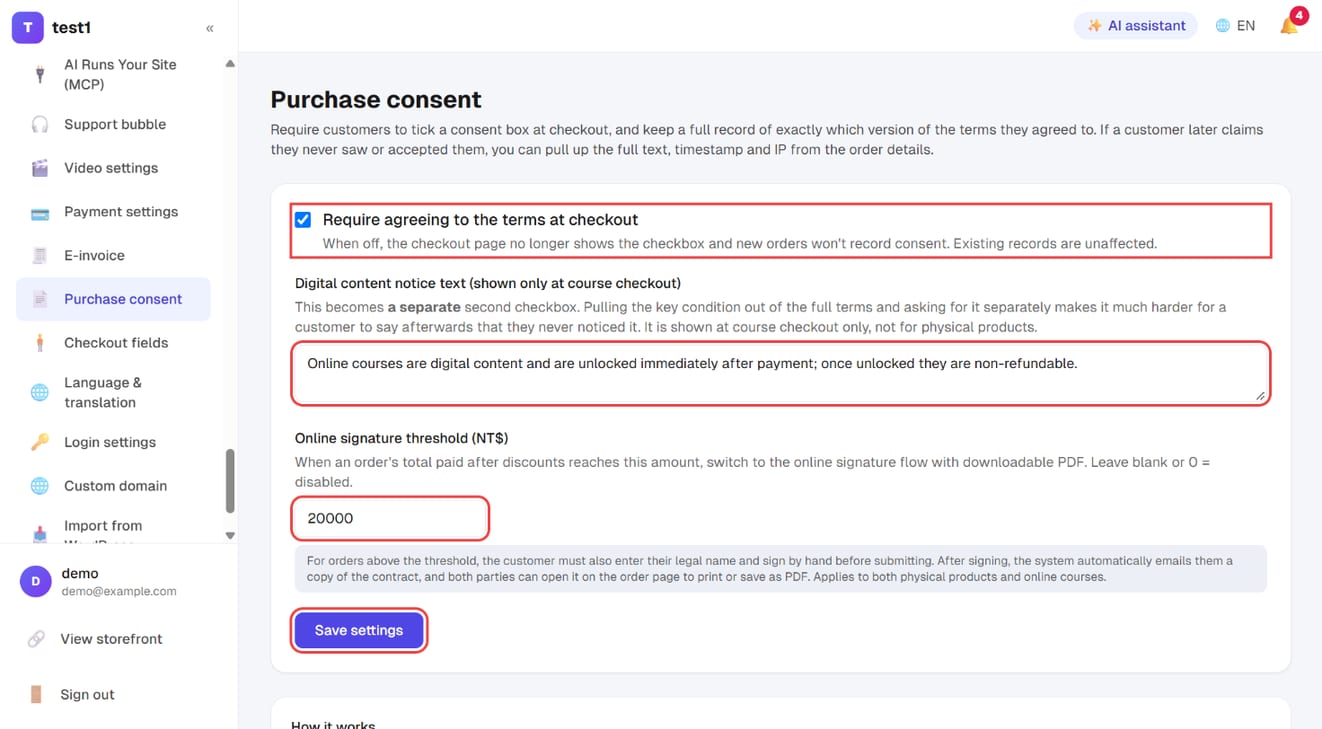
In the left menu, click "Settings → Purchase consent":
- Tick "Require agreeing to the terms at checkout"
- Digital content notice text (course checkout only): a separate second checkbox for your key condition, such as "no refunds once unlocked"
- Online signature threshold: orders at or above this amount go through an online signature with a downloadable PDF; blank or 0 turns it off
- Click "Save settings"
Step 2: Check the record on an order
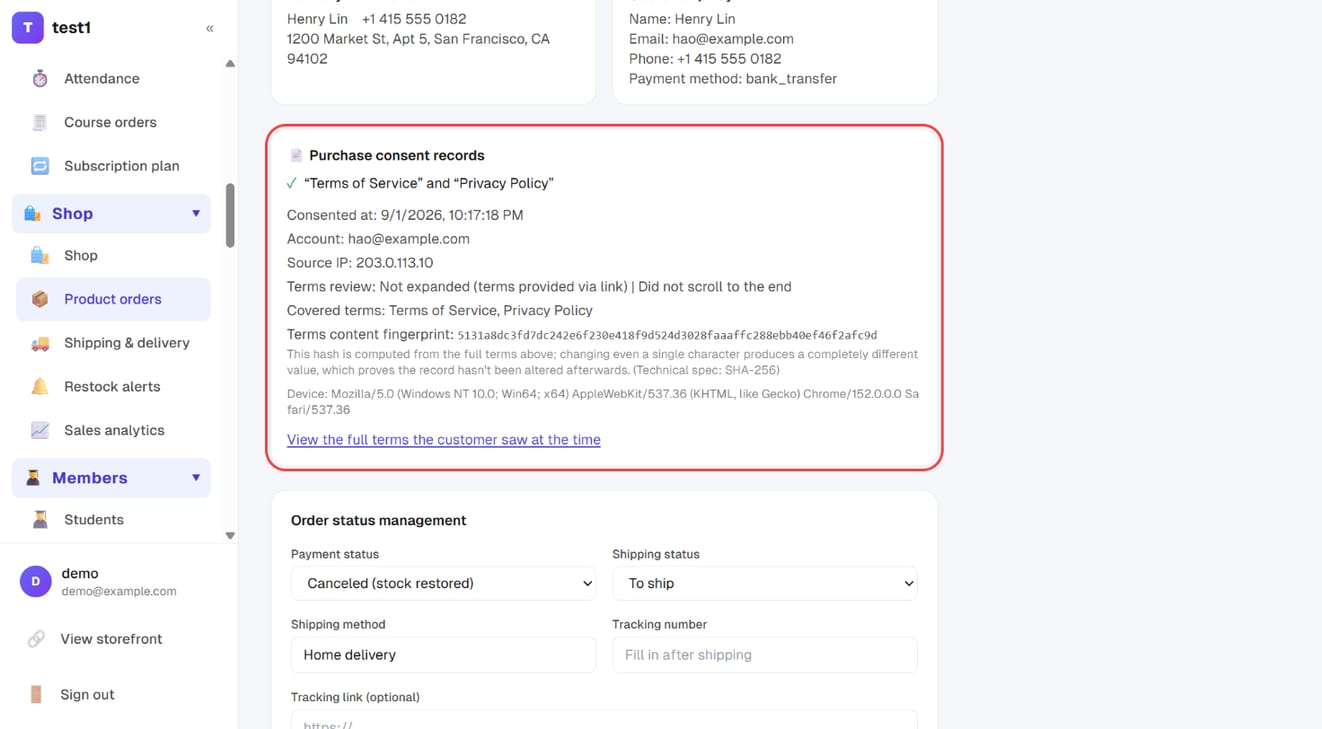
Open any order (course or product) and you'll see "Purchase consent records": when they agreed, the account, source IP, whether they opened and scrolled the terms, which terms were covered, the content fingerprint, and a link to the full text they saw.
Three settings
1. Require agreement at checkout
On is on. The text behind the tick box comes from your Terms of Service and Privacy Policy pages — edit those in Pages, not here.
2. Digital content notice (course checkout only)
This appears as its own line, separate from the terms block. Use it for the one condition that matters most — something like "access is granted immediately and is non-refundable once opened." Buried as clause 17 it may as well not exist.
3. E-signature threshold
When an order's total after discounts reaches this amount, checkout switches to a more deliberate flow: the customer types their legal name and signs by hand before they can submit. Once signed, a copy of the agreement is emailed to them automatically, and both sides can open it from the order page to print or save as PDF.
Applies to both physical products and online courses. Blank or 0 = off.
Worth setting? For a low-priced course, usually not. For high-ticket programmes, one-to-one coaching or instalment plans, yes. Set it at the figure where you'd want something in writing.
Why this record holds up
- Full-text snapshot — the actual wording at that moment, not a link. Editing your terms later does not touch orders already placed
- Content fingerprint — change a single character and the fingerprint changes completely, which is how you show the record wasn't altered afterwards
- Reading behaviour — when they opened the terms and whether they scrolled to the end is recorded too (some jurisdictions require a reasonable review period)
- Append-only — records can't be edited or deleted; that's enforced at the database level
What your terms should cover
At minimum these five, written on your Terms of Service page:
- What you're selling, and what is and isn't included
- Refund conditions — the single most disputed item; state the window and the exceptions
- How long access lasts
- Intellectual property, and no resharing or account sharing
- How to reach you and how disputes are handled
⚠️ This is product documentation, not legal advice. For high-value sales, or anything touching personal data, health or investment, have a lawyer read your terms.
FAQ
Can customers buy without ticking? No — the tick is required to submit the order.
I updated my terms. What about earlier orders? They're governed by the version they agreed to, which lives in that order as a snapshot and is never overwritten.
Is an online signature actually binding? A signature plus timestamp, IP, full-text snapshot and tamper-evident storage is a strong evidence set. Whether it prevails in court is for a court to decide — but having a complete record and having none are entirely different positions.
The customer wants a copy of the agreement. One was emailed automatically when they signed, and they can reopen and save it as a PDF from their order page at any time.
What if I delete the terms page? The tick box has nothing to display. Keep the Terms of Service and Privacy Policy pages — both were created for you when the site opened.