
Newsletters & Email Sequences
Manage your list and tags, send broadcasts, and set up automated drip sequences.
⚠️ Connect your own email provider first (Email & newsletters → Email settings, supports Resend / SendGrid / Mailgun / SES / Gmail). System notifications (password resets, registration confirmations) are sent by the platform until you set this up, but newsletters and sequences are not — bulk sending has to go out on your own domain and sending reputation, otherwise one bad campaign drags down deliverability for everyone.
Manage your list, step by step
Step 1: Add, import or export contacts
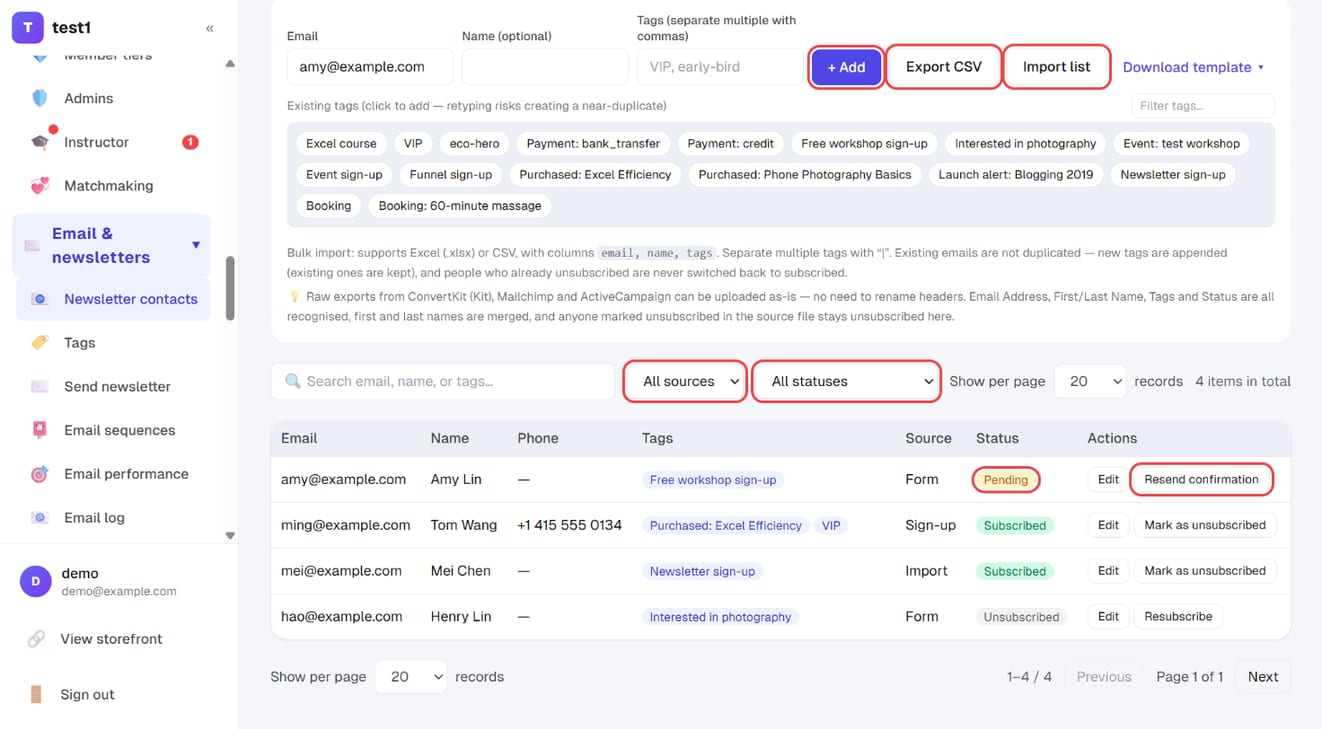
In the left menu, click "Email & newsletters → Newsletter contacts". Anyone who buys, registers or fills in a form is added automatically; you can also:
- Type an email, optional name and tags at the top and click "+ Add"
- Click "Import list" to upload an Excel or CSV file ("Download template" gives you the format)
- Click "Export CSV" to download the list
Step 2: Filter the list and deal with pending contacts
Use the source and status filters to narrow the list. Contacts marked "Pending" haven't clicked their confirmation email yet — "Resend confirmation" sends it again.
List and tags
Anyone who buys, registers, or fills in a form is added to Newsletter contacts automatically.
Tags are the heart of the whole system — segmentation and automation both run on them. Tags are applied automatically when someone:
- Submits a form (each form sets its own tags)
- Opts into a funnel or registers for a webinar
- Buys a course or a product
You can also add tags manually, import a list, or export the whole thing.
Personalisation fields
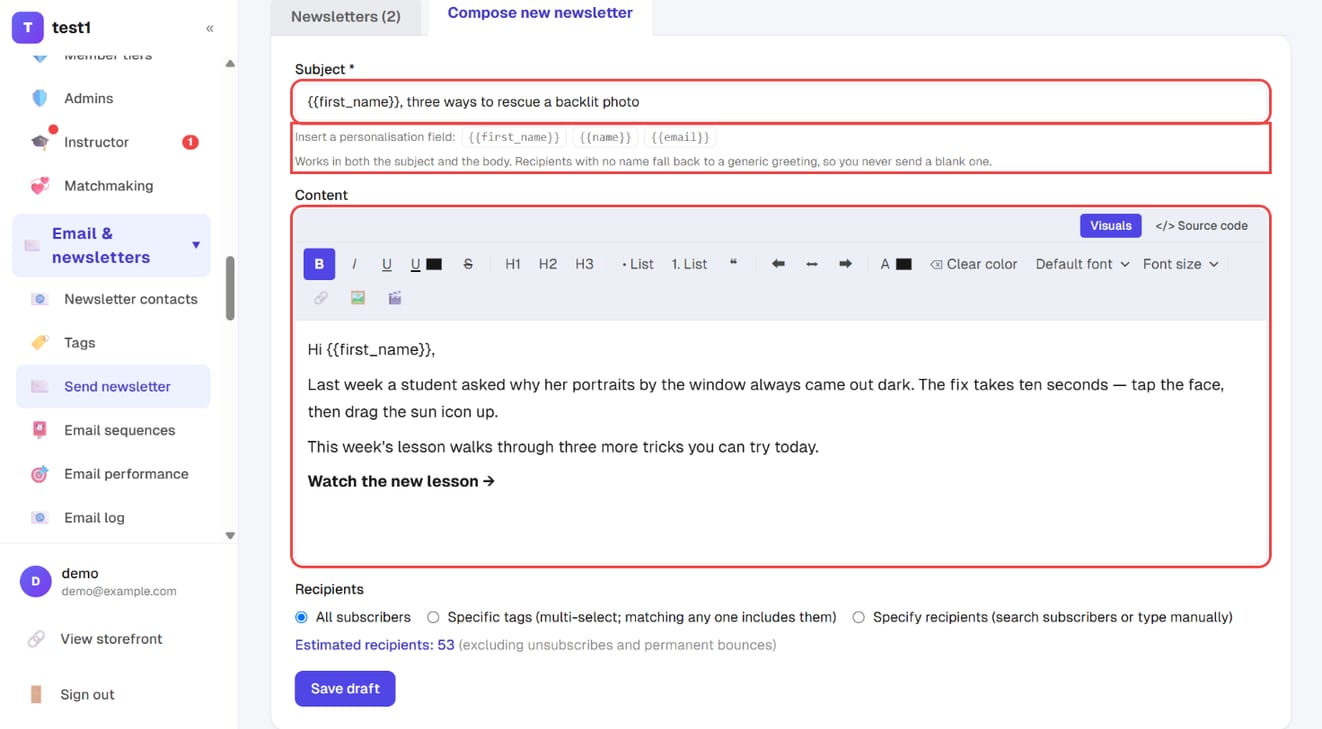
Both the subject line and the body can contain fields that are replaced per recipient:
| Field | Becomes |
|---|---|
{{first_name}} |
Preferred name → full name → a generic greeting |
{{name}} |
Full name → preferred name → a generic greeting |
{{email}} |
Their email address |
Preferred name is its own field (edit any contact in the list to set it). Why not split names into first and last: a Chinese name like 王小明 breaks on compound surnames, and "Mary Anne van der Berg" is not something code can split reliably — only the person themselves can tell you. So instead you simply write how you want to address them.
🚨 Contacts with no name never get a blank greeting. There are always people in a list who only ever gave an email address; for them the field falls back to a generic greeting, so you never send "Hi ,".
When importing from Kit or Mailchimp, the First Name column goes straight into the preferred name field — and your existing
{{ subscriber.first_name }}and*|FNAME|*templates are understood as-is, so you can paste them over without rewriting.
Moving a list over from ConvertKit (Kit), Mailchimp or ActiveCampaign
Upload their raw export as-is — no need to rename headers. Email Address, First Name / Last Name, Tags and Status / State are all recognised, and first and last names are merged into one name.
🚨 Anyone marked unsubscribed, cleaned or bounced in the source file stays unsubscribed here. That is deliberate: those people already opted out on your previous platform, and emailing them is what gets your sending domain flagged as spam — which drags your order notifications down with it. The import summary tells you how many were marked that way.
The same rule applies in reverse: importing never switches an unsubscribed contact back to subscribed. Re-importing the same file is safe — existing emails only get new tags appended and blank names filled in.
When the list gets large, the page only loads the most recent batch — use Export when you need everything.
Unsubscribes and bounces
- Every newsletter automatically includes an unsubscribe link (legally required — it can't be turned off)
- Unsubscribed addresses and hard bounces are excluded from every future send automatically — you don't maintain a suppression list yourself
Subscription confirmation (double opt-in)
Email & newsletters → Email settings → Subscription confirmation, and it is on by default.
Anyone can type any address into a public form — including someone else's. With confirmation on, those subscriptions first receive a confirmation email, and only count once they click the link in it.
| On (default) | Off | |
|---|---|---|
| List size | Smaller, but everyone on it actually wants your emails | Bigger, mixed with addresses typed in by someone else |
| Deliverability | Good: high open and click rates, rarely flagged as spam | Poor: people who never signed up hit "report spam" |
| When new subscribers start receiving | After they click confirm | The moment they submit the form |
🚨 A spam complaint costs you more than that one email. Once your provider sees the complaint rate it suspends your domain — order notifications and password resets stop going out too. A smaller, clean list means more email actually lands, not less.
When it's reasonable to turn off: your list comes entirely from offline sources (sign-up sheets at a live class, addresses you type in yourself), or your form is only ever shown to paying customers. For a form sitting on a public web page, leave it on.
Which sources need confirming and which don't
| Source | Confirmation required? |
|---|---|
| Forms, funnels, webinar registrations, bookings, an email left in a support chat, launch notifications (filled in by a logged-out visitor) | Yes |
| A student registering their own account, an actual purchase | No |
| Contacts you add by hand, or import (including from another platform) | No |
The test is "could someone other than the owner have typed this address?" — not whether they were logged in. An imported list is made up of people who already subscribed with you, and asking them to confirm again would simply lose you most of them, so imports are never held back.
What a pending contact looks like
The status column shows an amber Pending badge, and the status filter at the top lets you show only pending subscriptions. These contacts:
- Stay on the list — you can see that someone filled in the form; nothing disappears
- Receive no newsletters and no sequence emails, and are excluded from the recipient estimate before a send
- Start at day 0 of a sequence from the moment they confirm, not from when they signed up
Every pending row has a Resend confirmation button — use it when someone says they never got it, or it landed in spam. The automatic send has a five-minute cooldown (submitting the form three times doesn't produce three emails), but the button you press yourself ignores that cooldown. Submitting the form again also reuses the same confirmation link, so the link in the earlier email still works; clicking the same link twice just shows "already confirmed" rather than an error.
🚨 The "Resubscribe" button does not confirm anyone. It only flips subscribed / unsubscribed — the status stays pending. If you genuinely want to let one person through (they told you in person that it's them), add the same email again through Add contact: a manual add counts as something you typed yourself, so it flips straight to confirmed and their sequences start. Importing a file does not do this — an import never changes the confirmation status of contacts already on the list.
Rewriting the email in your own words
The subject line, heading, body, button text and footnote are all editable, with a live preview beside them — what you see is what they receive. Your site name sits in the text as a field, so renaming your site updates the email too; delete it and type your own name if you'd rather.
Fields you leave blank follow each subscriber's own language (Traditional Chinese / English / Simplified Chinese). The moment you rewrite a line, that line becomes fixed text and everyone gets the same version — worth knowing if you run a multilingual site.
You can also set a redirect URL for after they confirm — point it at your freebie download page, or leave it blank to show the built-in confirmation page.
The confirmation email is transactional and goes out over the notification connection, so it still sends before you've connected your own bulk provider. See Email setup.
Send a newsletter, step by step
Step 1: Open "Compose new newsletter"
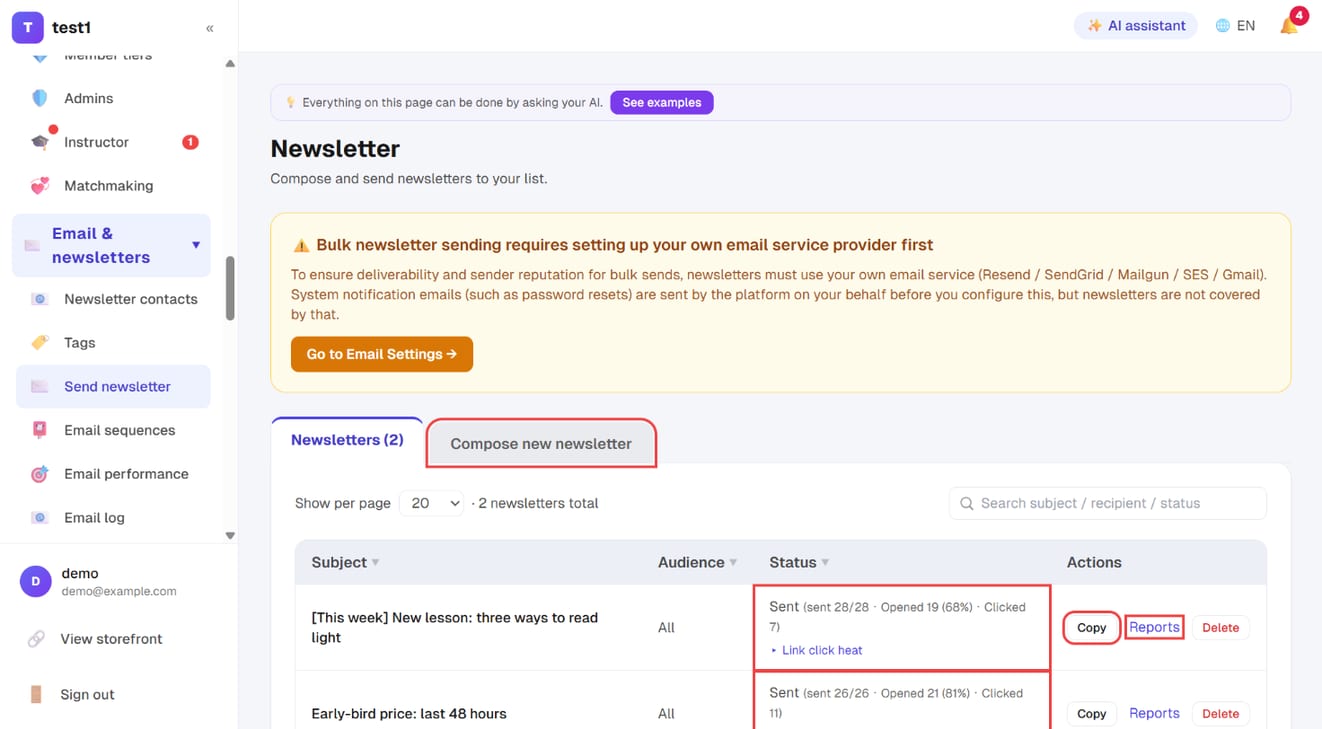
In the left menu, click "Email & newsletters → Send newsletter" and switch to the "Compose new newsletter" tab. Sent newsletters are listed with their results (sent, opened, clicked), plus "Copy" to reuse one and "Reports" for details.
Step 2: Write the subject and content
Enter the subject and write the email in the editor. Click a personalisation field — {{first_name}}, {{name}} or {{email}} — to copy it, then paste it into the subject or body. Recipients with no name get a generic greeting instead of a blank.
Step 3: Pick the recipients and check the count
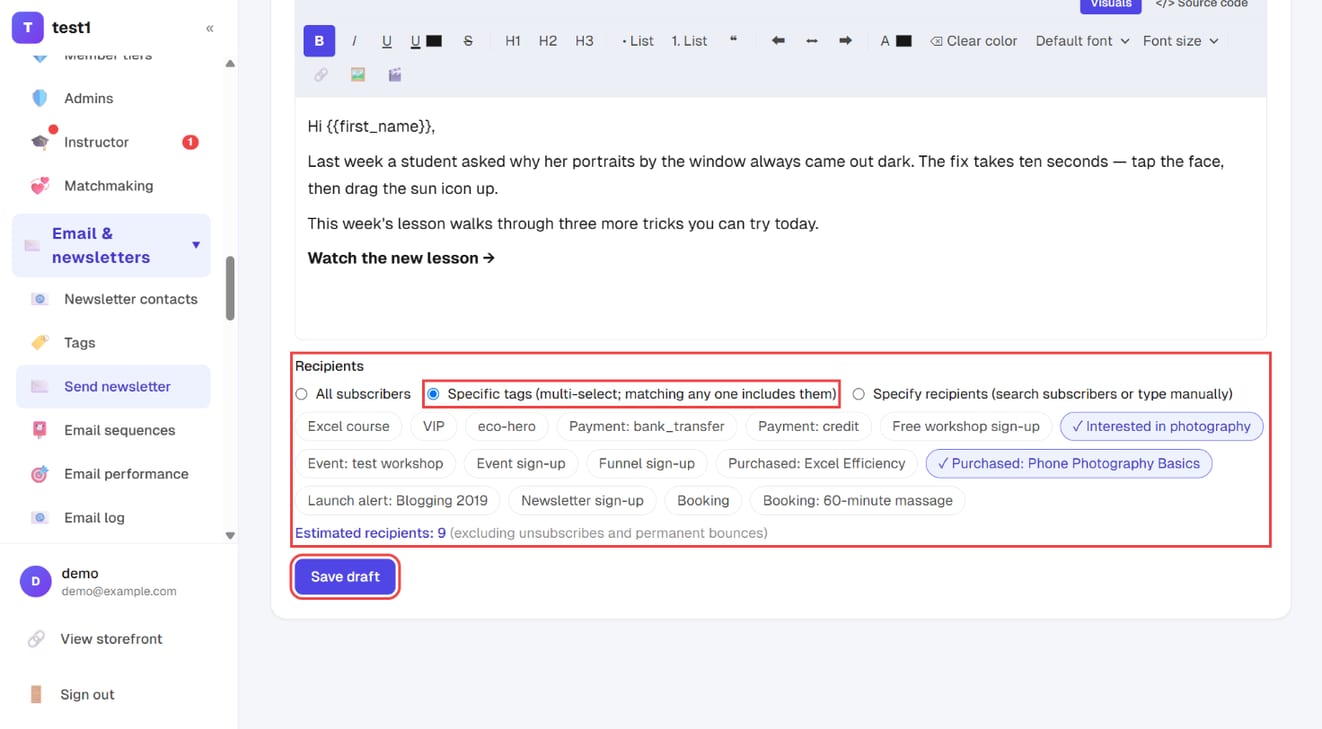
Under "Recipients", choose all subscribers, specific tags or specific people. "Estimated recipients" updates live — check it, then click "Save draft". You'll confirm and send from the newsletter list.
Newsletters (one-off broadcasts)
There are three ways to choose recipients:
| Audience | Use it for |
|---|---|
| Everyone | All currently subscribed contacts |
| Selected tags | Segmented sends; you can pick several tags |
| Specific people | Hand-pick a few — good for tests or small announcements |
Once you pick an audience the screen shows a live recipient estimate. That number already excludes unsubscribes and bounces, so it matches what will actually go out. Glance at it before sending — it catches the "meant to send to 50, about to send to 5,000" mistake.
Build an email sequence, step by step
Step 1: Add a sequence
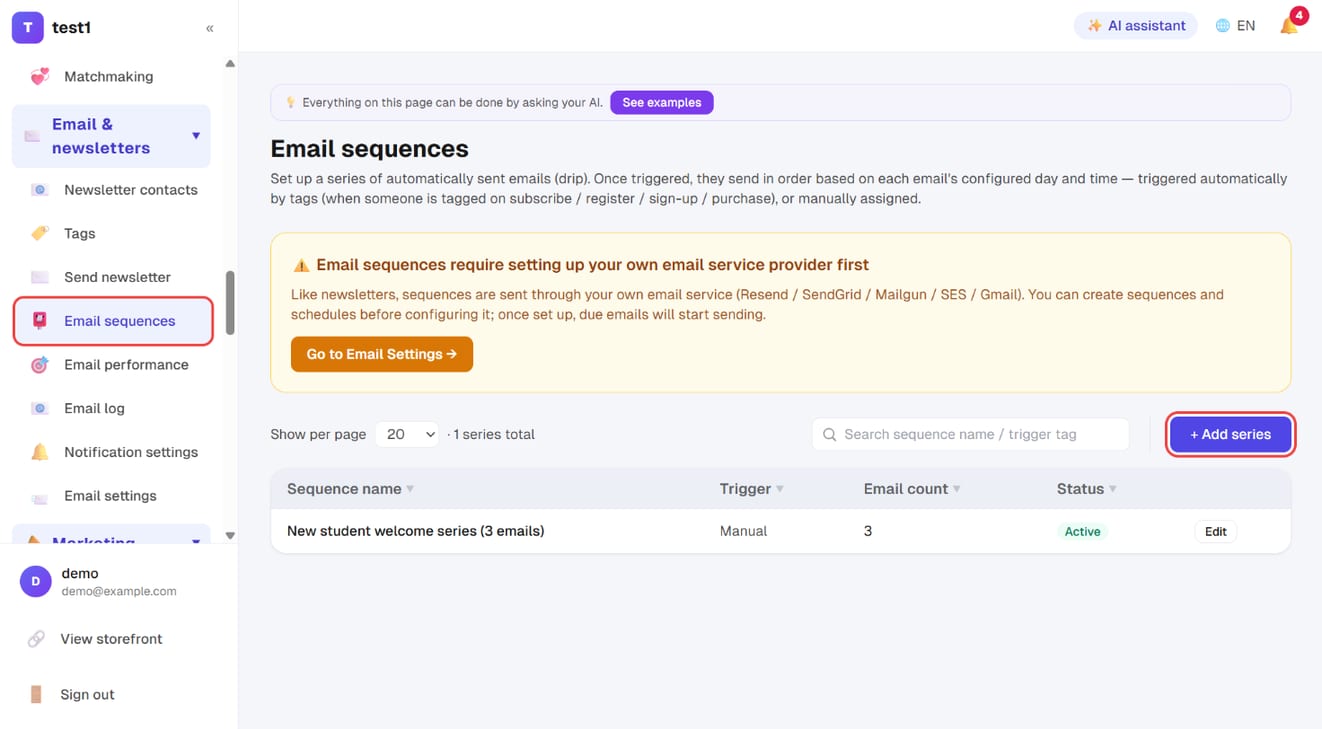
In the left menu, click "Email & newsletters → Email sequences", then "+ Add series".
Step 2: Name, status and trigger
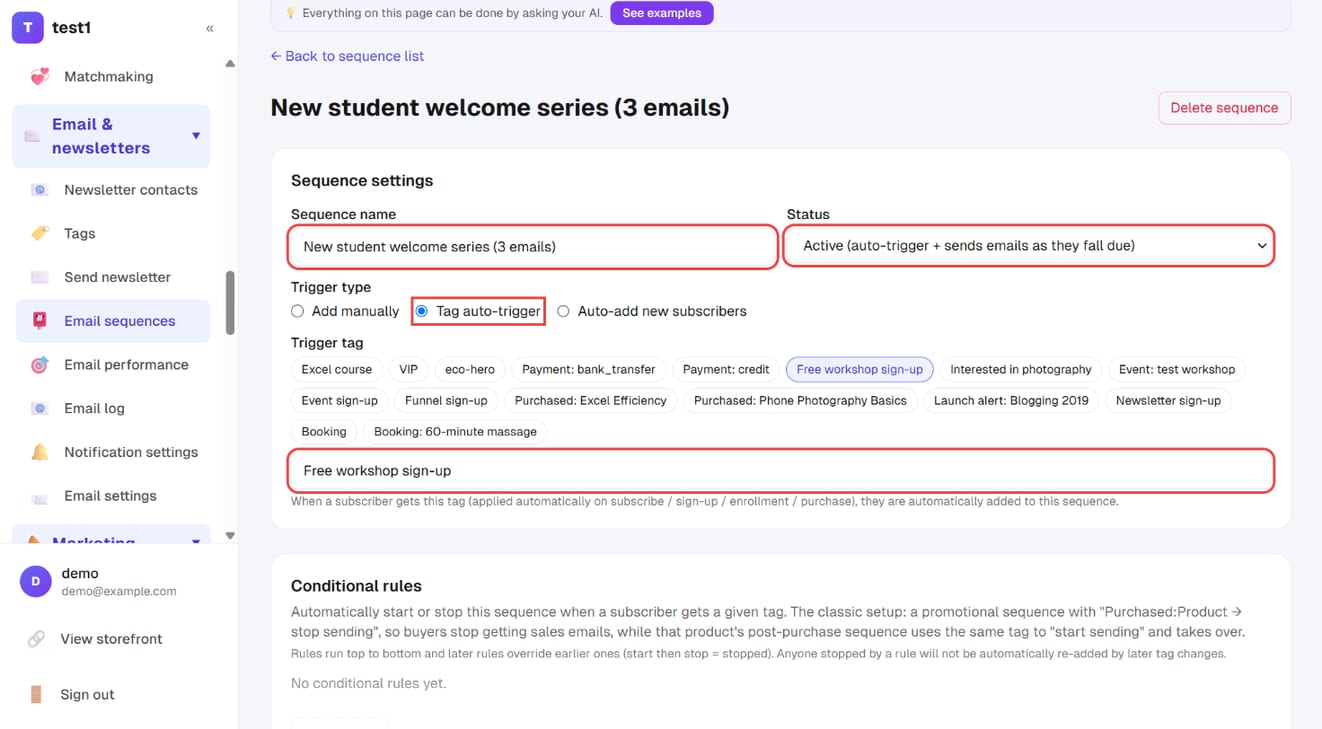
- Sequence name and Status (set it to "Active" when you're ready)
- Trigger type: "Add manually", "Tag auto-trigger" or "Auto-add new subscribers"
- With tag auto-trigger, pick or type the trigger tag: anyone who gets that tag (on sign-up, purchase and so on) is enrolled automatically
Step 3: Exit rules and each email's schedule
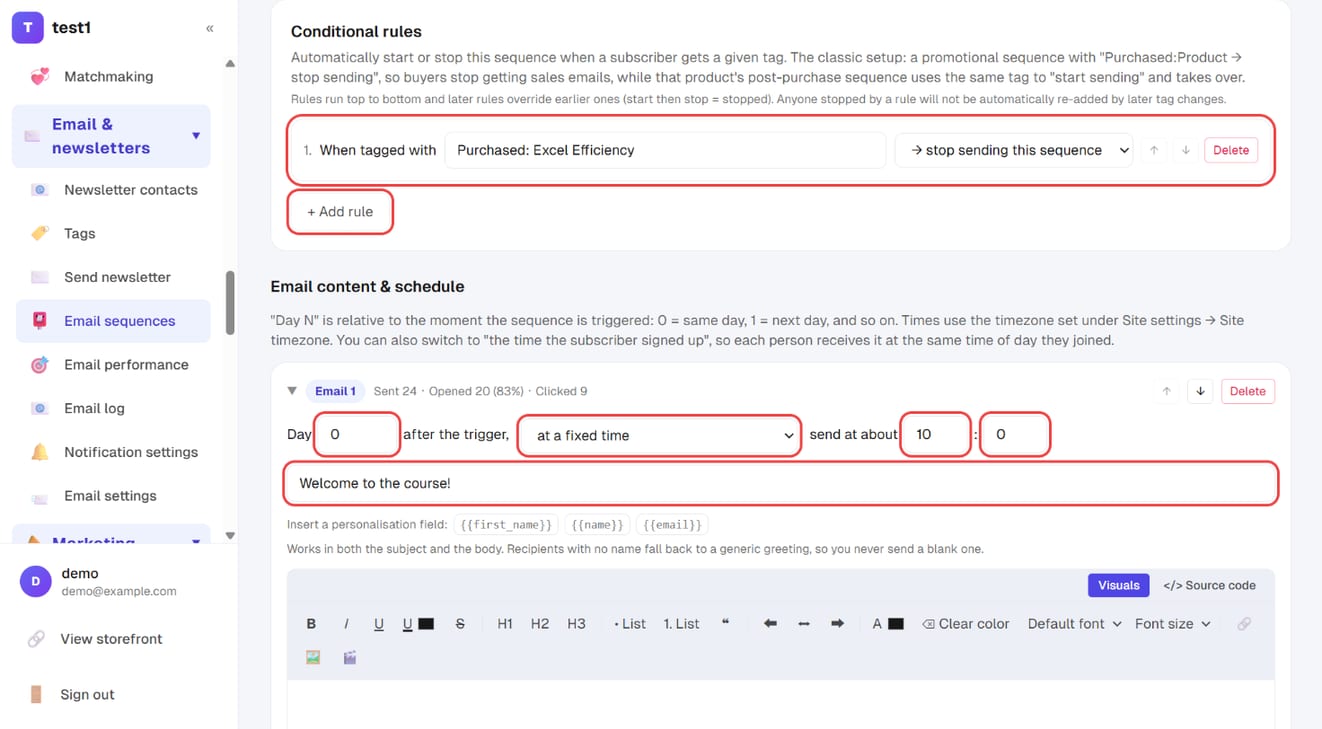
- Conditional rules: click "+ Add rule" — e.g. when tagged "Purchased: Excel Efficiency" → stop sending this sequence, so buyers stop getting sales emails
- For each email, set the day after the trigger, a fixed time (or the time the subscriber signed up), and the subject and content
Step 4: Save, and add people manually if needed
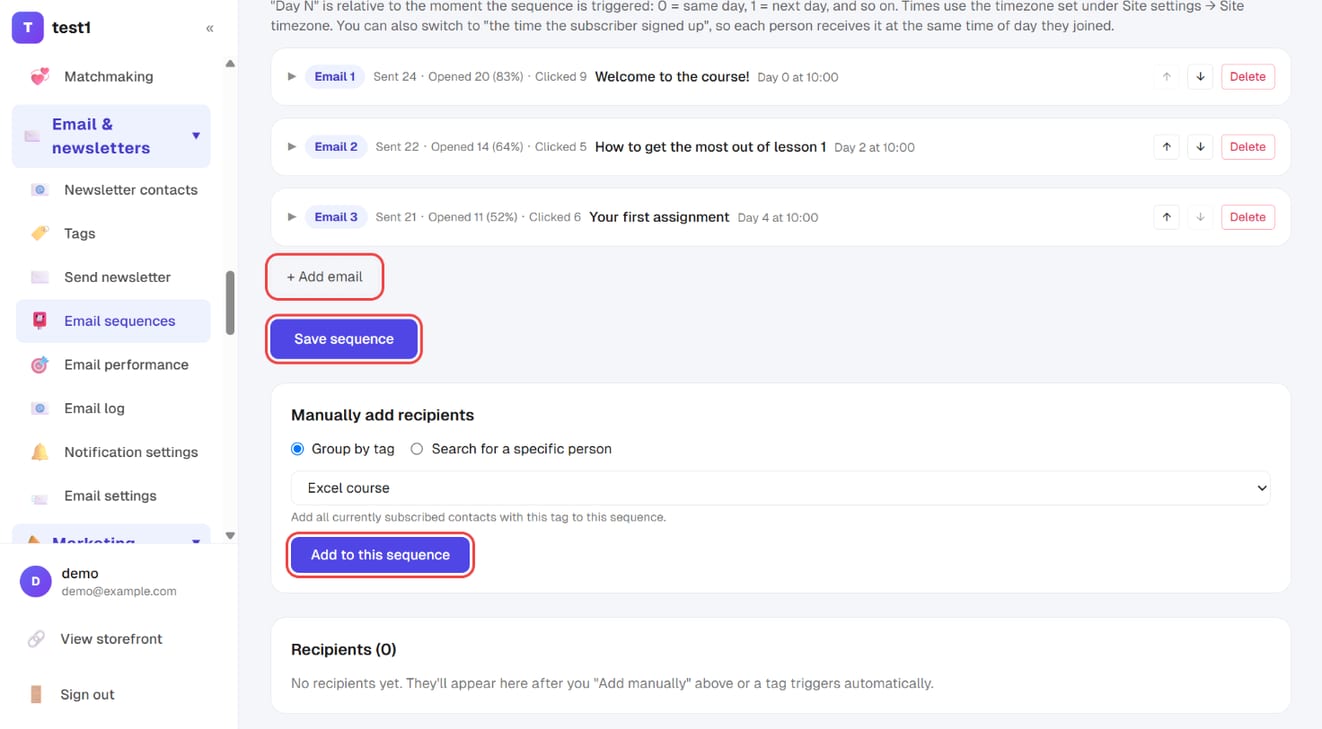
Click "+ Add email" for more emails, then "Save sequence". To enrol people who already have a tag (or one specific person), use "Manually add recipients" → "Add to this sequence".
Sequences (drip automation)
A sequence is a series of emails that go out in order once someone is enrolled.
Triggers
- By tag: anyone tagged with your chosen tag is enrolled automatically (subscribing, registering, opting in and buying all apply tags)
- Manual: you pick who to enrol
Scheduling each email
Every email in the sequence has its own day number and time of day:
- Day 0 = the day they join
- The time is a fixed clock time, not "N hours after joining" — so the rhythm of the whole sequence is predictable
A typical welcome sequence:
| Day | Content |
|---|---|
| 0 | Welcome + deliver whatever they signed up for |
| 1 | Who you are and why you do this |
| 3 | One genuinely useful lesson |
| 5 | A student result |
| 7 | Make the offer |
With subscription confirmation on, day 0 starts the moment they click confirm, not when they submitted the form.
Exit rules (when a sequence stops by itself)
Every sequence can carry rules of the form "when this tag is applied → start / stop this sequence". The classic setup is a pair:
| Sequence | Rule |
|---|---|
| Promotional sequence | Tagged "bought: product" → stop sending |
| That product's post-purchase sequence | Tagged "bought: product" → start sending |
Once they buy, they stop being pitched the same thing and the follow-up takes over.
How the rules behave (deliberately predictable):
- Evaluated top to bottom, later rules override earlier ones (start then stop = stopped). The order is the one you arrange on screen
- The trigger tag counts as a "start" rule pinned to the top, so a stop rule below it can override it
- Stopping cancels every email not yet sent; anything already delivered is left alone — that's history
- Up to 20 rules per sequence
🚨 Someone a rule stopped is never added back automatically. No later tag, and no edit to their tags in the dashboard (which re-runs the whole tag list), will push them back into that sequence — otherwise customers who already bought would keep getting dragged back into the pitch. To restart someone, add them yourself under "Add recipients manually".
What happens to unsubscribed, bounced and pending contacts
Only that one email is skipped — the sequence itself is not stopped. So if they resubscribe later, or finally click the confirmation link, they still receive the remaining emails. The recipient list for the sequence marks the skipped email as cancelled, so you can see which one didn't go and why.
FAQ
My newsletter won't send. Check Email & newsletters → Email settings first. Sequences and newsletters both require your own provider — those are the two kinds of email the platform will not send on your behalf.
Can one person end up in several sequences at once? Yes. If their tags match more than one trigger, they're enrolled in each. Think through which segments should be mutually exclusive when you design your tags.
If someone unsubscribed, does filling in a form bring them back? No. Unsubscribing is an explicit choice, and a form submission doesn't override it — they have to opt back in themselves.
Can I recall an email after sending? No. Once it's sent, it's in their inbox. Which is exactly why that recipient estimate is worth a second look.
Someone is clearly on my list but says they've never received anything. Check whether their status is Pending — that means the confirmation email went out but they haven't clicked it. Hit "Resend confirmation" and ask them to check their spam folder. Pending contacts get no newsletters and are not enrolled in sequences.
Why is my list smaller than I expected? Subscription confirmation is on by default, so only people who clicked the link are counted. Filter by pending subscriptions to see where the gap is. Those contacts were never going to open your emails anyway — a clean list is what gets the real subscribers delivered.
Why can't I get someone back into a promotional sequence after a rule stopped them? That's deliberate: anyone stopped by an exit rule is not pulled back in by later tag changes, otherwise paying customers would keep receiving the pitch. To restart them, use "Add recipients manually" inside the sequence.