
Import from WordPress
Use the migration plugin to bring across posts, pages, members, lists, courses and orders.
Settings → Import from WordPress. You run the whole thing yourself — no credentials handed to anyone.
Import from WordPress, step by step
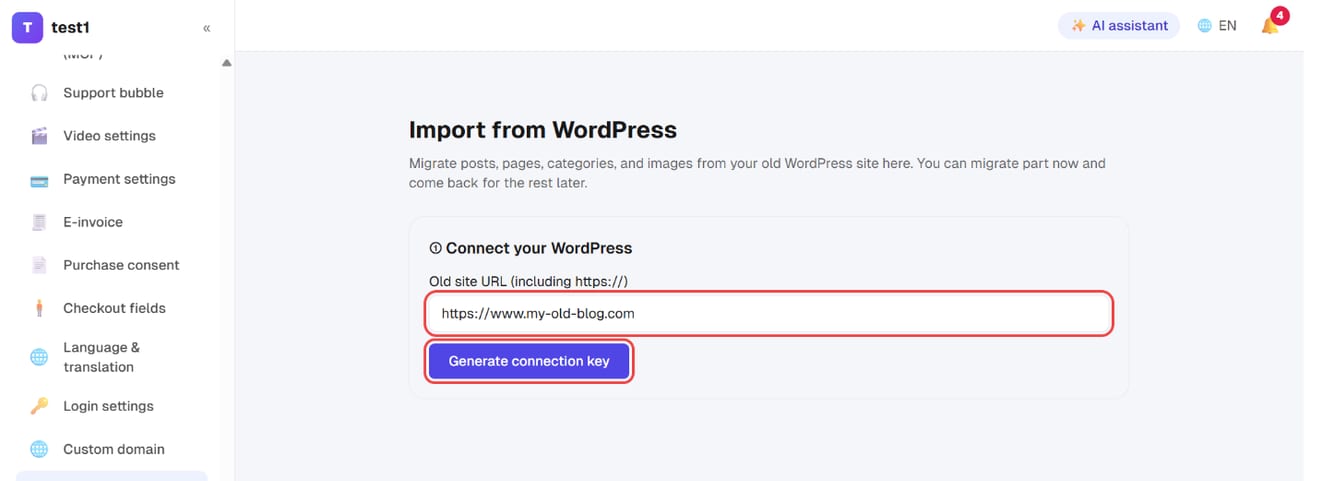
Step 1: Enter your old site URL and generate a connection key
In the left menu, click "Settings → Import from WordPress". Enter your old site's URL (including https://) and click "Generate connection key".
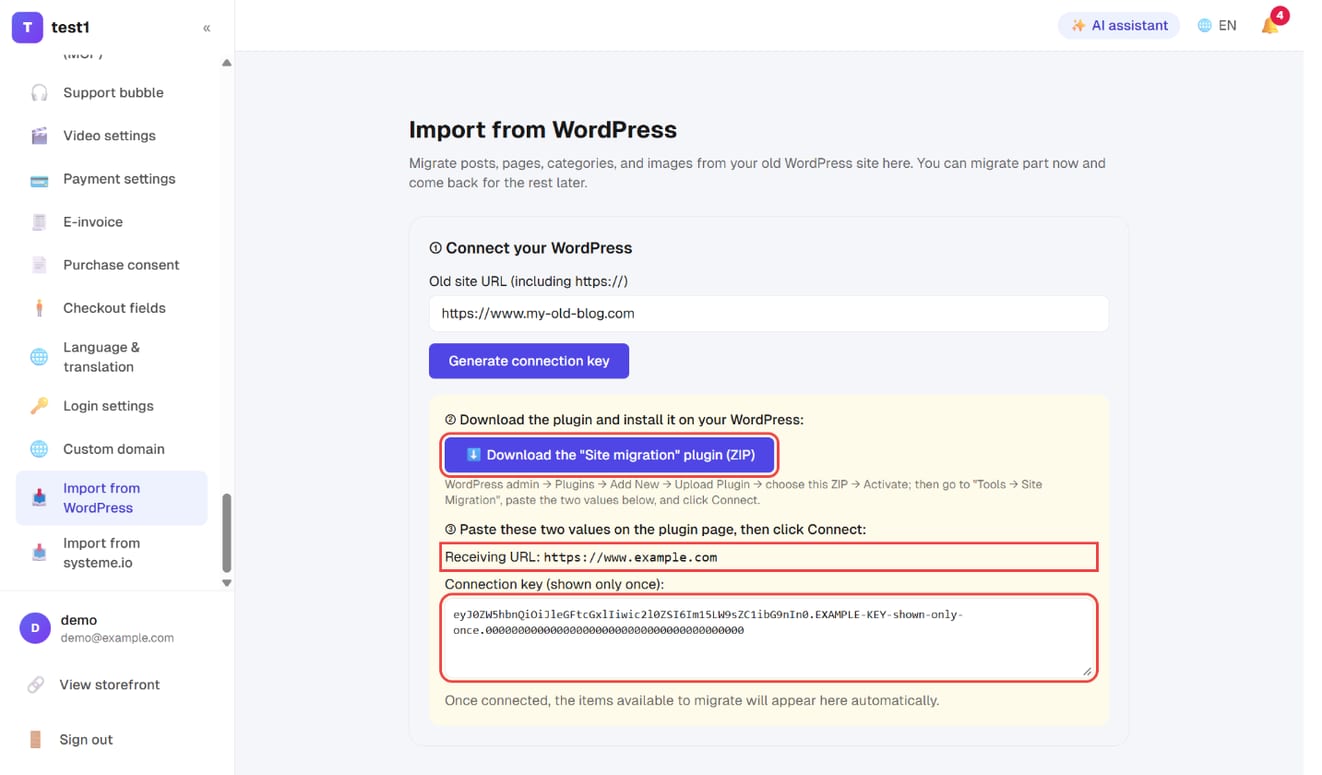
Step 2: Download the plugin and note the receiving URL and key
Click "⬇️ Download the "Site migration" plugin (ZIP)", and copy the Receiving URL and Connection key shown below it.
Step 3: Install the plugin in WordPress and connect
In WordPress go to Plugins → Add New → Upload Plugin, choose the ZIP and activate it. Then open Tools → Site Migration, paste the receiving URL and key, and click Connect.
The key is shown only once. If you didn't copy it, just generate a new one.
Once connected
The system scans your site and lists what it found, with counts:
| Item | Details |
|---|---|
| Pages + blog posts + categories | Including inline images |
| Member accounts | With their original passwords, so members can sign in as before |
| FluentCRM newsletter list | Unsubscribed and bounced contacts are marked unmailable and won't trigger sequences |
| Tutor LMS courses and enrollments | Courses arrive unpublished — set your prices before publishing |
| WooCommerce orders | Paid historical orders only; nothing is charged again and no emails go out |
Tick what you want and press start; progress updates live.
Order matters
Some items reference data created by others:
- Enrollments need member accounts and courses to exist first
- Orders need member accounts first
Getting the order wrong doesn't raise an error — it silently skips, so you'll think it worked when nothing came across. The screen shows prerequisites; follow them and you won't hit this.
Everything is idempotent: if you do get the order wrong, just run it again. You won't create duplicates.
After the migration
- Check the numbers: detected counts and completed counts should line up
- Set prices and publish your courses (they arrive unpublished)
- Set up 301 redirects: Settings → 301 redirects → Bulk import, pasting an "old path, new URL" mapping — up to 2,000 rows at a time. This is what carries your SEO equity across
- Once you're happy, deactivate and delete the migration plugin on WordPress
FAQ
Will pages built with Elementor or Divi come across? Post content will, but sales pages and homepages laid out in a page builder need rebuilding in this platform's page builder, or importing as whole HTML. Those plugins store layouts in their own format, so a rebuild is unavoidable when changing platforms.
Will migrated orders charge customers again? No. Only the historical record moves. Nothing touches payments and no emails are sent.
Do members need to reset their passwords? No. Password hashes come across, so existing passwords keep working.
The migration stalled halfway. The plugin runs on your WordPress host and can hit its PHP time limit. Go back to the migration page and restart that item — completed work isn't repeated.
Can I run it twice? Yes. Everything is idempotent, so re-running won't create duplicates.