
Facebook lead ads into your list
Pipe Facebook lead ad submissions into your list here via Zapier, Make or ManyChat — in seconds, with your sequence firing automatically.
When you run lead ads on Facebook or Instagram (Meta calls them instant forms), the email someone submits can land in your list here within seconds and trigger your email sequence — no daily trip to Ads Manager to download a file.
You need one connector service in the middle (Zapier, Make or ManyChat). That is not busywork: pulling leads from Meta directly requires Meta Business Verification and App Review, and these three passed it long ago — you are borrowing their pass.
Pick a connector
| Service | Best for | Note |
|---|---|---|
| Make (formerly Integromat) | Just want the leads, cheaply | Facebook Lead Ads works on the free plan |
| Zapier | Already using Zapier | Facebook Lead Ads is a paid-plan app there |
| ManyChat | Already using it for comment automation | Do it in the same flow, no extra vendor |
The setup is identical in all three; only the screens differ. Plan contents change, so check the current terms when you sign up.
1. Create a form here
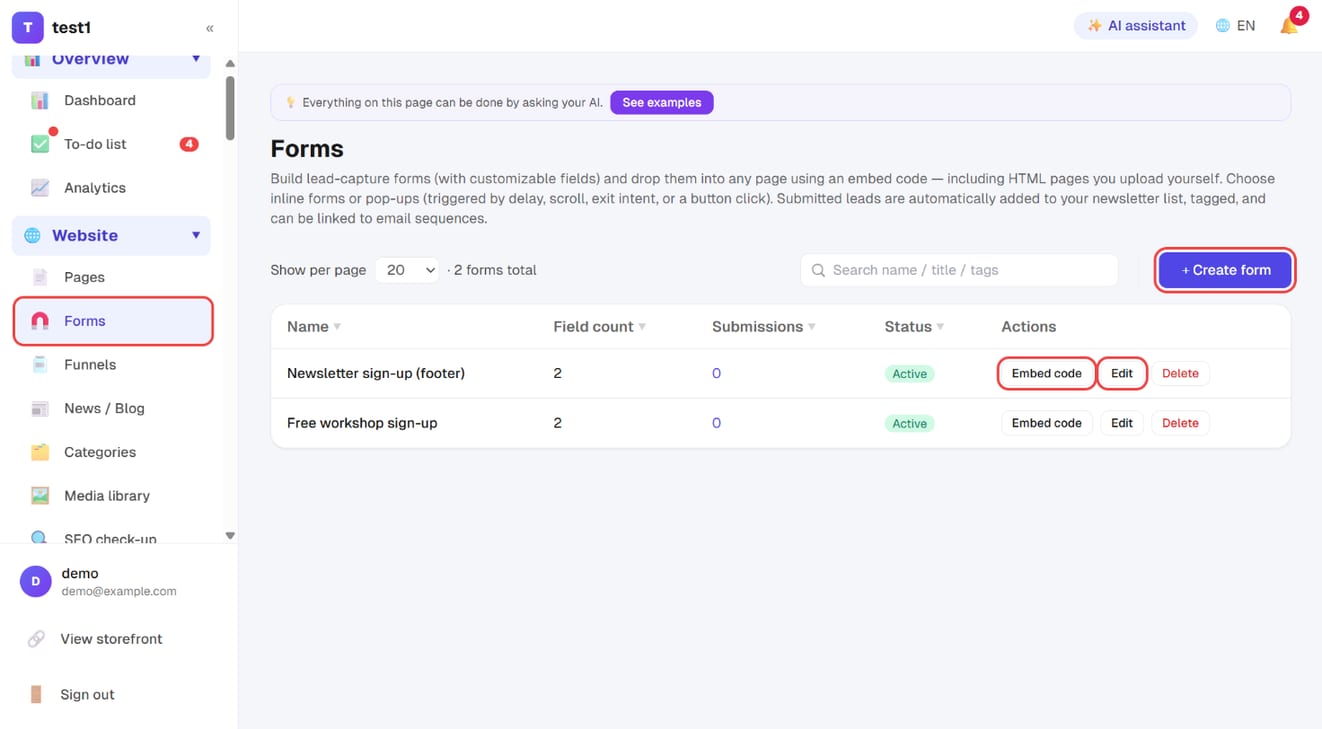
Go to Website → Forms and click "+ Create form" to add one, e.g. “FB lead ads”. Keep Email and Name only — other questions on your ad form (phone, company) are not stored in the list here; those answers stay on Meta's side.
Set two things:
- Tags: e.g.
fb-ads. That is how you later tell “these came from ads” and mail only them. - Sequence: under Email & newsletters → Email sequences, create one triggered by that tag. The first email should go out within minutes.
2. Generate the key
Back in the forms list, click Embed code on that form, scroll to Server integration (ManyChat / Zapier / n8n), click Generate key, then Copy. You get the submit URL, the key and a JSON example.
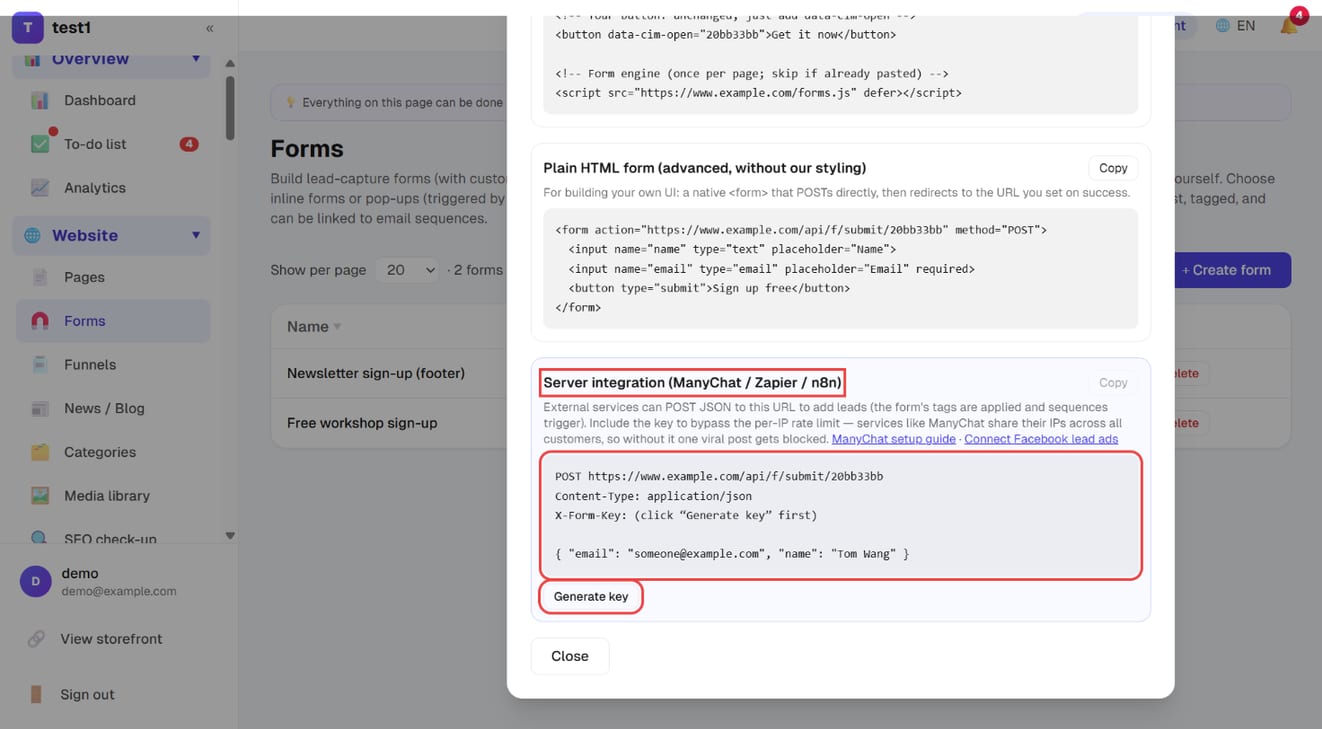
The key exempts server-side submissions from the per-IP rate limit (connector services share outbound IPs across all their customers, so without it a scaling ad campaign gets blocked). Details on the FB / IG comment auto-reply page.
3. Configure the connector
Trigger: choose Facebook Lead Ads → authorise your Facebook account → pick the Page and the instant form.
It will ask for ad-management and lead-retrieval permissions. Those are for that service, and unrelated to this platform.
Action: choose Webhook / HTTP / External Request and fill in:
| Field | Value |
|---|---|
| Method | POST |
| URL | the submit URL you copied (https://your-domain/api/f/submit/FORM_ID) |
| Headers | Content-Type: application/jsonX-Form-Key: YOUR_KEY |
| Body | { "email": "{{email}}", "name": "{{full_name}}" } |
Replace {{email}} and {{full_name}} with the service's own variables — insert them by clicking the field in its UI rather than typing. Meta's standard field names are email and full_name.
4. Test
Use Meta's Lead Ads Testing Tool to send a fake lead, or submit the instant form preview once. Then check two places here:
- Forms → View submissions should show the entry immediately
- Email → Subscribers should show the same address with your tag on it
If nothing arrives, it is almost always a URL missing https://, a body that isn't valid JSON, or a variable that wasn't actually picked (so it posts an empty string).
Why it's worth it
The most expensive thing about lead ads is silence after the form. Interest peaks the moment someone submits; if your first email lands the next day, many have forgotten what they signed up for. Connected, the first email goes out in minutes and the sequence takes it from there — so your ad spend buys more than a spreadsheet.
FAQ
What about leads I already collected? Download the CSV from Meta Business Suite's instant forms and drop it into Subscribers → Import. We recognise Meta's headers (email, full_name) as they are. ⚠️ Meta keeps leads for 90 days only.
What if the same person submits twice? The list de-duplicates by email, billable contacts are not double-counted, and sequences are not re-sent.
Do I need Meta app review for this? No. The connector service did that; you are only authorising them to read your own leads.
Do Instagram lead ads work too? Yes, same setup — IG leads sit under the Page you linked.
Can I capture phone numbers? The list here stores email and name only. Phone numbers stay in Meta's lead data; use the CSV download if you need them.