
Your notification emails
Which events email you: orders, questions, reviews and submissions — five switches, one per type.
Email & newsletters → Notification settings. Two tabs: Owner & instructors decides who on your team hears about each event, and Customers & students decides which emails the system sends to your students on your behalf.
Set up notifications, step by step
Step 1: Decide who gets each notification (Owner & instructors)
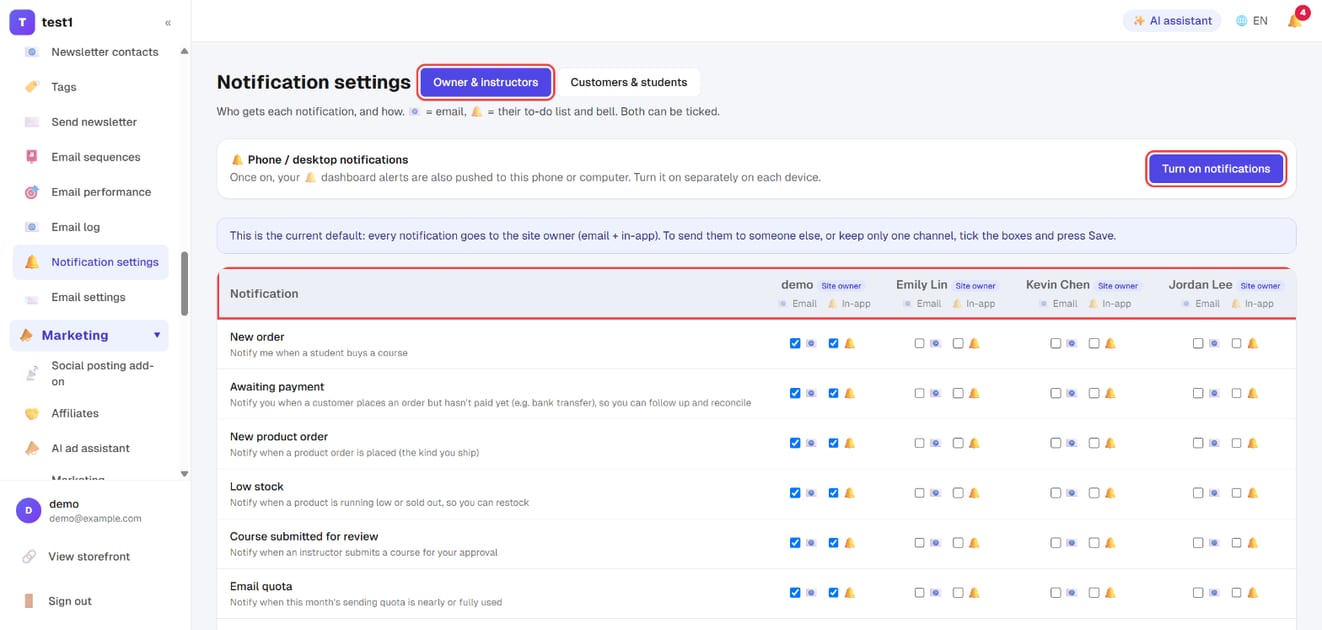
In the left menu, click "Email & newsletters → Notification settings". On the "Owner & instructors" tab, every notification is a row and every owner / admin / instructor is a column. Each person has two ticks per row: Email and In-app (their to-do list and bell). Tick the boxes and press Save.
By default everything goes to the site owner (email + in-app). "Turn on notifications" at the top also pushes in-app alerts to the phone or computer you're using — turn it on separately on each device.
Step 2: Decide which emails go to students (Customers & students)
Switch to the "Customers & students" tab and untick any email you don't want sent: assignment graded, reply to a question, course completed, new lesson published, course launch reminder, abandoned cart reminder, back-in-stock notice, booking reminder, webinar reminder. Press Save.
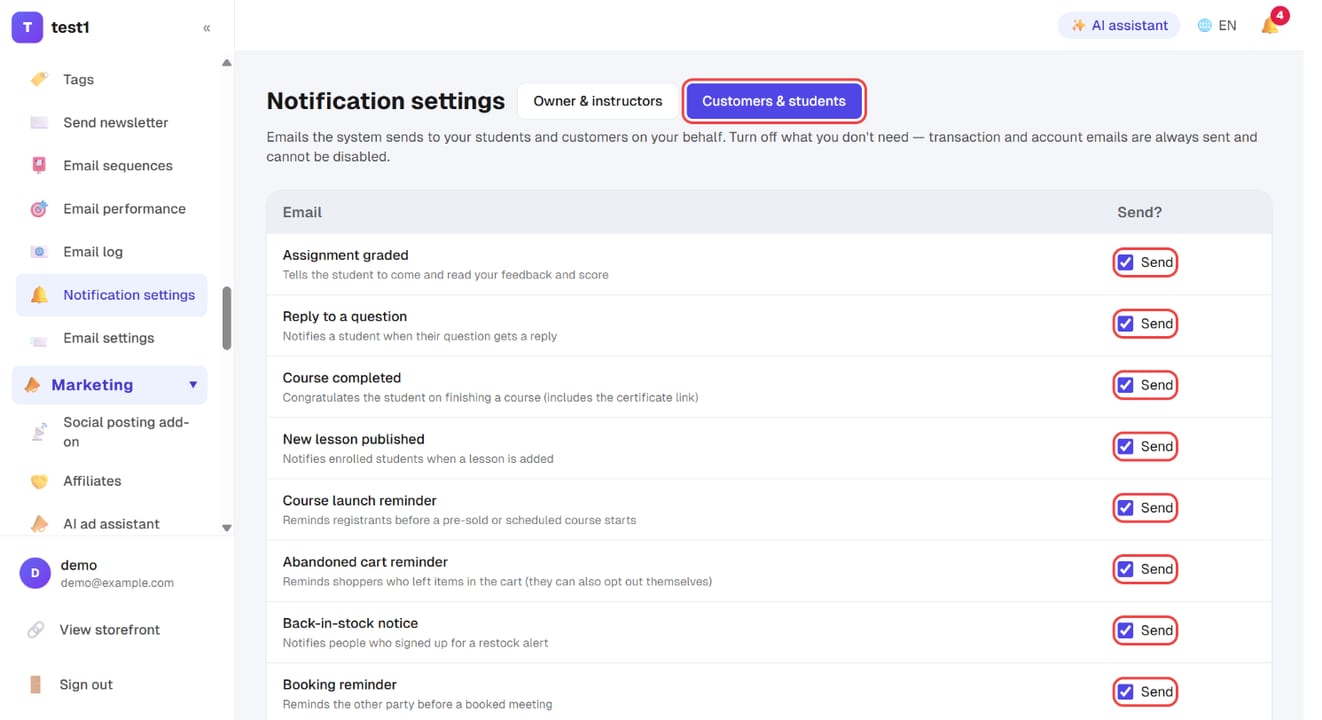
Transaction and account emails (purchase confirmation with the course link, shop order and shipping, bank transfer details, contract copy, password reset) are listed too, but can't be switched off — without them a customer pays and never finds their course.
Step 3: Work through the to-do list
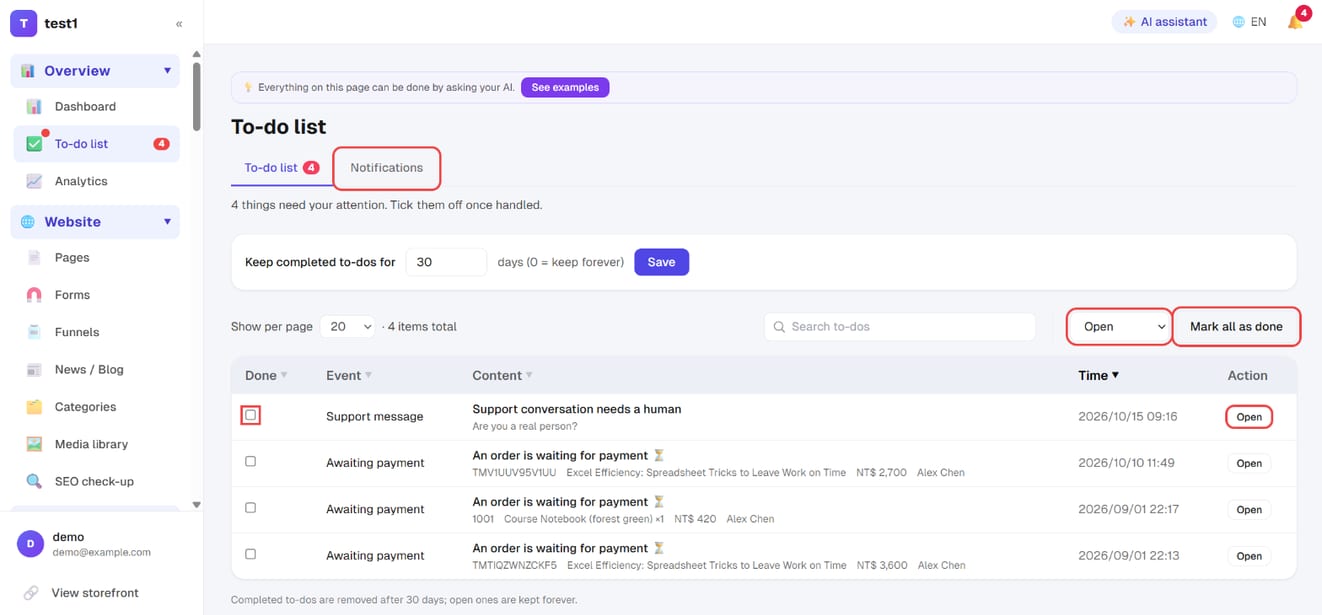
In the left menu, click "Overview → To-do list". Every notification also lands here. Tick "Done" when you've handled one, use "Open" to jump to it, filter by open / completed / all, or "Mark all as done". The "Notifications" tab next to it holds the items that need no action.
What you can be notified about
| Notification | Sent when |
|---|---|
| New order | Someone buys a course |
| Awaiting payment | An order is placed but not paid yet (e.g. bank transfer), so you can follow up |
| New product order | A product order you need to ship comes in |
| Low stock | A product is running low or sold out |
| Course submitted for review | An instructor submits a course for your approval |
| Email quota | This month's sending quota is nearly or fully used |
| AI action awaiting approval | Your AI (MCP) proposed a high-risk action that only runs after you approve it |
| Lesson question | A student asks a question in a lesson's Q&A |
| Course page enquiry | A visitor posts in the enquiry area on a course page |
| Review awaiting approval | A student submits a course review for you to approve |
| Assignment to grade | A student submits an assignment (quizzes are graded automatically and never queue up) |
| Instructor applications | Someone applies to be an instructor, or an application is approved |
Add-ons you've switched on (such as matchmaking) add their own rows.
Which ones to turn off
Leave them all on at first — early on, every one of them is good news. The moment to change something is when the volume gets high enough that you start ignoring them. An ignored notification is no notification, and it buries the one that mattered.
A practical order:
- New order — the first to go once sales are steady. Orders are all in the course orders list anyway
- Lesson questions / course enquiries — safe to turn off once you're in the dashboard daily
- To grade / to approve — keep these. Someone is waiting on you, and a day's delay is very noticeable
Before switching everything off: what's left is you remembering to check. If you have an assistant, give them an admin account and let them receive these instead.
Adding your own message to buyer emails
Email & newsletter → Email settings → Order emails: add your own message. It is appended below the system text — a community invite, when the invoice arrives, what to do next. HTML and personalisation fields ({{稱呼}}, {{姓名}}, {{email}}) both work, and buyers with no name get a generic greeting.
There are two boxes: course purchase / enrolment and shop orders (paid / shipped / completed). Leave one empty to add nothing.
The system's own content is never altered — purchase details, the "start learning" / "view order" button and order totals always appear. That is what the email is for; letting it be deleted only buys you support tickets.
🚨 Refund emails never include it. That is deliberate: it is not the right moment for marketing content.
Where these emails come from
They go through your mail setup. If a notification never arrives, check the mail log first — a record means it went to spam; no record means either the switch here is off or the mail setup isn't finished.
Nothing gets lost when email fails: the to-do list
Every notification also lands in Overview → To-do list in your dashboard. Email can go to spam, or you can simply be busy that day — this is the one place you can go back and find it.
The page has two tabs, and the split is worth knowing:
| Tab | What's in it | When it disappears |
|---|---|---|
| To-do list | Things you haven't done yet: an order to ship, an assignment to grade, an instructor application to review | Only when you tick it done. The red badge in the sidebar counts these |
| Notifications | Things that are just letting you know — "you approved instructor X", a receipt for something you did yourself | No action needed, and it never touches the badge |
Keeping them apart is deliberate. Mixed together, most of the to-do list would be items needing no action, and the badge would quickly stop meaning anything.
You can search the list, filter by open/done/all, and mark everything done at once. Completed items are cleared automatically after the number of days you choose; open items stay forever.
FAQ
Who receives them? Whoever is ticked in that notification's row, at their account email address. To change your own address, go to Members → Admins → My account.
Do admins get them too? Only if you tick their column. Each admin and instructor has their own Email / In-app ticks on the "Owner & instructors" tab.
Does this affect what students receive? The "Owner & instructors" tab doesn't. What students receive is set on the "Customers & students" tab — and the purchase, order and account emails there are always sent.
Can I edit the wording? No — these are system notifications with on/off switches only. For email you design and send to students, use newsletters and sequences.
Push to your phone (add-on)
With the Push notifications add-on, people with 🔔 dashboard alerts checked can also get notifications straight on their phone or computer: each person clicks "Turn on notifications" at the top of this page, once per device. For setup steps and iPhone limits, see Mobile app & push notifications.