
AI Runs Your Site (MCP)
Connect your own Claude or ChatGPT to your dashboard and run it by chatting.
Advanced plan only.
Connect your own Claude or ChatGPT to your dashboard and you can just tell it what to do instead of clicking through pages yourself.
Connect your AI, step by step
Nothing to install. Add it once in Claude or ChatGPT on the web, then use it from the web, the desktop app or your phone. About two minutes, no developer needed.
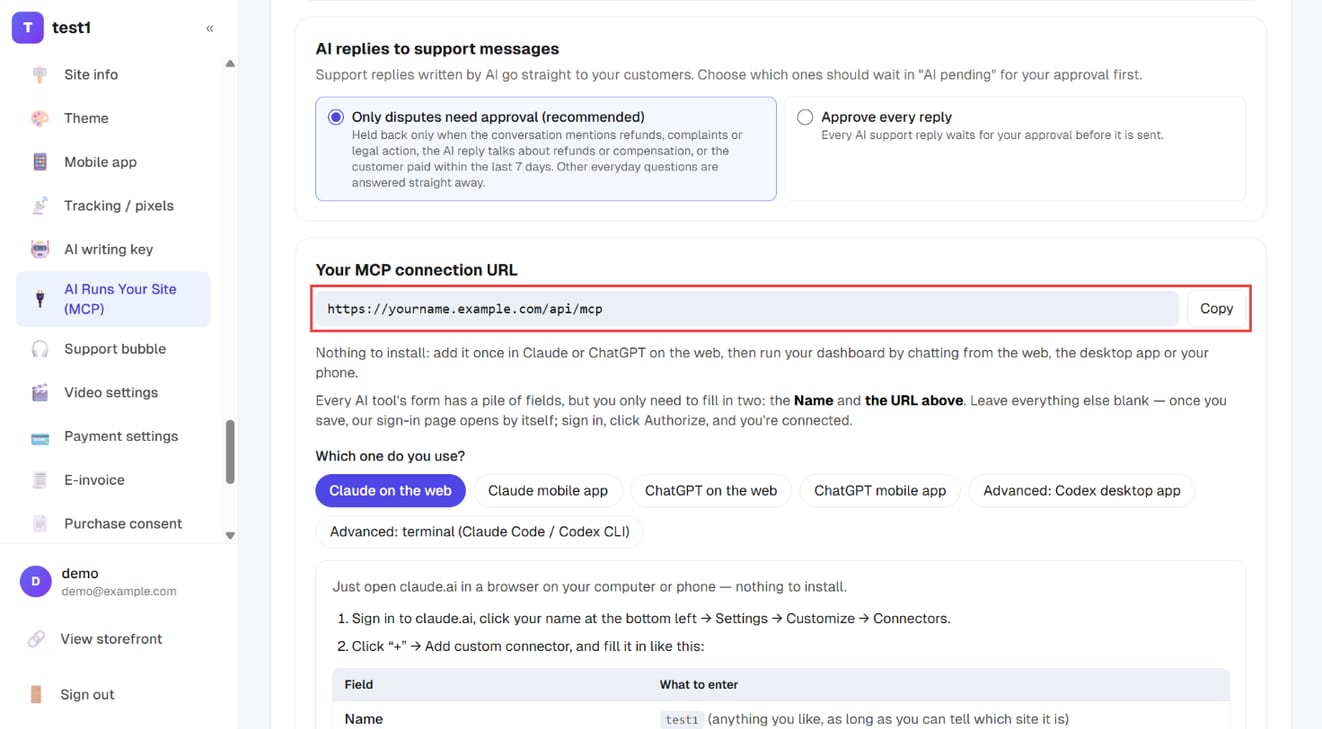
Step 1: Copy your MCP connection URL
In the left menu, click "Settings → AI Runs Your Site (MCP)". On the "Connection guide" tab, find "Your MCP connection URL" and click "Copy".
The "AI Runs Your Site master switch" at the top of the same page is your emergency brake: click "Pause site-wide connections" and every AI connection stops working immediately.
Step 2: Pick your AI tool and fill in the form
Scroll down to "Which one do you use?" and click your tool (for example "Claude on the web"). Its steps appear below, with a "field → what to enter" table.
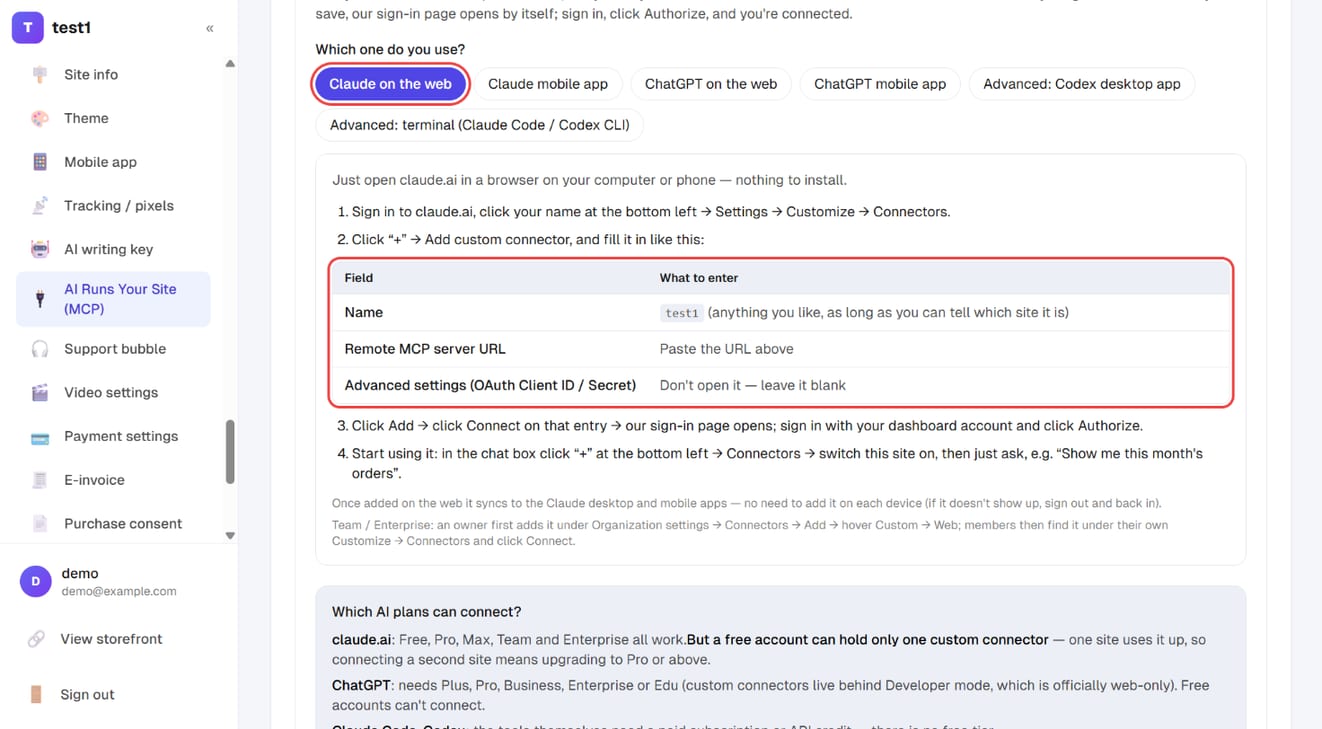
Every AI tool's form has a pile of fields, but you only fill in two: a name (anything you like) and the URL you just copied. Leave everything else blank. The steps for each tool:
Claude on the web (computer or phone browser)
- Sign in to claude.ai, click your name at the bottom left → Settings → Customize → Connectors
- Click "+" → Add custom connector
- Name: anything that identifies your site; Remote MCP server URL: paste the URL; leave Advanced settings blank; click Add
- Click Connect on that entry → our sign-in page opens; sign in and click Authorize
- Start using it: in the chat box click "+" → Connectors → switch this site on
Claude mobile app (iPhone / Android)
- Add it first with the "Claude on the web" steps above — you can do that right in your phone's browser at claude.ai
- Open the Claude app; connectors added on the web sync the next time you sign in (if it's missing, sign out and back in)
- In the chat box tap "+", find connectors and switch this site on
Anthropic currently lists adding custom connectors inside the mobile app as a beta, so add it in a browser and use it on your phone. You only authorize once.
ChatGPT on the web (computer browser)
- Sign in to chatgpt.com, click your name → Settings → Security and login → turn on Developer mode
- Back in Settings, open Plugins → click "+" to create one (older versions call this page Apps or Connectors)
- Name: your site; MCP server URL: paste the URL; Authentication: OAuth; click Create
- Our sign-in page opens; sign in and click Authorize
- Start using it: open a new chat, click "+" → Developer mode → tick this site
ChatGPT mobile app
Not recommended yet: OpenAI documents Developer mode as web-only, and users report the AI can only look things up on mobile — not create or change content. On a phone, use the Claude app or the dashboard AI assistant below.
The same menu also has steps for the Codex desktop app and the terminal (Claude Code / Codex CLI).
Step 3: Sign in and authorize
In your AI tool, click "Connect". Your site's sign-in page opens — sign in with your dashboard account and click "Authorize". That's it.
Step 4: Confirm the AI's high-risk actions
Actions that can't be undone — sending a newsletter, issuing a refund, deleting a course, publishing — can only be proposed by the AI. Proposals wait on the "AI pending review" tab and only run once you confirm them.
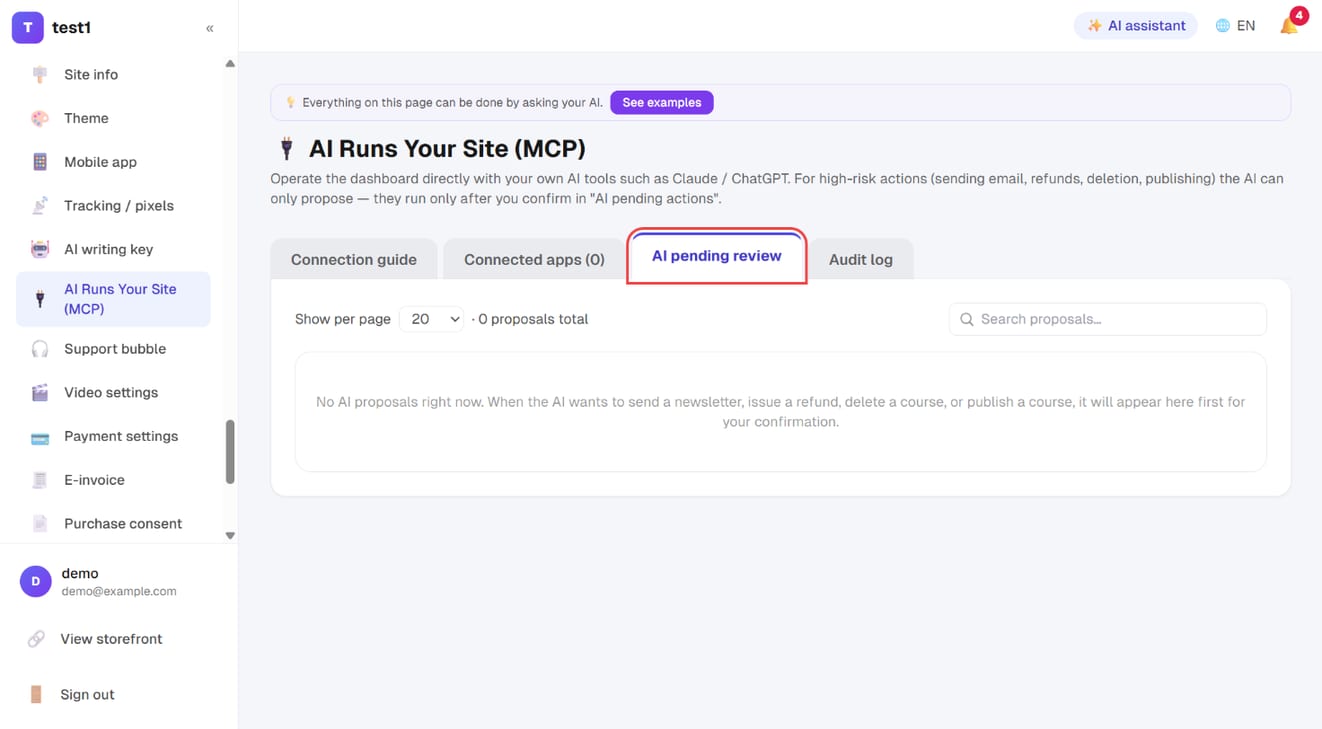
The "Connected apps" tab shows which AI tools are connected, and you can revoke any of them with one click. The "Audit log" records everything the AI has done (kept for 90 days).
No paid Claude or ChatGPT subscription? The "✨ AI assistant" at the top right of your dashboard chats right on this site — no leaving the site, available on every plan, billed by usage to your own "AI writing key".
Which AI plans can connect?
| AI tool | Plan needed |
|---|---|
| claude.ai | Free, Pro, Max, Team and Enterprise all work. But a free account can hold only one custom connector — one site uses it up, so connecting a second site means upgrading to Pro or above |
| ChatGPT | Needs Plus, Pro, Business, Enterprise or Edu (custom connectors live behind Developer mode, which is officially web-only). Free accounts can't connect |
| Claude Code, Codex | The tools themselves need a paid subscription or API credit; there is no free tier |
Every action the AI takes is one more call. A free account's message allowance is fine for trying this out, but runs out fast if you use it as a daily assistant.
What you can ask it to do
Build pages "Make a sales page for my 'Voice & Delivery' course: full-width hero at the top, then three testimonials, the curriculum, an FAQ, and a sign-up button at the end — use my site's accent colour." → It assembles the whole page and saves it as a draft for you to review.
Write articles "Write a 1,500-word blog post on how beginners can train their voice. Strong opening, and finish by pointing at my course." → Saved as a draft; you decide whether to publish.
Check numbers "How much did I sell this month? Which course sold best?"
Everyday admin "Give Wang Xiaoming access to the Advanced class." "Create a 10%-off coupon, code SPRING10, limited to 50 uses."
Safety
You keep control:
- Pages and articles are saved as drafts only — the AI can't publish
- Irreversible actions can only be proposed — sending a newsletter, refunding, deleting a course, publishing. The AI proposes; you confirm on the AI Runs Your Site page before anything happens
- Permissions are checked live on every call: revoke the connection, suspend the account or remove a permission, and the very next call fails
- The audit log shows everything the AI did
Teams and clients
If other people work on your site, you decide whose AI may connect and what it can touch.
An AI can never do more than the person it's connected as could do in the dashboard.
FAQ
Can the AI see my students' personal data? It can reach exactly what that account can reach in the dashboard. To keep it away from something, remove that permission from the account.
Is there an extra AI charge? It uses your own Claude or ChatGPT account, so the cost follows your AI subscription — we neither collect nor cover it. A free Claude account is enough to connect one site; a second site, or daily use, means upgrading (see the plan table above).
Can I disconnect at any time? Yes — one click on the AI Runs Your Site page, effective immediately.
How is this different from the "AI writing key" setting? That one supplies your API key to the platform's built-in article generation. This is the reverse: your AI tool operating your dashboard.