
Short links & click stats
Create short links on your own domain for ads, posts and flyers, and see daily clicks and where they came from.
Marketing → Short links. Turn a long URL into a short link on your own domain, like https://www.example.com/s/jp-grammar, and use it in ads, posts, messages or on a printed QR code. Every click is recorded.
Why not use a third-party link shortener?
- Your own domain shows up in the ad, which people trust more than an unfamiliar short-link service
- You can change the destination any time without replacing links you've already shared
- No dependence on an outside service shutting down or starting to charge, and nothing breaks if you move domains
Create a short link, step by step
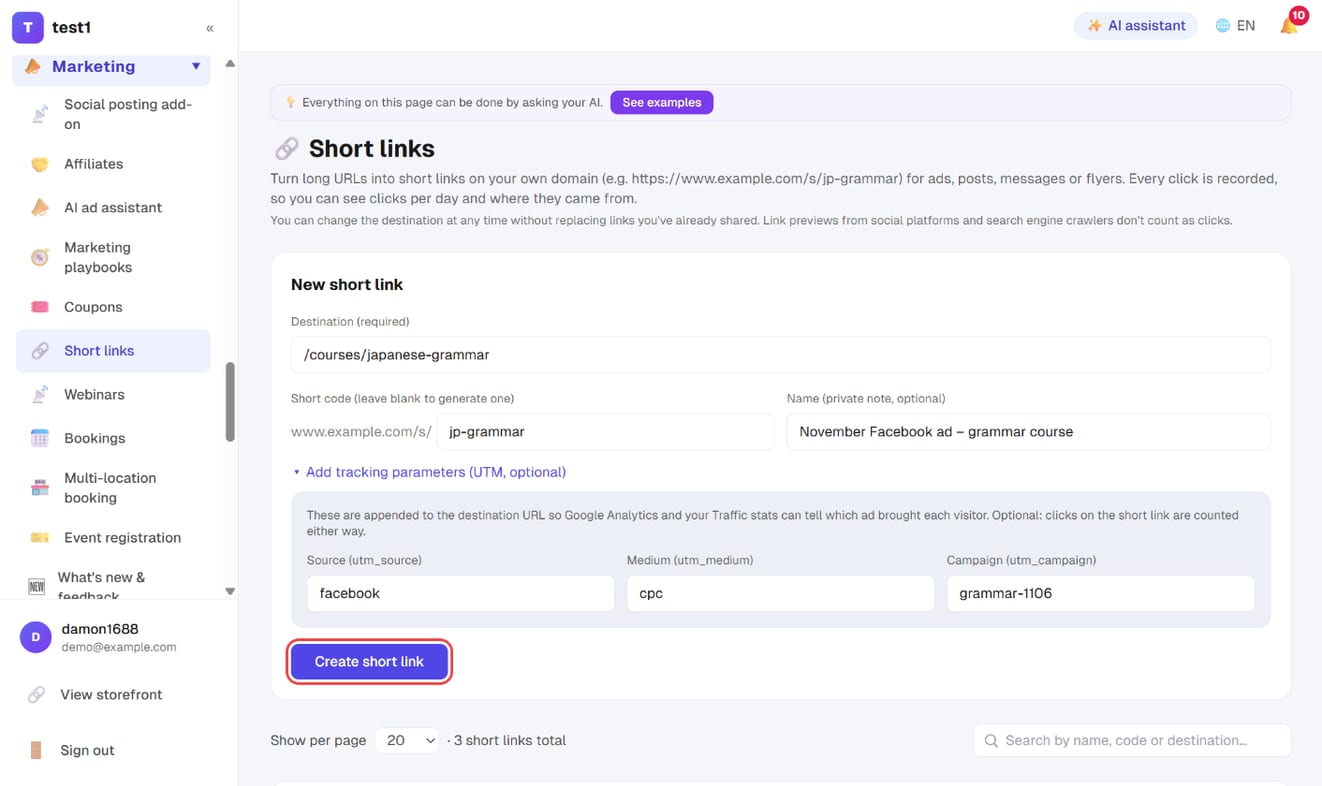
Step 1: Enter the destination and code
In the left menu, click "Marketing → Short links". Under "New short link":
- Destination (required) — a page on your site (e.g.
/courses/japanese-grammar) or a full URL (https://…) - Short code — the last part of the link: letters, numbers, underscores and hyphens only. Leave it blank to generate a 6-character code
- Name — a private note (e.g. "November Facebook ad – grammar course") so you can tell your links apart
- To let Google Analytics tell which ad brought each visitor, open "Add tracking parameters (UTM)" and fill in source / medium / campaign (optional)
Click "Create short link".
Step 2: Copy the link and use it
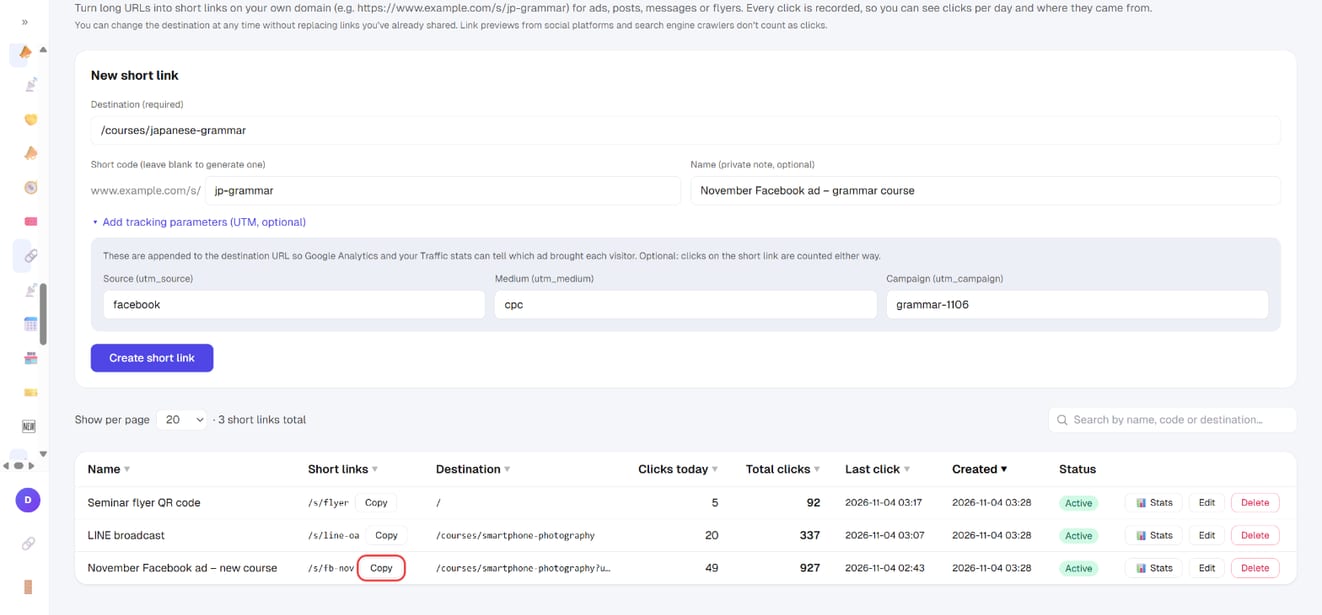
Each link in the list has a "Copy" button — click it and paste the link into your ad or post. The list shows:
- Clicks today, Total clicks and Last click (sort by any column to see which link performs best)
- Status — click "Active" to switch a link off; a disabled link opens your homepage instead
- Edit — change the destination, name or code
Step 3: Check the click stats
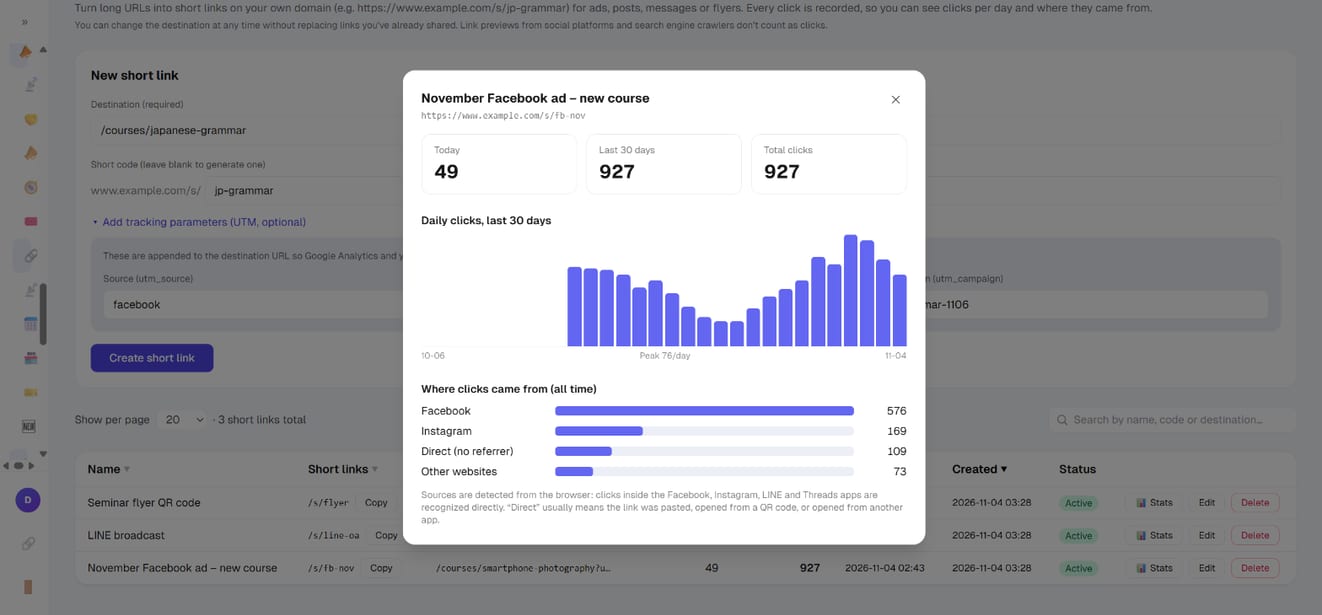
Click "📊 Stats" on a link:
- Today / Last 30 days / Total clicks
- A daily clicks bar chart for the last 30 days, so you can see which days your ad worked
- Where clicks came from — Facebook, Instagram, LINE, Threads, YouTube, Google, this site, direct, or other websites
How clicks are counted
- Every click counts — the same person clicking twice counts twice
- Not counted — link previews fetched by social platforms when you paste a link, and search engine crawlers
- Sources — clicks inside the Facebook, Instagram, LINE and Threads apps are recognized directly. "Direct" usually means the link was pasted, opened from a QR code, or opened from another app. Clicks from pages on your own site (e.g. a homepage slider) count as "This site"
FAQ
If I change the destination, do I need to replace links I've already shared? No. The short link stays the same and simply takes people to the new destination.
What happens if I change the code? The old code stops working and links already shared with it will open your homepage. To send people somewhere else, change the destination — don't change the code.
What happens if I delete a short link? The old link opens your homepage and its click stats are deleted. If you only want to pause it, switch it to inactive instead.
Does this affect Facebook ad conversion tracking?
No. Parameters such as fbclid that ads add to the URL are passed through to the destination, so your pixel still knows which ad the visitor came from.
Can I create several short links to the same destination? Yes, and it's a good idea: use one for your ad, one for your newsletter and one for your flyer, and you'll see which channel performs best.
How is this different from 301 redirects? 301 redirects connect old URLs to new pages when you move a site (for Google and existing links) and have no click stats. Short links are links you hand out yourself, and every click is recorded.
Do I need to recreate them after connecting a custom domain?
No. Short links belong to your site, so they work as your-domain/s/code after the change, and links on the old address still get through.