
Admins & instructors
When someone else helps run the site: how admins differ from instructors, how to grant only the features they need, and how to see who did what.
Sooner or later a second person needs access — an assistant answering students, a guest instructor running their own course. This page is about giving them only what they need.
Three roles
| Role | Can do | Who sets it up |
|---|---|---|
| Owner | Everything. Exactly one, the person who opened the site | — |
| Admin | The dashboard features you tick, one by one | Owner only |
| Instructor | Their own courses and students, with a revenue share | Owner only |
Assistants, marketing, support → admin. People who teach and take a cut → instructor.
Admins
Members → Admins (visible to the owner only).
Step 1: Add an admin
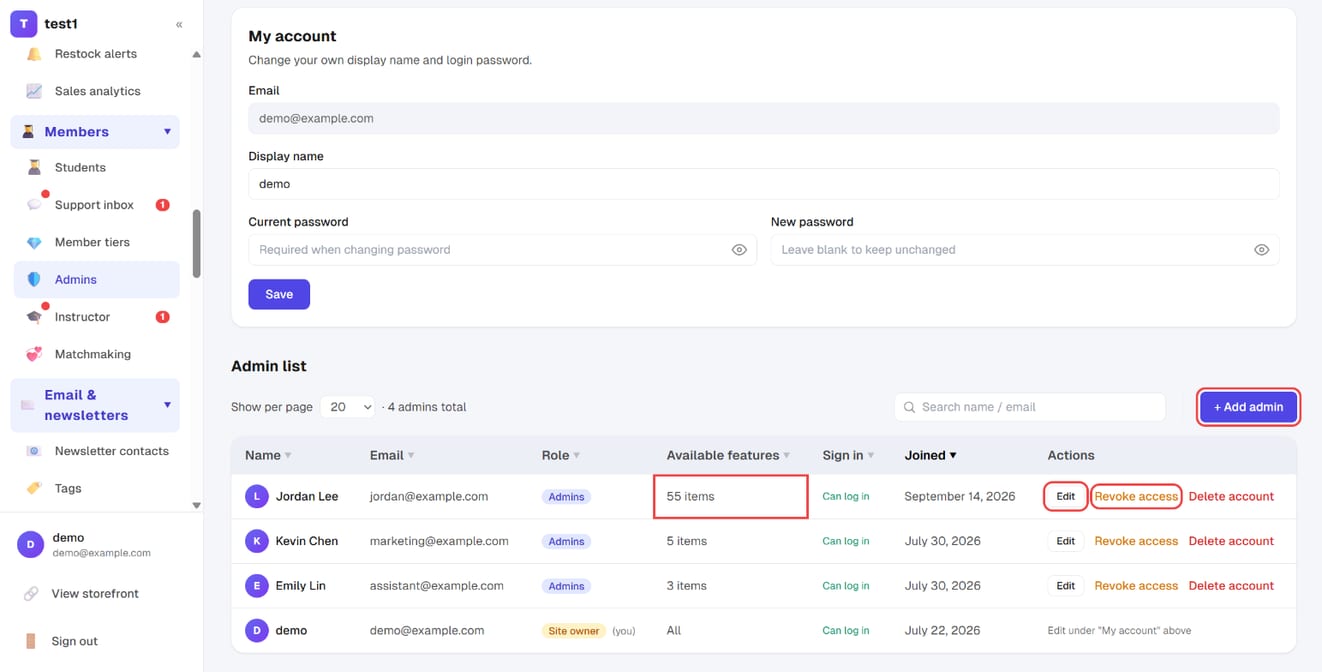
In the left menu, click "Members → Admins". The admin list shows each person's role, how many features they can use and whether they can sign in. Click "+ Add admin" to create one; "Edit" changes an existing admin, and "Revoke access" takes the role away.
Step 2: Tick the dashboard features they can use
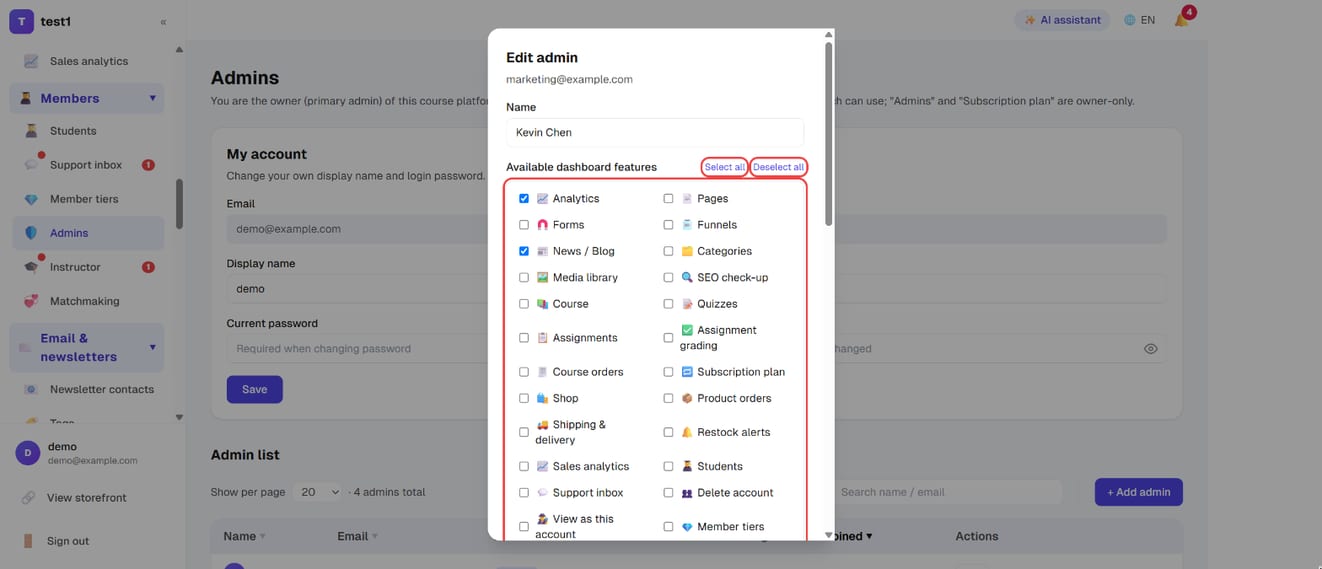
In the add / edit window, the part that matters is the Available dashboard features list — tick what they should reach, with "Select all" / "Deselect all" for speed. Press Save.
Practical starting points:
- Support assistant: students/accounts, support inbox, course orders. Not payment settings
- Marketing: blog, subscribers, newsletters, funnels, coupons, analytics
- Bookkeeping: course orders, shop orders, email performance. Not account deletion
The list's "features" column shows either "all" or a count, so over-broad access is visible at a glance.
Passwords and removal
- You can set a simple starting password and ask them to change it after signing in
- If they forget it, the owner resets it directly in Edit — no email round trip
- "Revoke access" and "Delete account" are different. Revoke access means they stop being an admin but the account survives (they may also be a student). Delete account removes everything. For staff changes, use revoke access
Who did what
Settings → Audit log records write actions in the dashboard (create, edit, delete). The owner sees everything; an admin sees only their own. When there's a dispute, this is the single source of truth.
Instructors
Members → Instructor (owner only). An instructor is someone who teaches and shares revenue, not a back-office helper.
Step 1: On the "Settings" tab, assign instructors and set the share
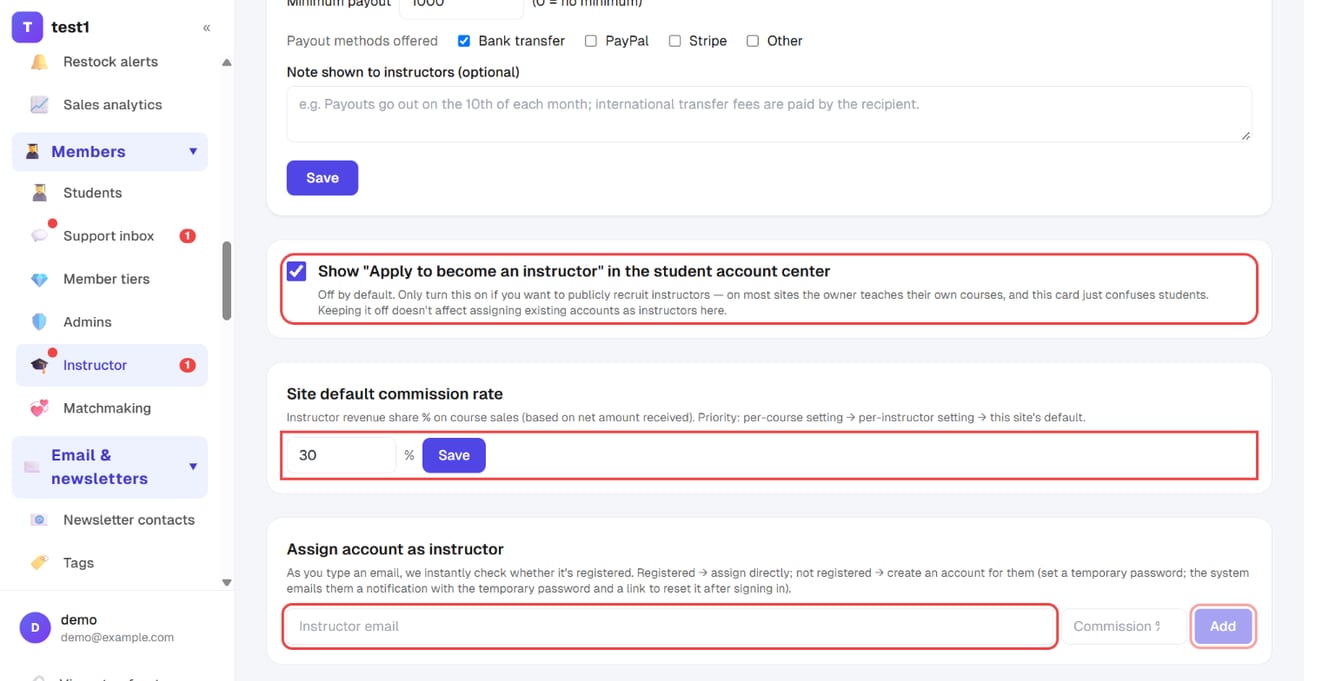
In the left menu, click "Members → Instructor" and open the "Settings" tab. Here you can switch on "Show 'Apply to become an instructor' in the student account center", set the Site default commission rate, and type an email under "Assign account as instructor", then click "Add".
Step 2: On the "Approvals" tab, approve, assign courses and set individual shares
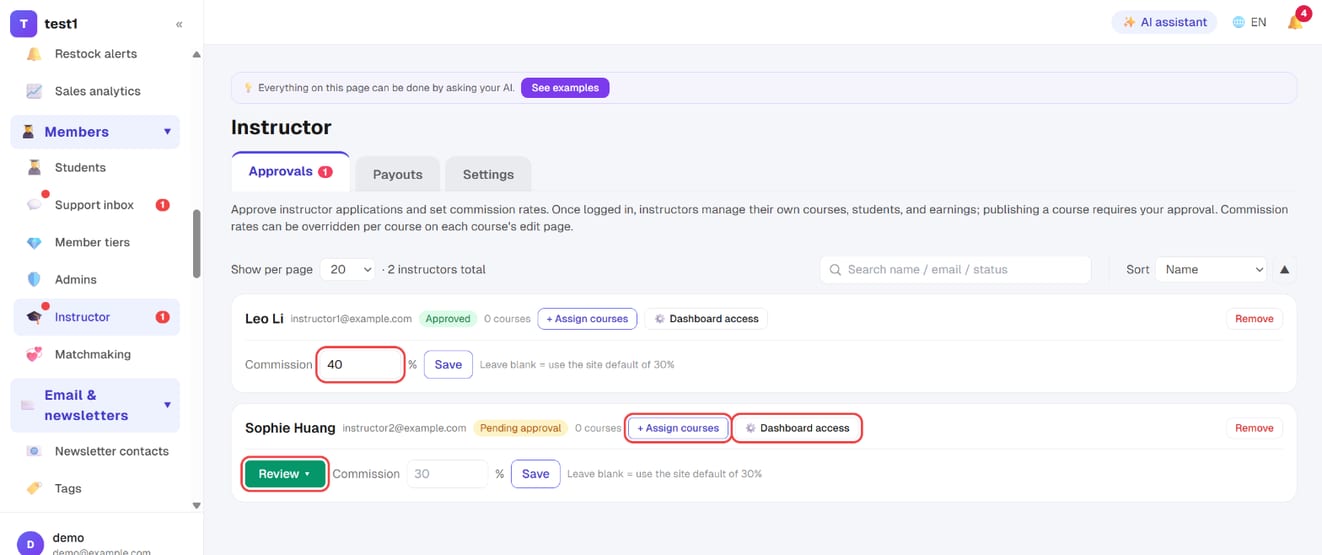
The "Approvals" tab lists every instructor. For a pending applicant click "Review"; "+ Assign courses" gives them courses, "⚙️ Dashboard access" picks what they see in their dashboard, and the Commission box overrides the site default for that person (blank = default).
Adding one
Type their email under "assign an account as instructor" and the system checks live whether it's registered:
- Registered → hit Add and they're assigned
- Not registered → create the account for them: set a temporary password of at least 6 characters and the system emails them, including that password and a link to reset it after signing in
You can also switch on "Show 'apply to become an instructor' in the student account area" and approve applicants yourself — the list shows pending / approved.
Revenue share
- Set a site-wide default share at the top; it applies to anyone without their own setting
- Individual instructors can override it (blank = use the default)
- Pending payout is what you still owe. Pay however you normally pay people, then mark it as paid to keep the record straight
Removing an instructor
Removal keeps the history — past orders and shares stay intact — and their courses can be reassigned rather than disappearing with them.
FAQ
Can an admin add other admins? No. The admin page is owner-only, so access can't quietly expand layer by layer.
Can instructors see each other's students? No. An instructor's view is limited to their own courses and the students on them.
Can one person be both admin and instructor? Yes — both roles attach to the same account and are granted separately.
Can I transfer ownership? The owner is the account that opened the site and can't be reassigned from the dashboard. Contact the platform if you genuinely need to hand over.
An admin left. What's the minimum I should do? Remove their role. They lose dashboard access immediately, while the activity log and their student record stay intact.