
Attendance and learning hours
Record how many hours each student actually watched and export it as CSV — for corporate training and subsidised courses that need proof of attendance.
Attendance (under "Teaching" in your dashboard) answers one question: how many hours did this student actually spend on the course?
Most online courses never need that number — you sell the course and you're done. The ones that do need it are specific: a company paying for internal training wants to know whether staff finished it, a subsidised programme requires an hours report, an employer needs the record to claim reimbursement. "I'm sure they watched it" doesn't survive that kind of review. You need a record that holds up.
Record and export hours, step by step
Step 1: Switch on "Certified attendance course" in the course settings
In the left menu, click "Teaching → Course" and click "Edit" on the course. In the "Course info box" section, tick "Certified attendance course: record and export each student's actual hours", then save.
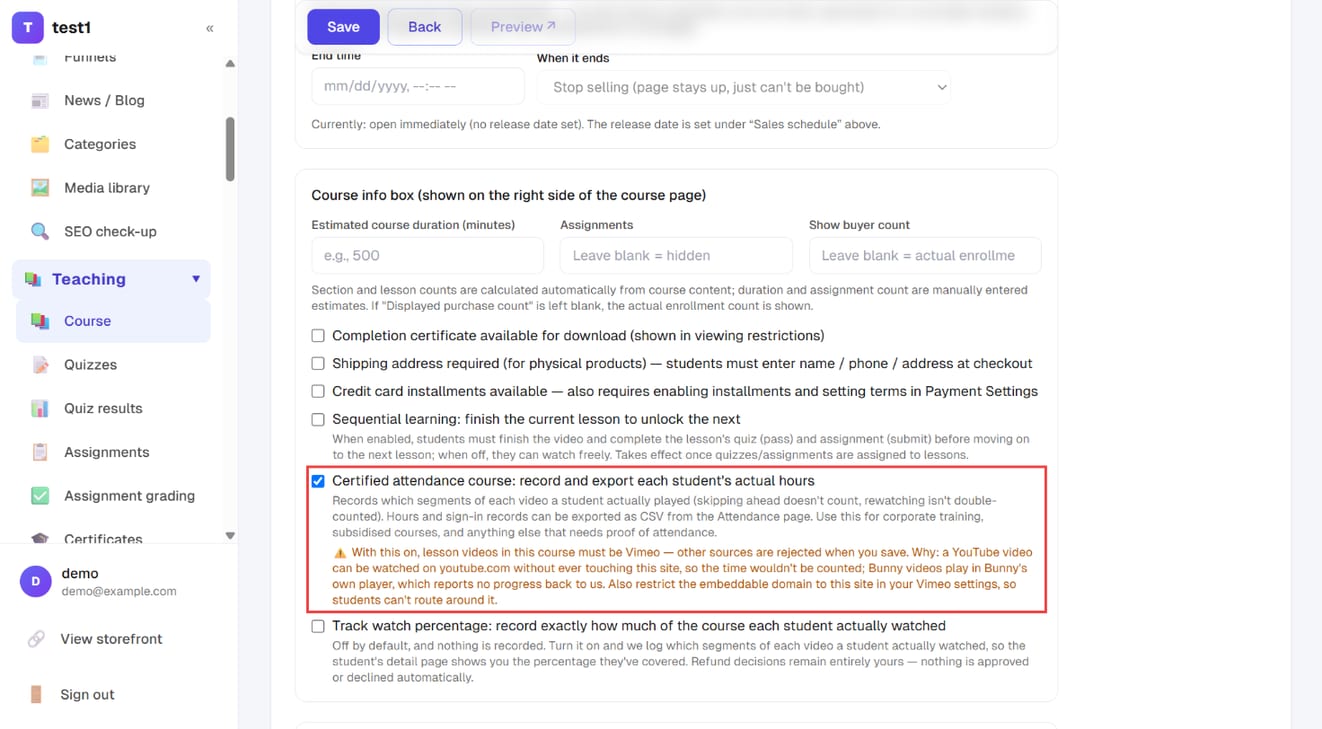
Once it's ticked, lesson videos in this course must be on Vimeo — any other source is rejected when you save a lesson (see "Videos need to be on Vimeo" below for why).
Step 2: Read the hours on the Attendance page and export CSV
In the left menu, click "Teaching → Attendance". There are two tabs — "Attendance" (time actually watched) and "Sign-in log" — and "Export CSV" at the top right downloads the current view.
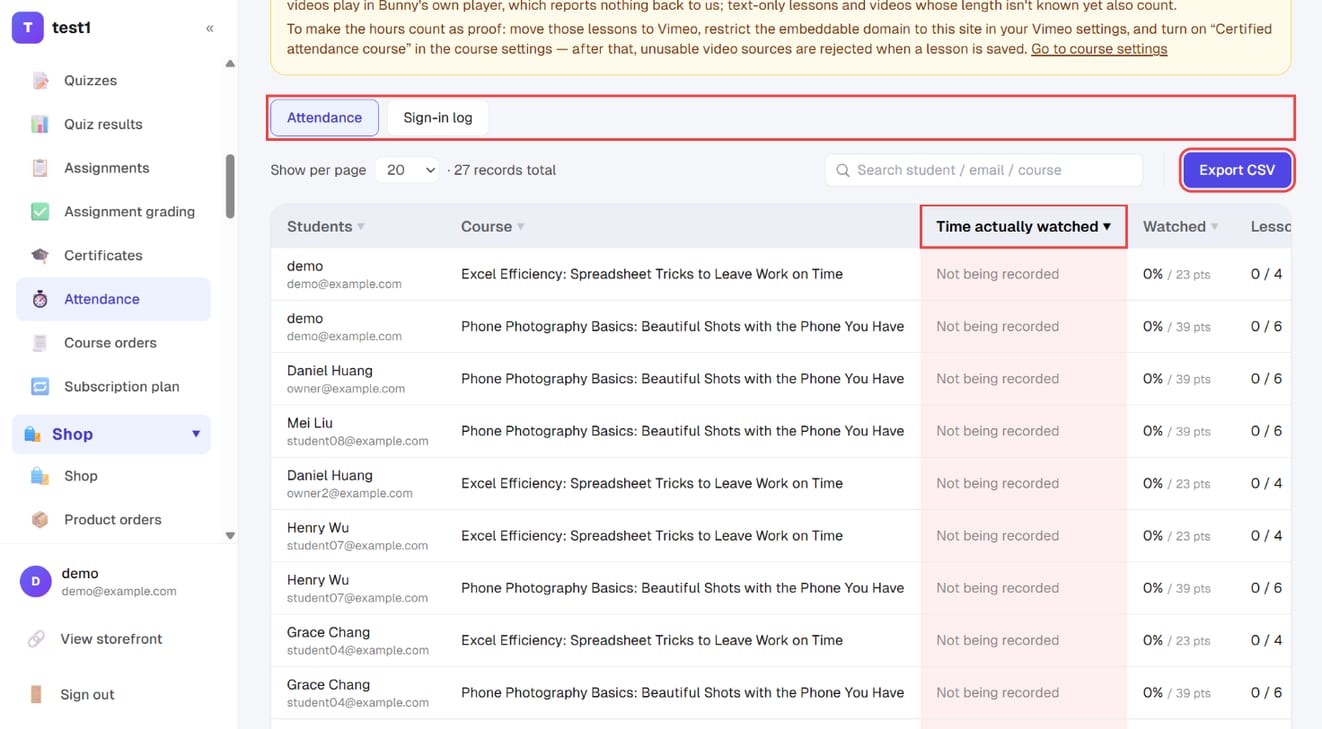
Courses that aren't switched on show "Not being recorded" in that column rather than 0 — see the explanation below.
Two numbers, and they are not equally solid
The page has two tabs. They come from different sources and carry different weight — don't mix them up:
| Tab | What it is | Usable as proof |
|---|---|---|
| Learning hours | Seconds of video the student actually played | ✅ Yes |
| Login log | Who signed in when, and how long they stayed | ❌ Reference only |
Actual watched hours works by splitting each video into 15-second segments and counting only the ones that genuinely played. Dragging the progress bar to the end counts for nothing, watching the same segment ten times still counts once, and playback speed can't inflate it. This is the number you can hand over.
Session length runs from sign-in to the last playback heartbeat. The catch: most people never click sign out — they just close the tab, and the server has no way of knowing when they left. So it's an "at least this long" estimate, and it only covers stretches where a video was actually playing. The screen and the CSV both label it as estimated. For proof of hours, use the watched-hours column, never session length.
It's off by default, and you switch it on per course
There is no site-wide toggle — it's decided course by course. Go to Courses → edit the course → tick "Certified-hours course: record each student's actual learning hours, exportable".
For a course that isn't switched on, the hours column reads "not being recorded" rather than 0. That wording is deliberate: "we aren't measuring" must never be misread as "nobody watched".
⚠️ Hours are not backfilled. Segment-level recording starts only once the toggle is on; whatever students watched before that was never stored. If a course will need proof of hours, switch it on before you start selling it.
The separate "watch-percentage" setting (the one used to weigh up refund requests) starts the same recording. Either toggle being on is enough for hours to accumulate.
Videos need to be on Vimeo for the hours to stand up
This is the part people trip over. The three video sources behave differently:
| Source | Playback progress received | Valid as formal proof |
|---|---|---|
| Vimeo | ✅ | ✅ the only one |
| YouTube | ✅ | ❌ |
| Bunny | ❌ nothing at all | ❌ |
- YouTube progress does reach us, but the same video is also watchable on youtube.com (unlisted links included). A student can finish it entirely outside your site and your record will show zero. Fine as a rough figure, worthless as proof.
- Bunny plays through its own player, and that player reports no playback progress at all — hours will always be 0. It isn't broken; there is simply nothing to receive.
So once "certified-hours course" is ticked, the system refuses to save a lesson video from any other source. That refusal is the entire enforcement power of the toggle. If the course already contains lessons that don't qualify when you tick it, the page lists exactly which ones so you can swap them.
One step we can't do for you: in your Vimeo account, restrict the domains the video may be embedded on to your own site. Without that, students can still watch the same video on vimeo.com and your record will miss it.
If even one lesson doesn't qualify — YouTube, Bunny, a text-only lesson, or a video whose length hasn't been detected yet — the whole course is flagged "reference only", on screen and in the export. Keep that column in the file: exports usually get forwarded to HR or an auditor, and without it a "reference only" figure gets read as a certified one.
What the report shows
Learning hours tab (one row per student per course): student name and email, course, actual watched hours, percentage watched (watched ÷ total video length), lessons completed out of total, last watched.
Login log tab (one row per sign-in): student, sign-in time, end time (marked "estimated" when they never signed out), session length, sign-in method (password / Google / two-step / registration / created at checkout / password reset), device (phone, tablet, desktop) and IP address.
Both tables support search, sorting by any column header, page size and paging.
Exporting to CSV
Each table has its own Export CSV button. A few deliberate choices:
- The export covers everything matching your search, not just the page you're looking at
- Alongside readable durations, there's a column of plain decimal hours so a spreadsheet can sum them directly
- The hours export carries a "usable as proof" column: yes / no (contains lessons that can't be counted) / no (recording not enabled for this course)
- The login export carries an "end time source" column: signed out / last playback (estimated)
- Files open in Excel without character corruption
Instructors see less than you do
If courses are assigned to instructors (see Admins & instructors), an instructor opening this page sees only the watched hours for courses they teach, and no login-log tab at all — the login log is account-level data covering you and every other instructor, and there is no course dimension to narrow it down by.
FAQ
Students are clearly studying, so why does it say "not being recorded"? That course hasn't had the certified-hours toggle switched on. Tick it in the course settings and hours will start accumulating from then on; nothing before that can be recovered.
Will hours be backfilled once I switch it on? No. Nothing was recorded while it was off, so there's nothing to reconstruct. Switch it on before launch for any course that will need hours.
Why do some courses say "reference only" next to the hours? At least one lesson can't be counted: it uses YouTube or Bunny, it's text-only, or its video length hasn't been detected. Move those lessons to Vimeo and the flag goes away.
Can I submit session length as learning hours? Not advisable. Students usually just close the tab, so the server never learns when they left and the figure is a lower-bound estimate. Use actual watched hours for anything official.
How are quizzes, assignments and text lessons counted? Only video generates hours, so those lessons contribute nothing — and a text-only lesson is enough to flag the whole course as reference only. If the course must produce formal proof, turn that material into video, or move it into a separate course that doesn't need certification.
If a student drags the progress bar to the end, do they get full hours? No. Video is counted in 15-second segments and only segments that actually played are marked. Skipped segments stay empty, and rewatching never adds twice.