
FB / IG comment auto-reply (via ManyChat)
Run “comment to get it” automations in ManyChat, and push the emails it collects straight into a form and your list here.
The classic “comment ‘send me the guide’ and I'll DM you” play — auto-reply to the comment, then message the person — is not built into this platform. Use ManyChat for it. ManyChat has already passed Meta's review, so connecting a Page is one click. What this platform handles is the second half: taking the emails ManyChat collects and putting them into your form and your list, where your email sequences take over.
Why not build it in? Messaging commenters requires Meta Business Verification and App Review, with annual re-certification. That door is only worth walking through for a company whose whole product is this.
Looking to connect lead ads (instant forms) rather than comments? See Facebook lead ads into your list.
The flow
- A visitor comments “send me the guide” under your Facebook Page or Instagram post
- ManyChat replies to the comment (e.g. “check your DMs”) and messages them
- In the DM, ManyChat asks for their email
- ManyChat posts the email to a form on this site (this is what the page is about)
- This site adds them to your list, applies the form's tags and triggers your sequence
- ManyChat sends them the download link
From step 5 on it's this platform's job: the list lives here and every later email is sent from here.
1. Create a form here
Go to Website → Forms and click "+ Create form" to add one, e.g. “FB lead magnet”. Keep just Email (and optionally name) — ManyChat won't fill anything else.
Set two things:
- Tags: e.g.
fb-leadmagnet. Tags are what let a sequence target only these people. - Sequence: under Email & newsletters → Email sequences, create one triggered by that tag (first email carries the download link; later ones introduce your course).
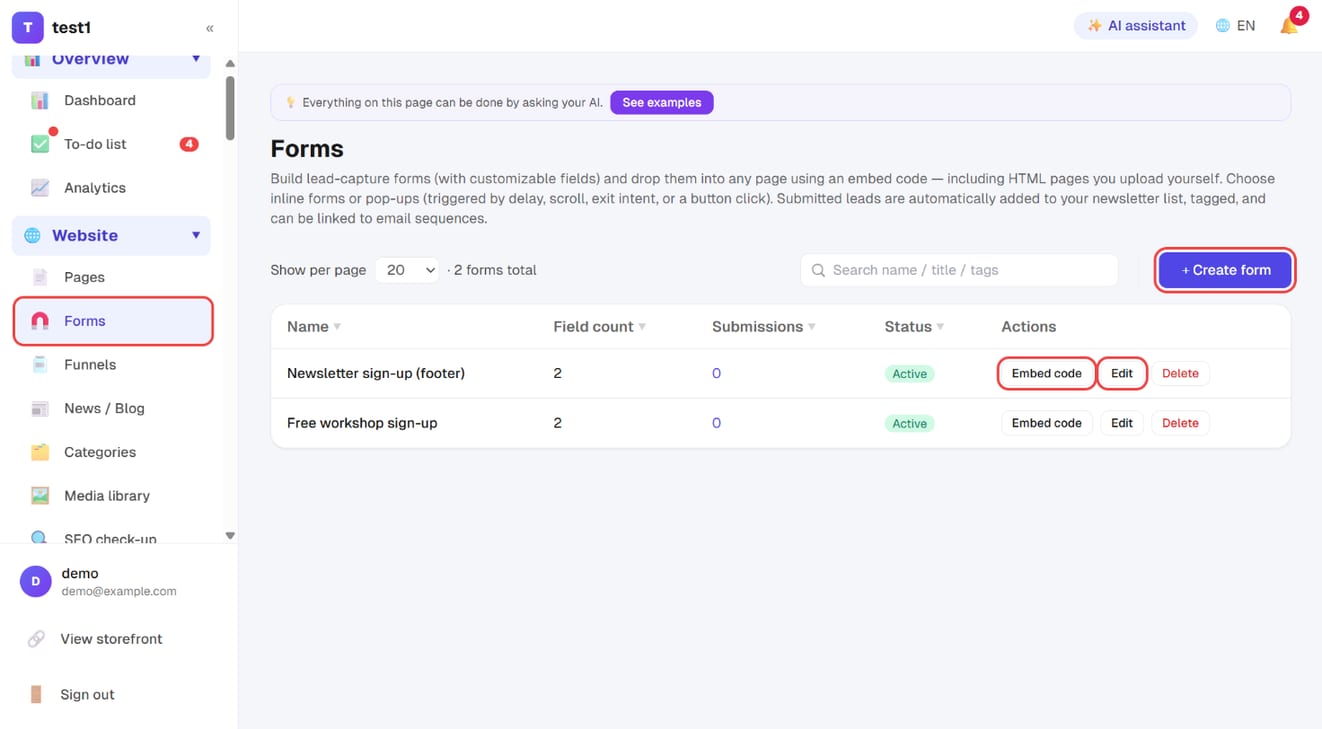
2. Get the submit URL and key
In the forms list click Embed code and scroll to Server integration (ManyChat / Zapier / n8n) at the bottom:
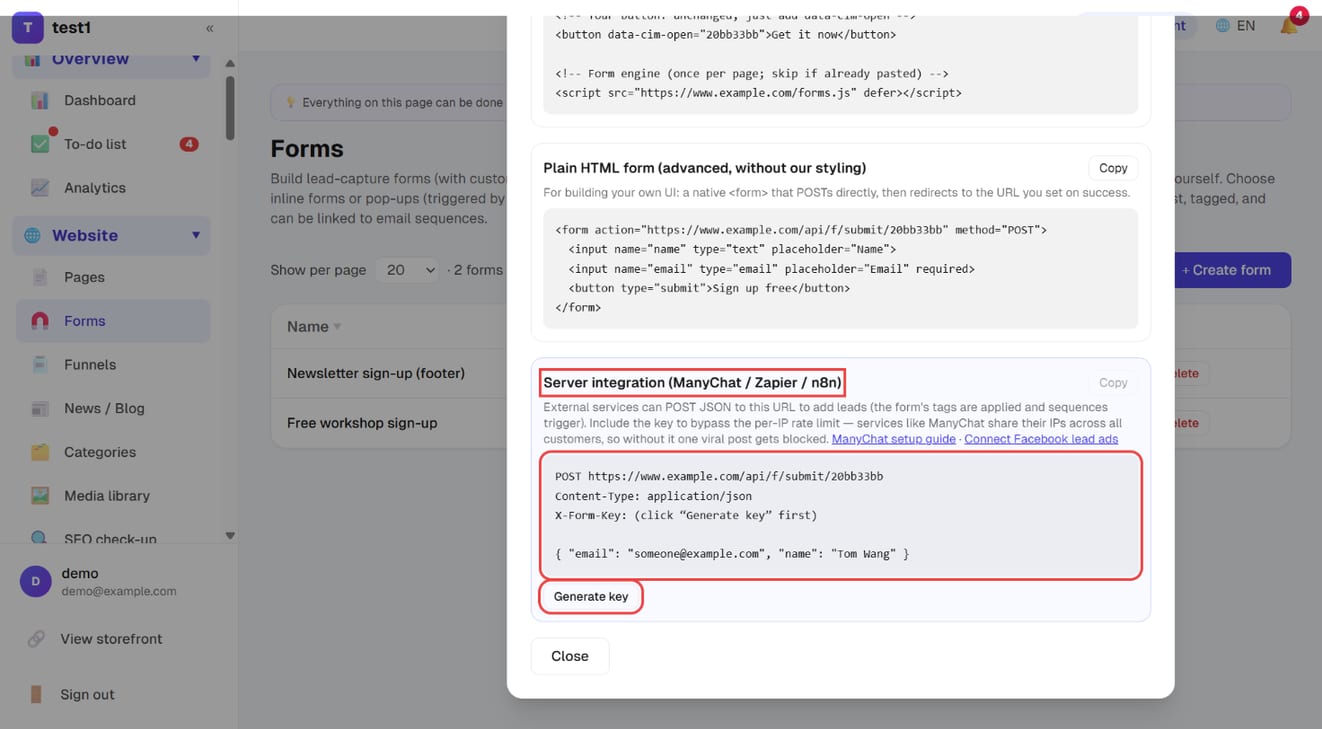
- Click Generate key
- Click Copy — you get the URL, the key and a JSON example to paste into ManyChat
The key does exactly one thing: exempts server-side submissions from the per-IP rate limit. ManyChat's outbound IPs are shared by all its customers, so without the key one viral post of yours would look like a single IP flooding the form and get blocked. It is not a secret that protects data — if it leaks, someone could bypass the rate limit to spam your list; click Regenerate key and the old one stops working.
3. Configure ManyChat
In your ManyChat automation, after the step that collects the email, add an External Request action:
| Field | Value |
|---|---|
| Request type | POST |
| URL | the submit URL you copied (https://your-domain/api/f/submit/FORM_ID) |
| Headers | Content-Type: application/jsonX-Form-Key: YOUR_KEY |
| Body | { "email": "{{email}}", "name": "{{first_name}}" } (ManyChat variables) |
Save and run ManyChat's test; the entry should appear under Forms → View submissions immediately. If it doesn't, the usual culprits are a URL missing https:// or a body that isn't valid JSON.
FAQ
Does it have to be ManyChat? No. Anything that can send an HTTP POST works the same way (Zapier, Make, n8n, your own code). But the comment → DM part must be done by a service that has passed Meta's review — self-hosting n8n doesn't skip that review.
What if the same person requests twice? The list is de-duplicated by email, and sequences are not re-sent.
The DM already delivers the link — why push to the list? Because after the link, that person is gone. On the list, they get your follow-up emails about the course — that's where “comment to get it” actually pays off.
Is there a per-email limit too? Yes: the same email can submit at most 8 times per 10 minutes. It never affects normal use; it only stops bots.