
Custom domain
Point course.yourbrand.com at your course site: two CNAME records, verification, SSL — and how to spot what went wrong.
When your site opens you get a subdomain (something like yourname.example.com), and it works perfectly well — it can be indexed, it can take payments, it isn't penalised. Moving to your own domain buys you two other things: your brand, and an asset you own.
The longer you wait, the more old URLs need redirecting later. Do this before you start running ads or printing business cards.
No domain yet? Buy one first from GoDaddy, Cloudflare, Gandi, Namecheap or similar — roughly USD 10–25 a year; .com is the safe choice.
Connect your own domain, step by step
Step 1: Open "Custom domain" and note the two DNS records
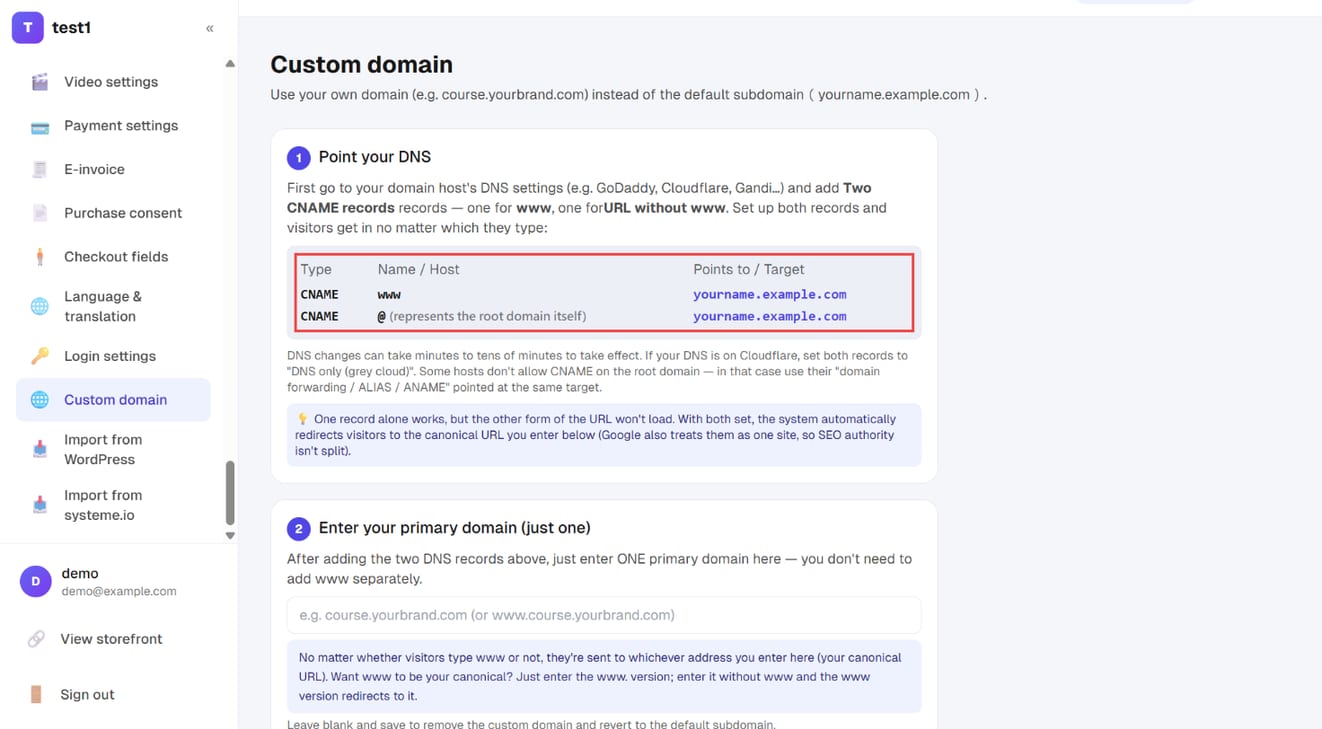
In the left menu, click "Settings → Custom domain". The table in the first section, "Point your DNS", lists the two records you'll add at your domain registrar:
| Type | Name / Host | Points to / Target |
|---|---|---|
| CNAME | www |
the target shown on the page |
| CNAME | @ (the domain itself) |
the target shown on the page |
Step 2: Add the two CNAME records at your registrar
Sign in wherever you bought the domain, open its DNS settings and add two CNAME records exactly as in the table — one for www and one for the bare domain. With both in place, visitors get through whichever way they type it.
Three things people trip over:
- If your DNS is on Cloudflare, set both records to DNS only (grey cloud). Leaving the orange cloud on creates a double proxy and the site won't load
- Some registrars don't allow a CNAME on the bare domain. Use their ALIAS / ANAME / domain forwarding option pointing at the same target
- Propagation takes time — minutes to tens of minutes. Verification failing immediately after you save is normal; come back after a coffee
Step 3: Enter your canonical address, verify, then save
Back on the "Custom domain" page:
- In section 2, "Enter your primary domain (just one)", enter one address only — you don't need to add the www version separately
- Want
www.course.yourbrand.comas the canonical? Enter the www version - Want
course.yourbrand.com? Enter that, and visitors typing www are redirected to it
- Want
- In section 3, click "Verify" to check the DNS records (a ✅ appears when they're right)
- Click "Save domain". The domain is activated and the SSL certificate is issued automatically, usually within one to a few minutes
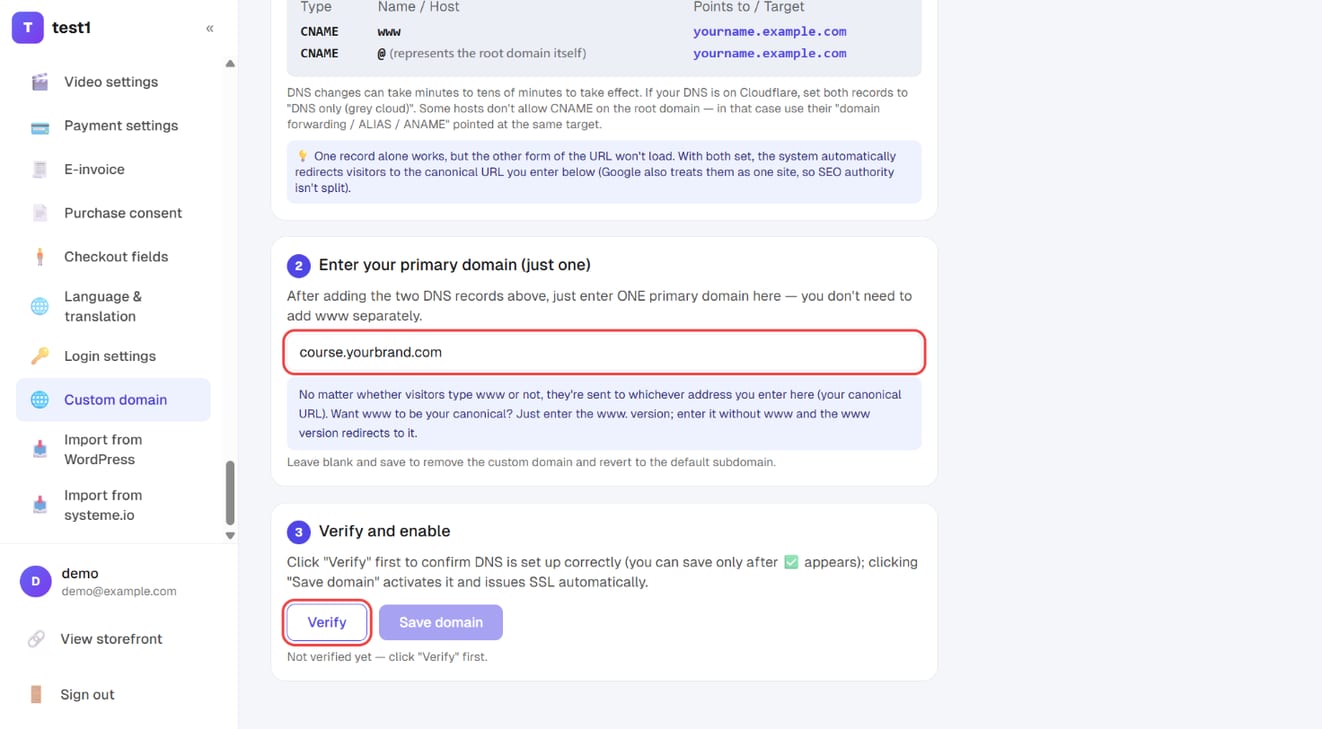
"Save domain" stays greyed out until verification passes — that's expected.
Step 4: Confirm it in a private window
Open a private window and type your address. Your normal window is the one most likely to be lying to you via cache — seeing it yourself doesn't mean anyone else can.
A padlock in the address bar means SSL is issued. "Not secure" usually just means the certificate is still being issued; wait a few minutes and reload.
What happens next
- The old subdomain 301-redirects to your new domain, so search equity carries over and old links keep working
- The "still using the platform subdomain" item in the SEO check flips to done
- Student emails, payment callbacks and affiliate links all switch to the new address
Changing or removing it
Clear the field and save to remove the custom domain and fall back to the default subdomain. To switch to a different domain, redo the DNS records and verify again.
FAQ
I don't have a domain — where do I buy one?
GoDaddy, Cloudflare, Gandi and Namecheap are all fine; expect roughly USD 10–25 a year. .com is the safe choice.
Can I use the bare domain (yourbrand.com) instead of course.yourbrand.com? Yes, but not if that domain already serves your main website — they'd collide. A subdomain (course. or school.) is the usual approach.
Verification keeps failing. Check in order: did the DNS record actually save? Is the Cloudflare cloud grey? Is it a CNAME rather than an A record? If all three are right, wait another 30 minutes — DNS is just slow.
Does changing domains affect courses I've already sold? No. Accounts, orders and progress are untouched; only the address changes.
Can one domain serve two sites? No. A domain points at exactly one destination.