
Tracking codes & the SEO check
Paste in GA4, the Meta pixel and the Conversions API so your ads can measure results — then use the SEO check to finish the fields only you can fill.
Two things that work together: tracking codes let your ads measure results, and the SEO check lets free search traffic find you.
Tracking codes and marketing pixels
Settings → Tracking / pixels. Fill these in and the codes are injected into the <head> of every public page automatically, live within minutes — you never touch code.
Set up tracking, step by step
Step 1: Paste the snippet and let it fill in the ID
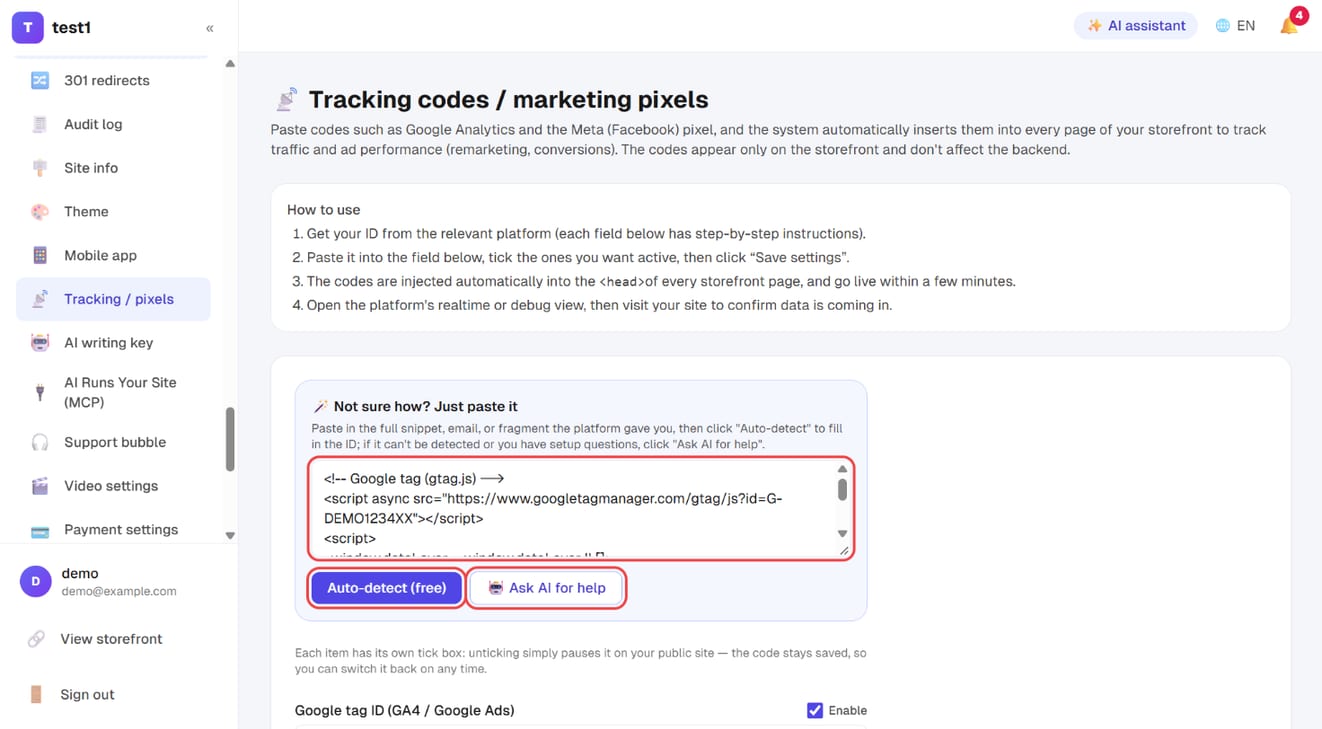
In the left menu, click "Settings → Tracking / pixels". Under "Not sure how? Just paste it", paste the full snippet (or email, or fragment) the platform gave you, then click "Auto-detect (free)" — the right field is filled in for you. If it can't tell, click "🤖 Ask AI for help".
Step 2: Check the IDs and their "Enable" ticks
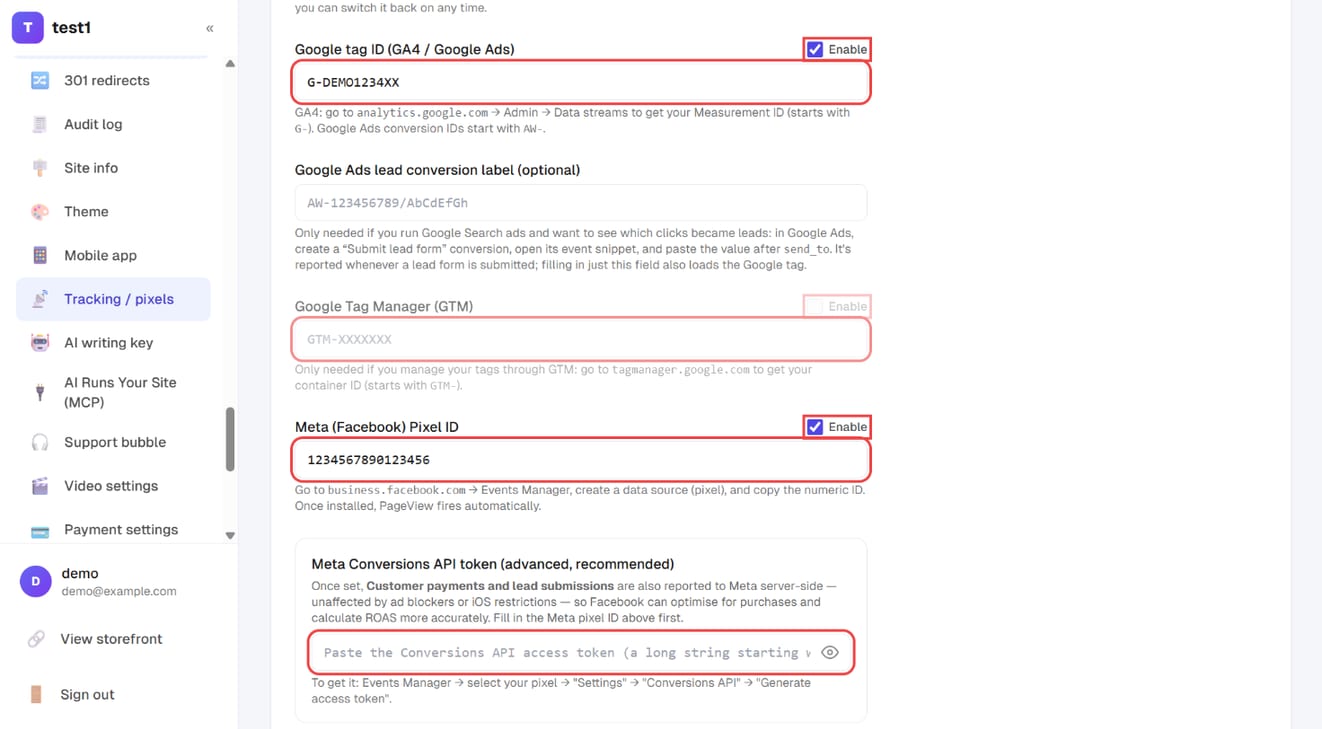
Below, each platform has its own field: Google tag ID (GA4 / Google Ads), Google Tag Manager, Meta (Facebook) Pixel ID and more, each with an "Enable" tick. The Meta Conversions API token also reports purchases and leads server-side, unaffected by ad blockers.
Step 3: Verification code, cookie banner, then save
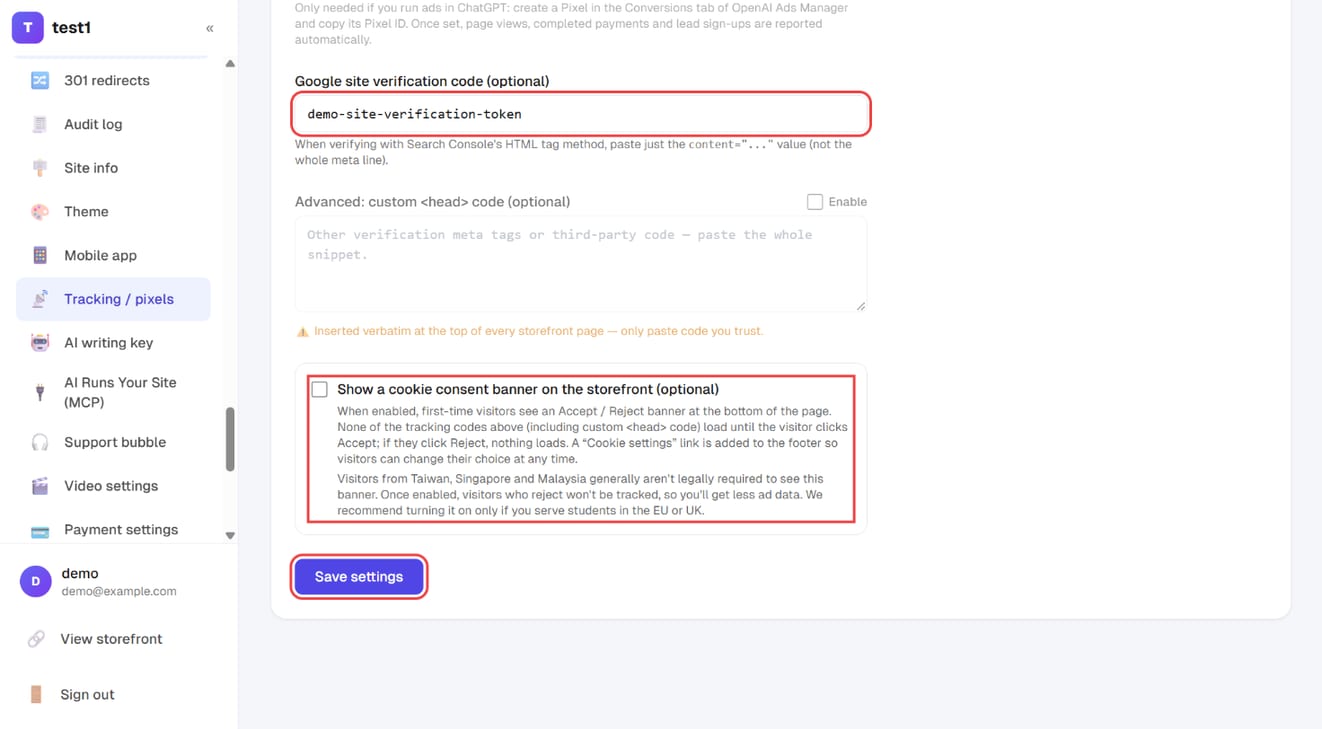
Further down: the Google site verification code (for Search Console), an optional cookie consent banner, and "Save settings".
Step 4: Work through the SEO check-up
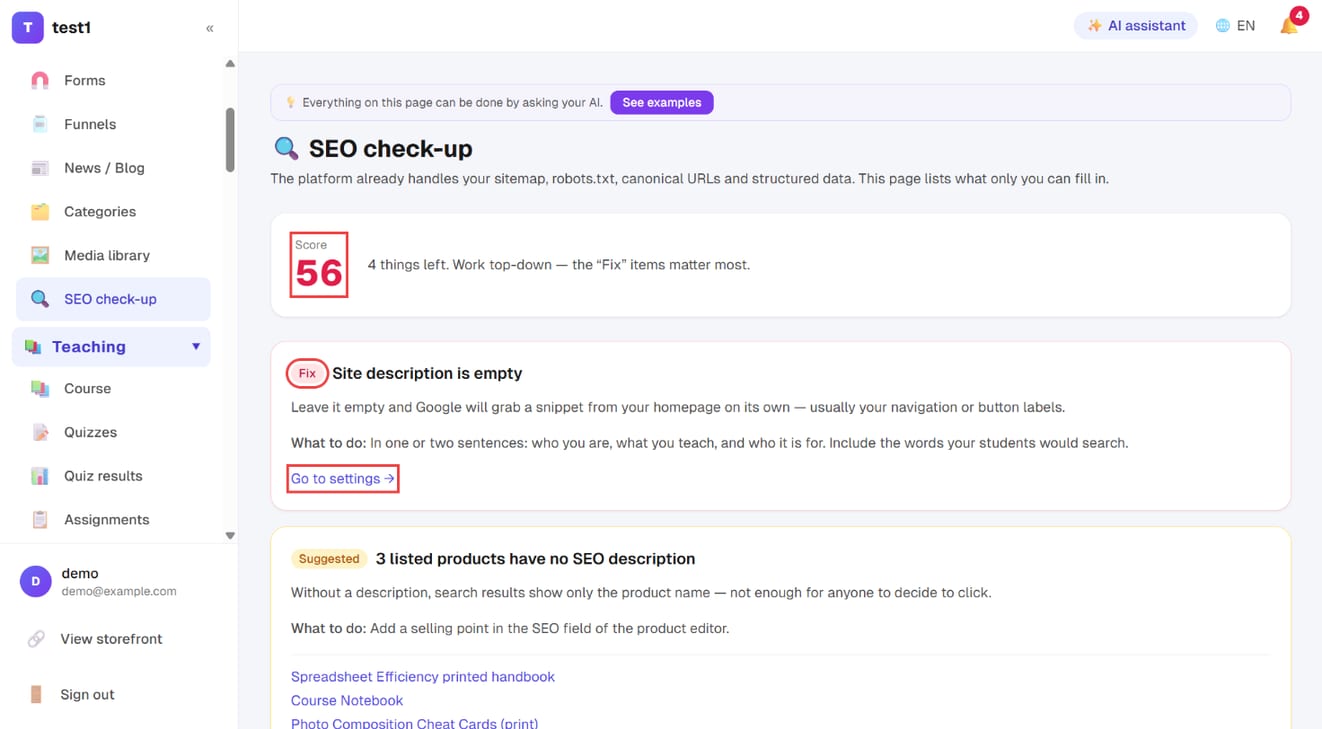
In the left menu, click "Website → SEO check-up". You get a score and a list of what's left — start with the "Fix" items; each has a link straight to the setting.
| Field | When you need it |
|---|---|
| Google tag ID | To use GA4, or to measure conversions on Google Ads. Looks like G-XXXXXXXXXX or AW-XXXXXXXXX |
| Google Tag Manager | Only if you already run everything through GTM. Otherwise leave blank |
| Meta pixel ID | To run Facebook / Instagram ads. A 16-digit number |
| Meta Conversions API token | Advanced, but strongly recommended. See below |
| OpenAI (ChatGPT Ads) Pixel ID | To run ads in ChatGPT. Create a Pixel in the Conversions tab of OpenAI Ads Manager and copy its Pixel ID; page views, successful payments and form submissions are then reported automatically |
| Google site verification | For Search Console. The SEO check looks for this too |
Custom <head> code |
Verification meta tags for other platforms, or third-party snippets |
⚠️ Custom <head> code is inserted verbatim into every public page. Only paste code you trust.
Want to pause one of them? Just untick it
The Google tag, GTM, the Meta pixel, the OpenAI pixel and the custom <head> block each have their own Enable tick box. Unticking only pauses it on your public site — the code stays saved. So when you stop running ads for a season, or want to check whether a snippet is slowing the site down, you don't have to delete the ID and go dig it out of the platform again. Tick it back on and it's live.
Unticking the Meta pixel also stops the Conversions API below — otherwise the browser side would be off while the server side kept firing, and you could never really turn it off.
Not sure how? Just paste it
The box at the top takes anything: a whole snippet, or the entire setup email a platform sent you. Hit auto-detect and it pulls the IDs out into the right fields. If that misses, 🤖 ask AI (needs an AI writing key).
Either way, press Save afterwards — auto-detect fills the fields, it doesn't save them.
The Conversions API is worth ten extra minutes
Browser-side pixels get blocked by iOS tracking restrictions and ad blockers. The result: your ad account reports 3 sales while your dashboard shows 7 — so Meta never learns who your buyers are, and the targeting gets worse over time.
The Conversions API reports from the server, which can't be blocked. Get the token from Meta Events Manager → your pixel → Settings → Generate access token (a long EAAB... string) → paste it in.
Once set, successful payments and form submissions are reported to Meta server-side.
Checking it actually works
Open the platform's realtime or debug view (GA4 Realtime, Meta Events Manager's Test Events), then visit your own site — your visit should appear within seconds.
Cookie consent banner (optional, off by default)
At the bottom of the tracking settings is a tick box: Show a cookie consent banner on the storefront (optional). When it's on:
- First-time visitors see an Accept / Reject banner at the bottom of the page (with a link to your privacy policy, if your site has one)
- None of the codes above — Google tag, GTM, the Meta pixel, the OpenAI pixel, custom
<head>code — load until the visitor clicks Accept. If they click Reject, nothing loads - A Cookie settings link appears in the footer so visitors can change their mind at any time
- The banner follows the language the visitor is browsing in (English / Traditional Chinese / Simplified Chinese)
Should you turn it on? It's a legal question that depends on where your visitors are:
| Your students / customers are in | Recommendation |
|---|---|
| Taiwan, Singapore, Malaysia | Usually not required — leave it off |
| The EU or the UK | The law requires consent before tracking — turn it on |
The cost: visitors who reject aren't tracked, so your ad accounts see less data and your retargeting audiences shrink. Only turn it on if you actually do business in Europe.
While it's on, keep two things in mind:
- The Meta Conversions API only sends events for visitors who clicked Accept. Payment events triggered by the payment gateway can't tell what the visitor chose, so they aren't sent server-side — only the browser pixel reports them (when the visitor accepted)
- Custom
<head>code also waits for consent. For site-verification meta tags, use the Google site verification field instead — it isn't affected
⚠️ If none of your tracking codes are enabled, no banner appears even with the box ticked — there's nothing to consent to.
The SEO check
Website → SEO check-up. This is not a generic SEO auditor. It lists only the things nobody but you can fill in — sitemap, robots.txt, URL canonicalisation and structured data are already handled for you.
The score runs 0–100 (each "fix" costs 20, each "suggested" costs 8). Work top to bottom. Seven checks:
- Site description — without one, Google grabs a snippet from your homepage, often your navigation menu
- Course descriptions — course pages are your most important pages; no description means no snippet in search results
- Post descriptions — those three lines of free sales copy in the results are worth writing
- Product SEO descriptions
- Translation coverage across your languages — ⚠️ see below
- Google Search Console — without it you can't see which words bring people in, and it's free
- A custom domain — see Custom domain
Does running several languages hurt SEO?
The number of languages costs you nothing. Each language has its own URL — your default language lives at /about, the others at /en/about and /zh-cn/about. Every version canonicalises to itself, the site emits hreflang automatically, and your sitemap lists each language version. Search engines understand these are the same page in different languages, so they are not treated as duplicate content, and the right version gets shown to the right searcher.
What does cost you is switching a language on and leaving it empty. A page with no translation still answers on that language's URL — with your default language's content. The URL and the hreflang tag claim one language while the content is another, Google reads that as a mismatch, and those URLs tend not to get indexed properly.
So the check measures coverage: fill in the "Multilingual content" panel on each page (or run "AI translate" on the whole page and review it). For a language you have no intention of maintaining, switch it off in language settings — off is better than a pile of untranslated pages.
What this page deliberately doesn't check
SEO is won on content. Your students search for their problem ("my ads stopped converting"), not your course title. Writing posts that answer those questions and lead into the course page beats any settings change — which is why the blog's four AI tools exist.
FAQ
Do I have to install GA4? No. The built-in traffic stats already show visitors, sources and top pages, without cookies. GA4 is for ad attribution and cross-device analysis.
I pasted the code but the platform says it sees nothing. Three usual causes: you didn't press Save; you pasted a measurement ID where the tag ID belongs; or your own browser has an ad blocker (retry in a private window).
Should I push the score to 100? Don't chase the number. Past the high eighties, writing content pays far better than filling in more settings.
How long until SEO changes show up? Description changes usually surface in search results within a few days to two weeks. Rankings themselves move on a scale of months.