
AI Support Chat
Put a chat widget on your site that answers from your site content and knowledge base, hands off to you when it can't, and learns FAQs from conversations.
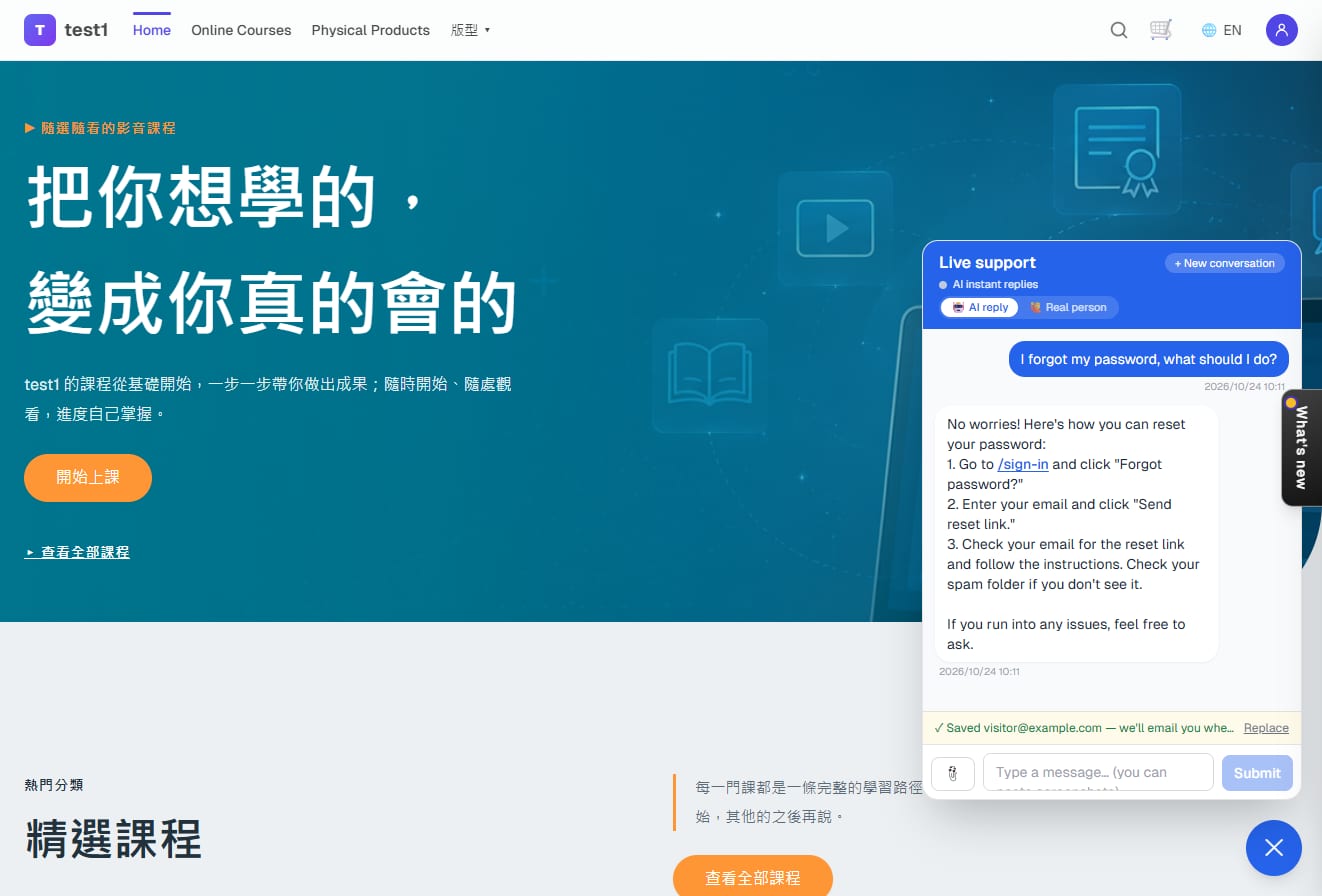
Once enabled, a chat widget appears in the bottom-right corner of your storefront. Visitors' questions are answered instantly by the AI using your site content, your knowledge base and a built-in student guide; when it can't answer, or the visitor asks for a person, the conversation lands in your support inbox and you're notified. Four steps to switch it on; after that your routine is just "reply to humans in the inbox" and "adopt the questions the AI couldn't answer into the knowledge base".
Turn on AI support, step by step
Step 1: Add your AI writing key
In the left menu click "Settings → AI writing key", paste the key from your AI provider (Anthropic or OpenAI) and save. Support and the blog share this key; usage is billed by the provider directly.
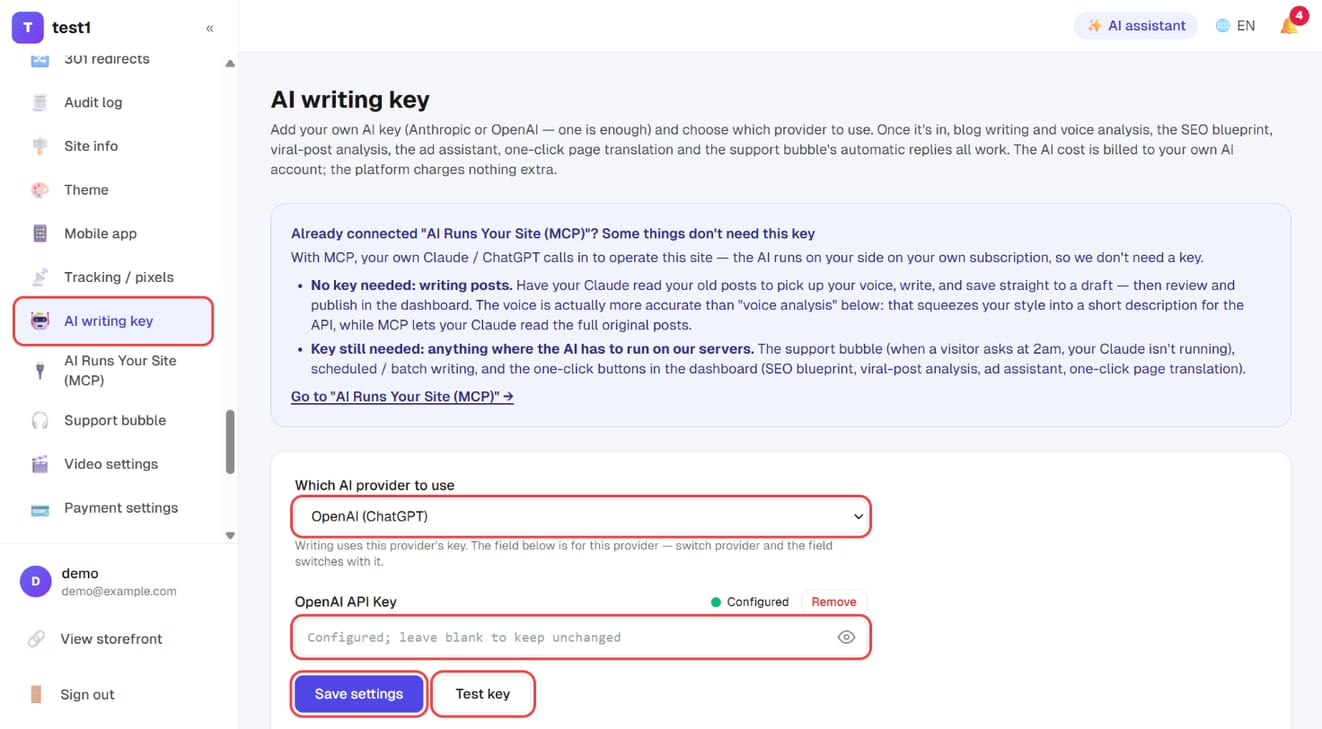
It works without a key too: the widget still appears, it just becomes a plain message form and everything lands in your inbox.
Step 2: Open the support bubble settings and check the status list
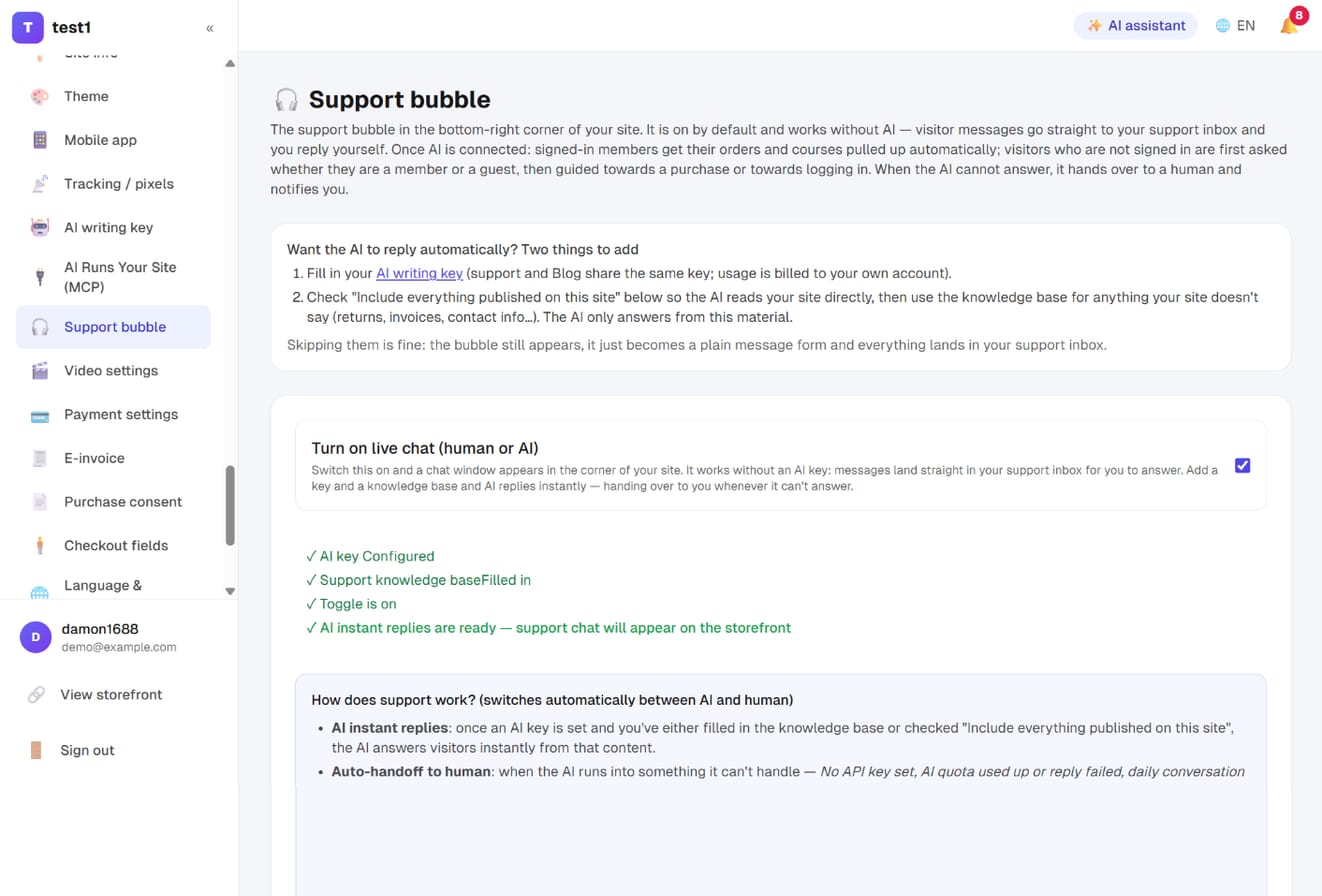
In the left menu click "Settings → Support bubble":
- "Turn on live chat (human or AI)" is on by default — the chat window shows up in the corner of your storefront straight away
- The status list below tells you what's still missing: the AI key, the knowledge base, the switch, and whether you're in "AI replies" or "human-only" mode
- Four ticks means visitors get instant AI answers
Step 3: Give the AI its material — site content, knowledge base, opening line
- Tick "Include everything published on this site": the AI reads what's already public (custom pages, course descriptions and FAQs, product descriptions, subscription plans, events, recent post summaries). Each message carries only a title-plus-summary overview; the full text is attached only for the pages the visitor asks about, so a big site never gets cut off
- Support knowledge base: add only what your site doesn't say — refund rules, how classes work, invoices, contact details. Where it conflicts with site content, the knowledge base wins
- Should support emails join your newsletter list: default "show the box, unticked" (explained below)
- Opening line and support tone / persona
- Click "Save settings" at the bottom
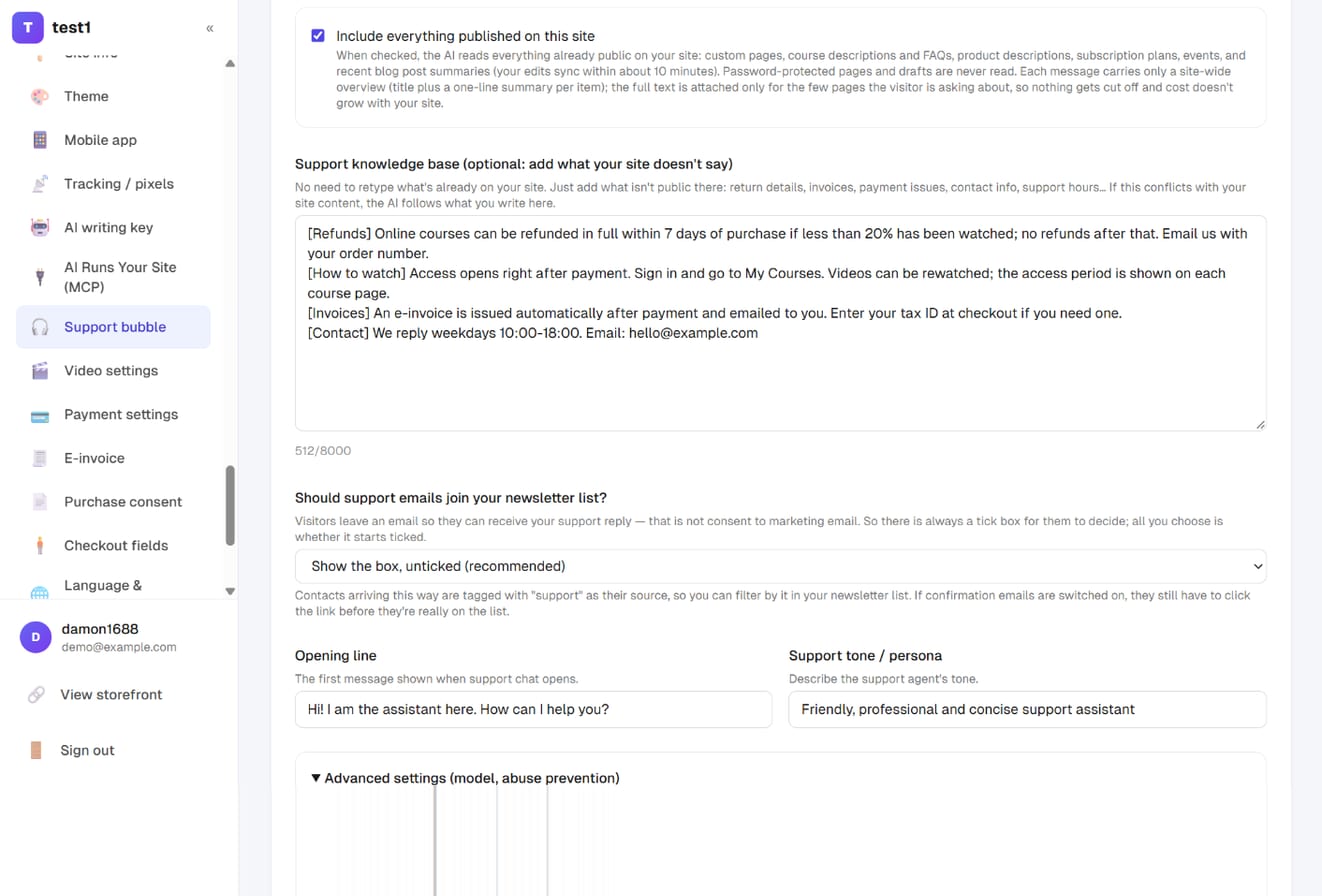
Write only what nobody else knows. Don't retype what's on your site, and don't write "how do I sign up / watch / redeem a code" either — those are built in (see step 9).
Step 4: Advanced settings — cost protection, models, hold window, retention
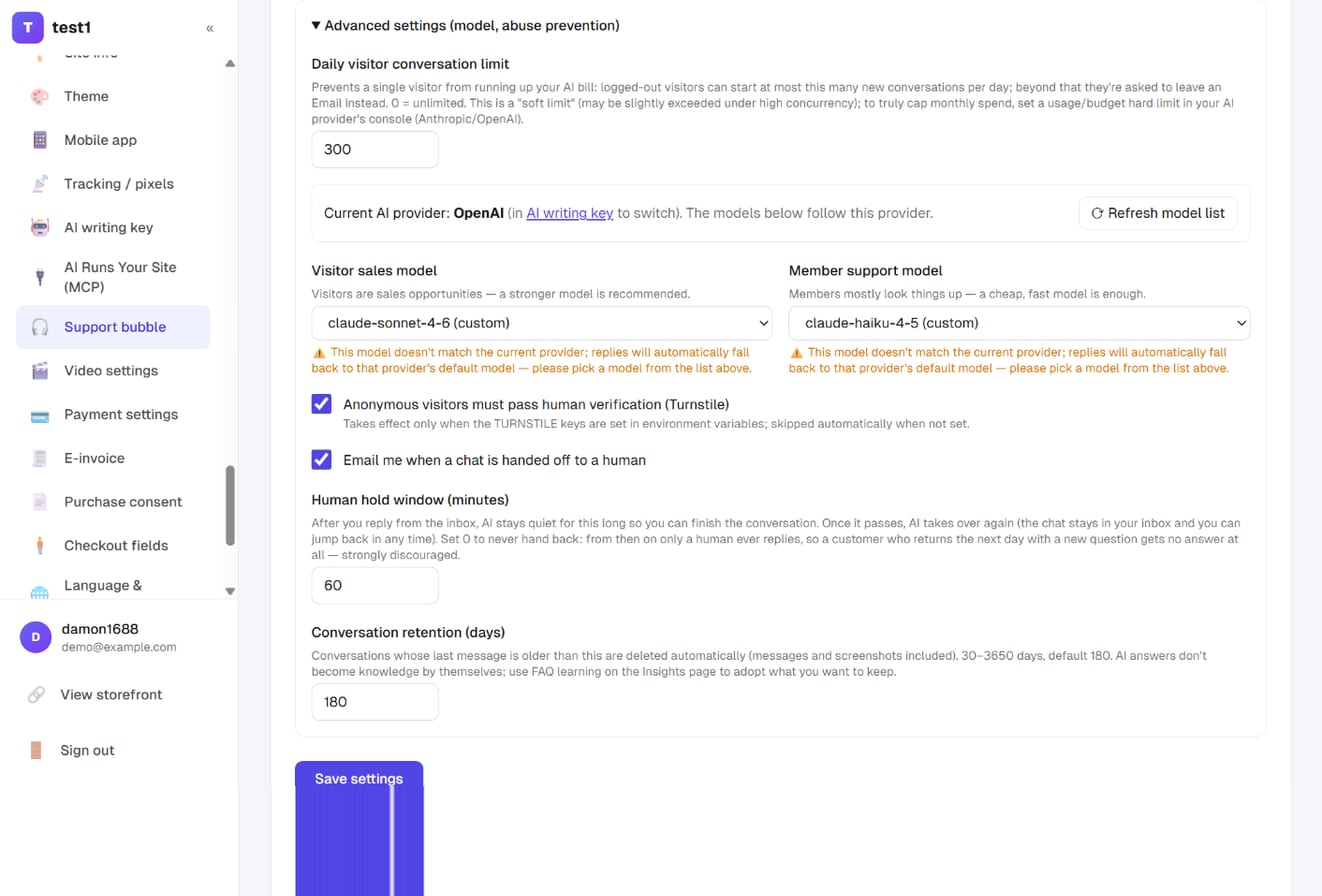
Expand "Advanced settings (model, abuse prevention)":
- Daily visitor conversation limit: how many new conversations a logged-out visitor may start per day (default 300); beyond that they're asked to leave an email instead, so nobody can run up your AI bill
- Visitor sales model / Member support model: visitors are sales opportunities, use a stronger model; members mostly look things up, a cheap fast one is enough. The list follows your current provider
- Anonymous visitors must pass human verification, Email me when a chat is handed off
- Human hold window (minutes): after you reply from the inbox the AI stays quiet for this long, then takes over again. Default 60; avoid 0 (that conversation would only ever get human replies)
- Conversation retention (days): conversations whose last message is older than this are deleted automatically, messages and screenshots included. Default 180, range 30–3650. AI answers don't turn into knowledge by themselves — keep what matters via step 13
What visitors see
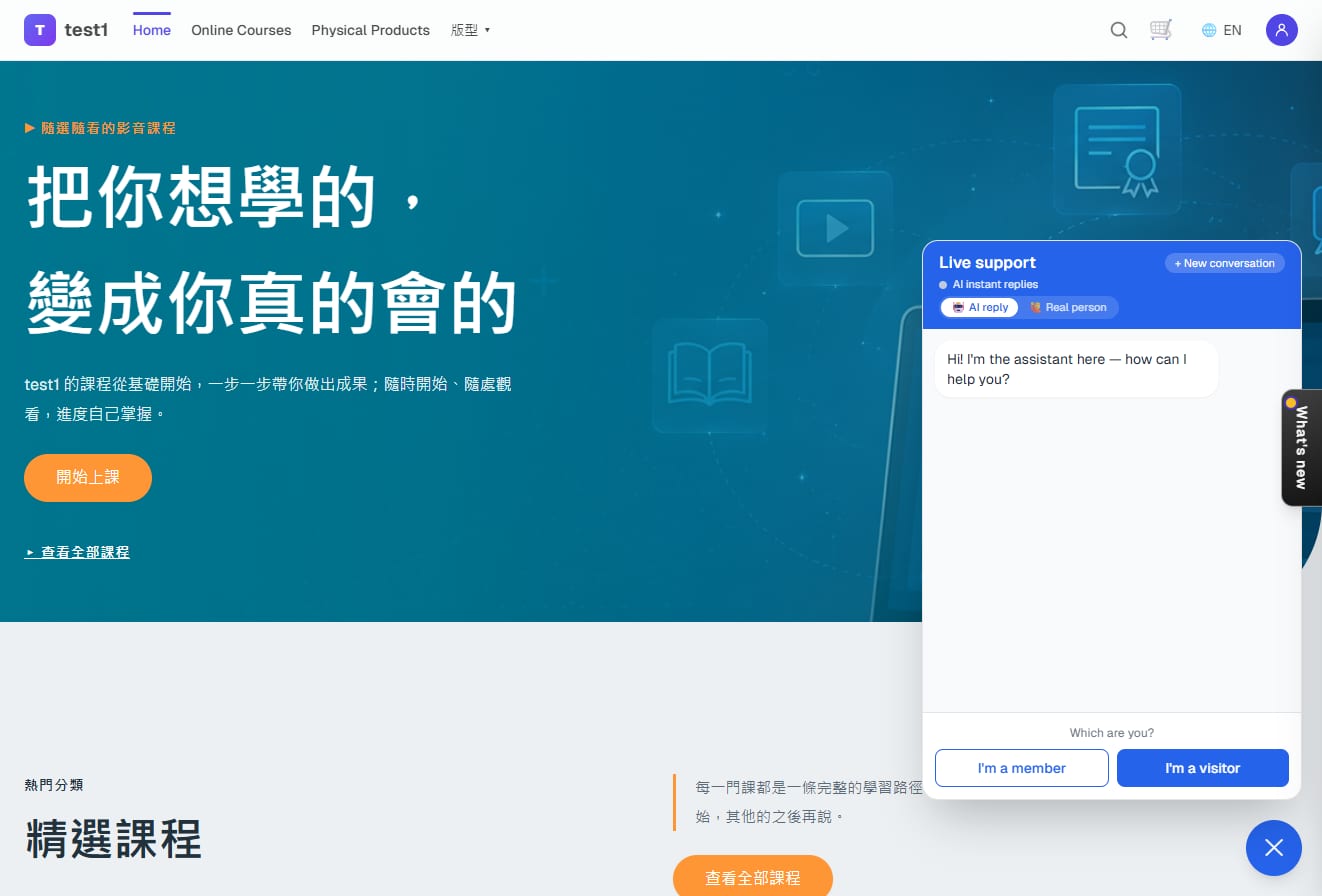
Step 5: "Which are you?" — member or visitor
Someone who isn't signed in first sees "Which are you?". "I'm a member" guides them to sign in (only then can the AI see their orders and courses); "I'm a visitor" goes down the sales path. The split is deliberate: the same question needs a different answer depending on whether they've bought.
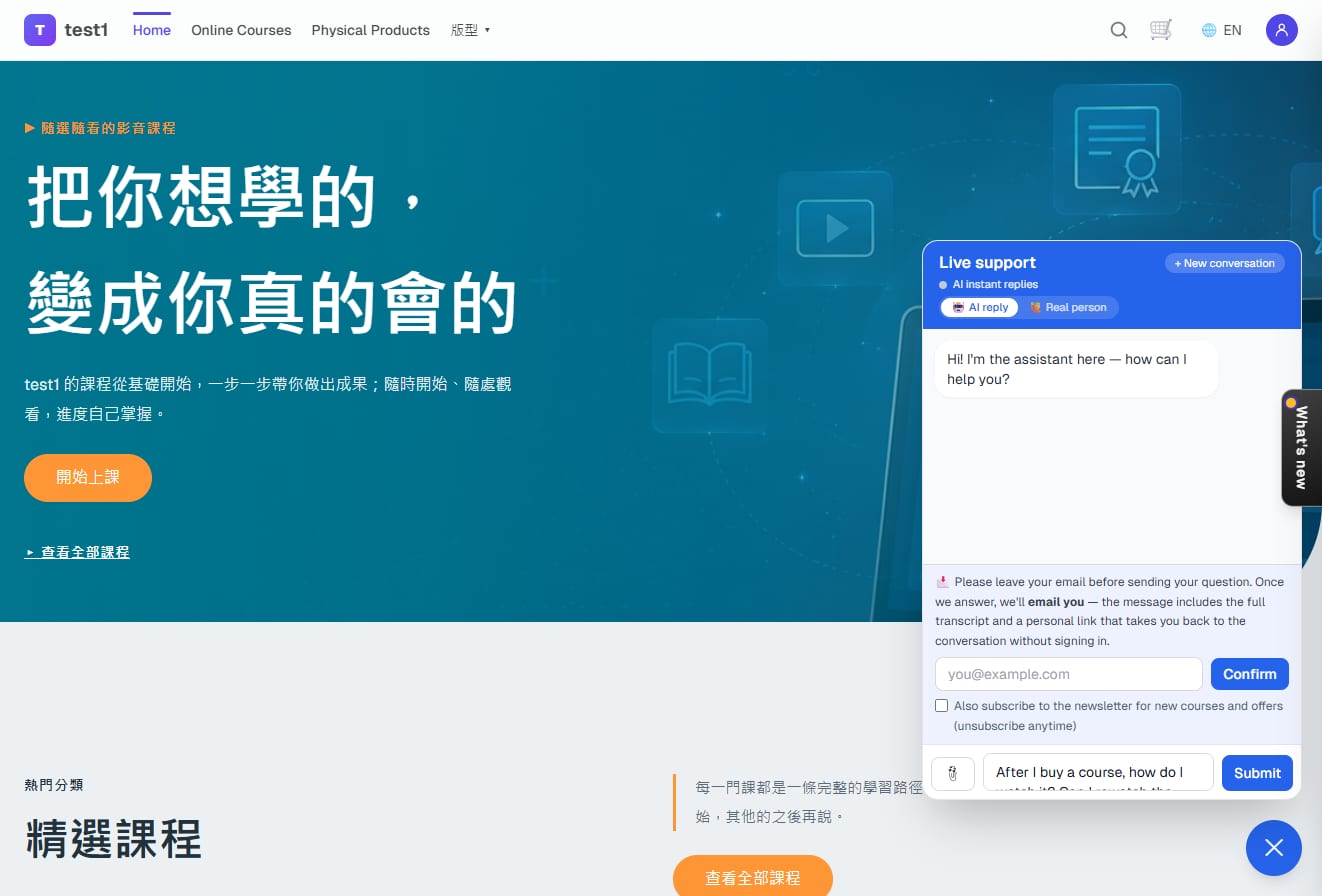
Step 6: Visitors leave an email before their first message
As soon as a visitor starts typing, the widget asks for an email. That's how a human reply reaches them later: when you answer from the inbox, they get an email with a link that reopens the conversation without signing in. The same device isn't asked again next time. The "also subscribe to the newsletter" box is the visitor's own choice; unticked means not on the list.
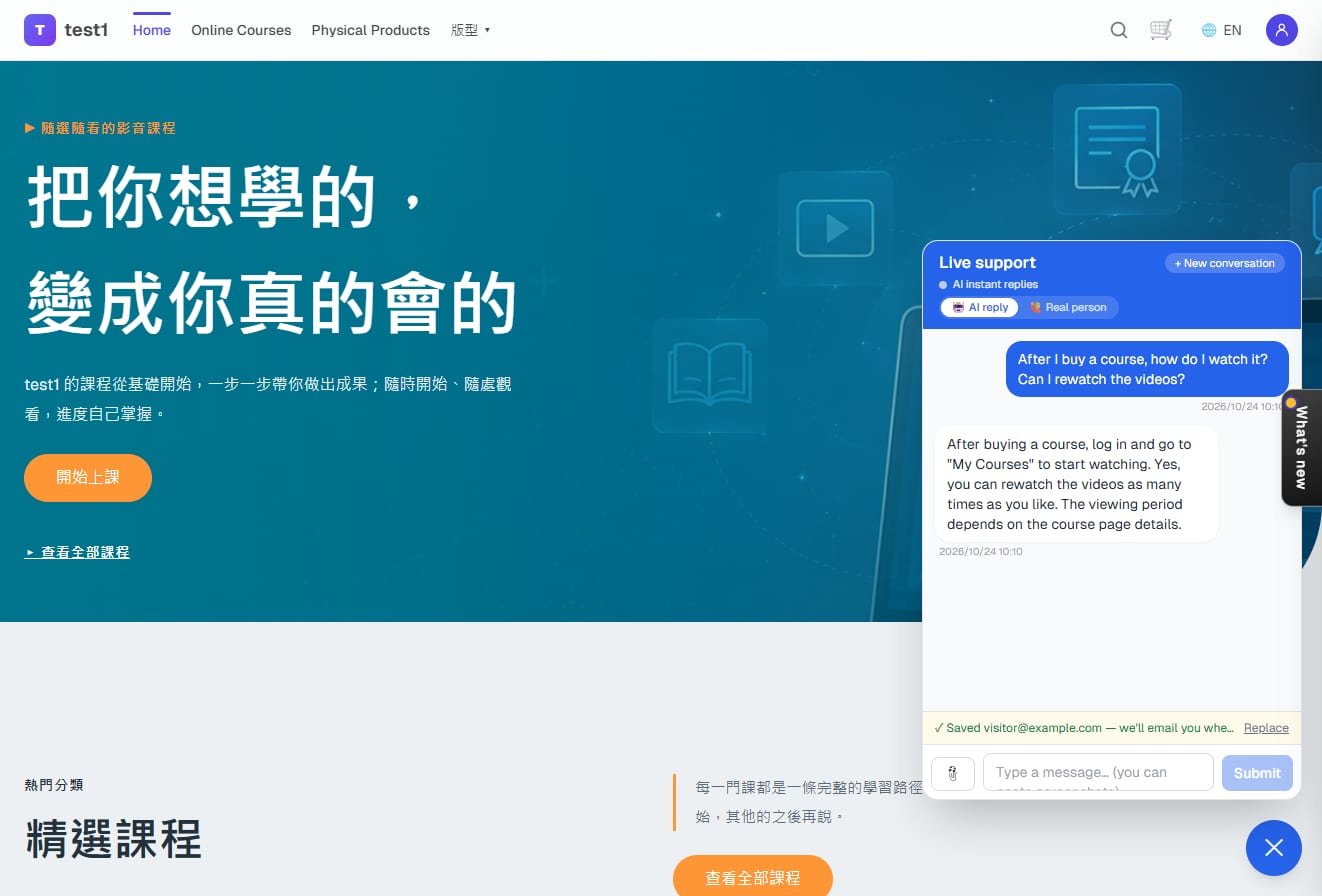
Step 7: Instant AI answers with clickable links
The AI answers from your site content and knowledge base. URLs, email addresses and site paths (such as /dashboard) in the reply are rendered as links the visitor can click.
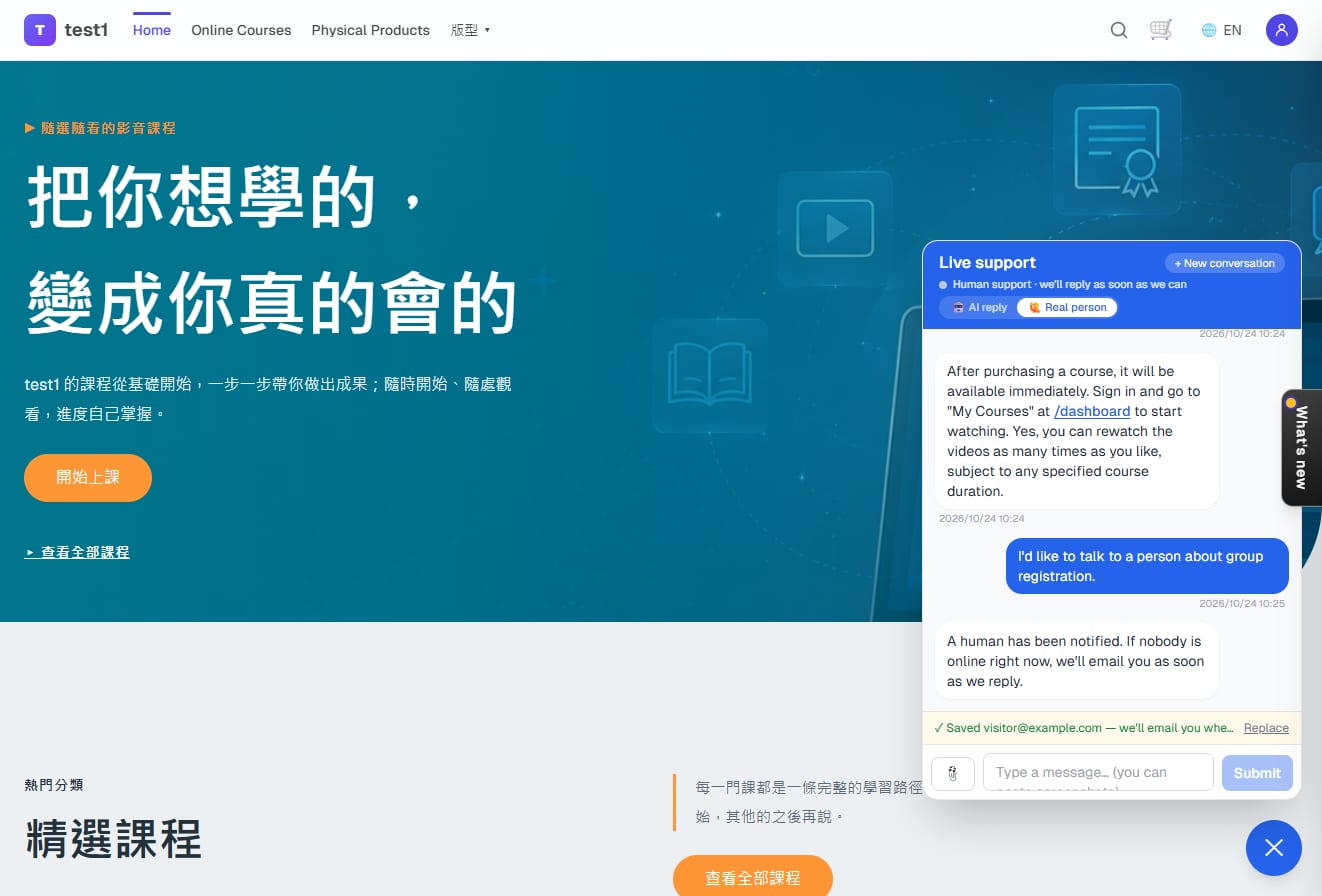
Step 8: Visitors can switch to a real person any time
The widget header has an "🤖 AI reply / 🙋 Real person" switch. In real-person mode, messages skip the AI and go straight to your inbox; the widget shows "A human has been notified". Saying "I want a human" in the chat, or hitting one of your handoff keywords (defaults include refund, complaint, real person), does the same.
Step 9: Student how-to questions are answered by the built-in guide
"I forgot my password", "how do I watch after buying", "how do I redeem a code", "how do I cancel my subscription", "how do I pick store pickup" — these work the same on every site, so the system ships a student guide (22 topics, filtered by the features you have on). Support walks the visitor through it step by step with site paths. Nothing for you to write or maintain; it updates with the product.
Taking over and learning
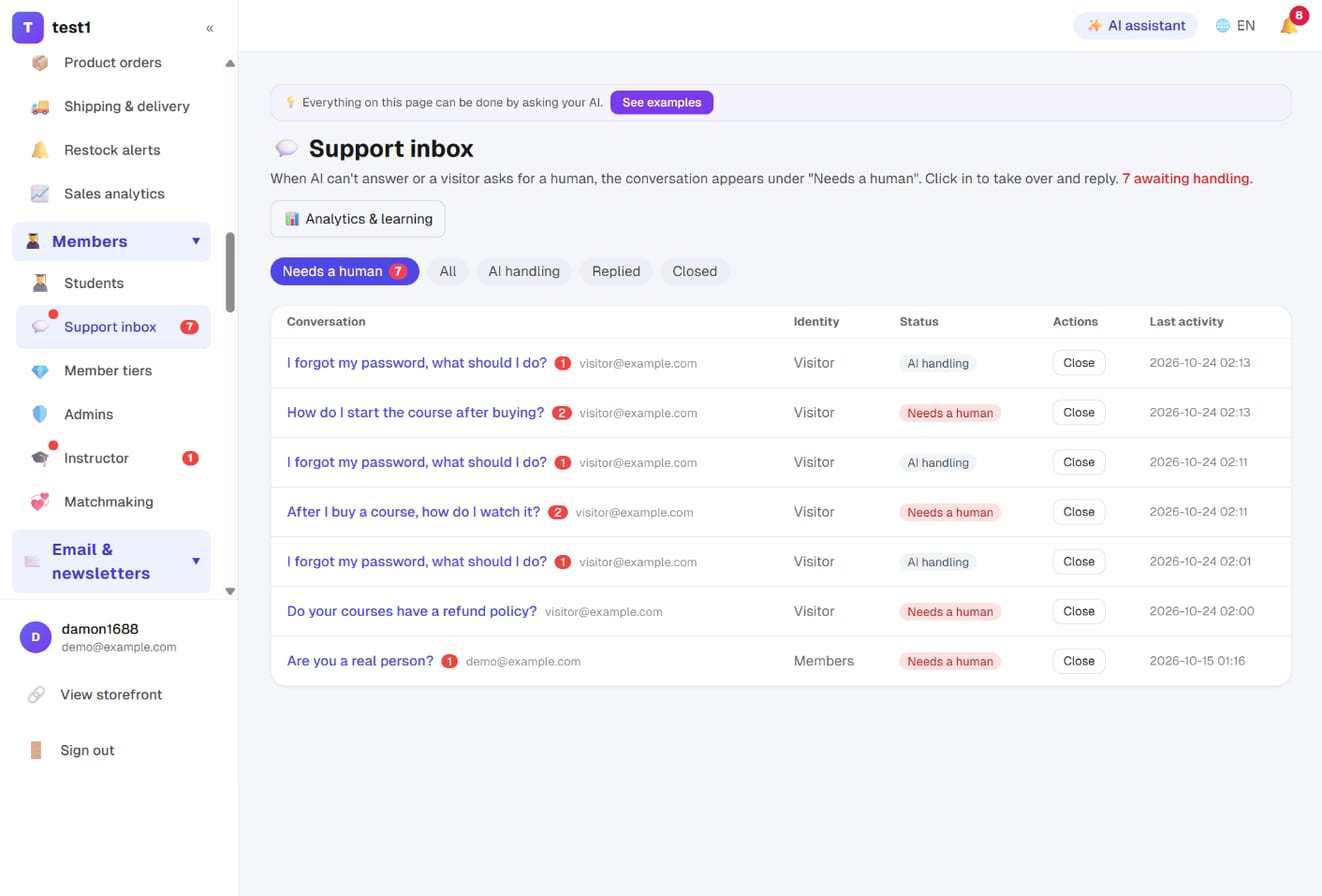
Step 10: See who's waiting in the support inbox
In the left menu click "Members → Support inbox". The "Needs a human" tab lists conversations the AI couldn't answer, where the visitor asked for a person, or that hit a keyword; the sidebar shows a red count and you get an email. Other tabs: All, AI handling, Replied, Closed.
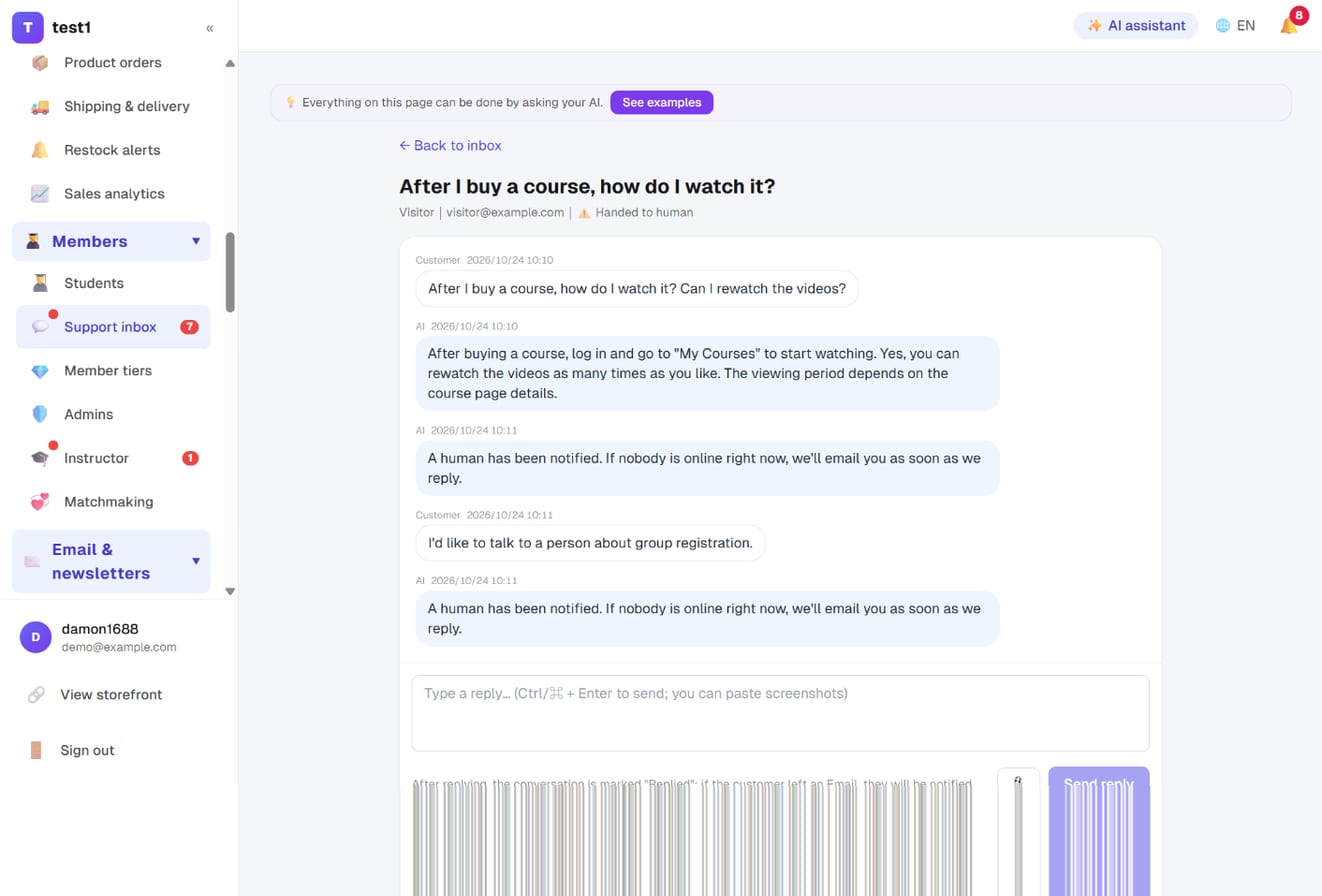
Step 11: Open the conversation and reply
Click the title to see the full exchange between the visitor and the AI. Type your reply below (screenshots can be pasted) and click "Send reply"; if they left an email they're notified. The conversation is marked "Replied"; click "Close" when done. During the human hold window the AI stays out.
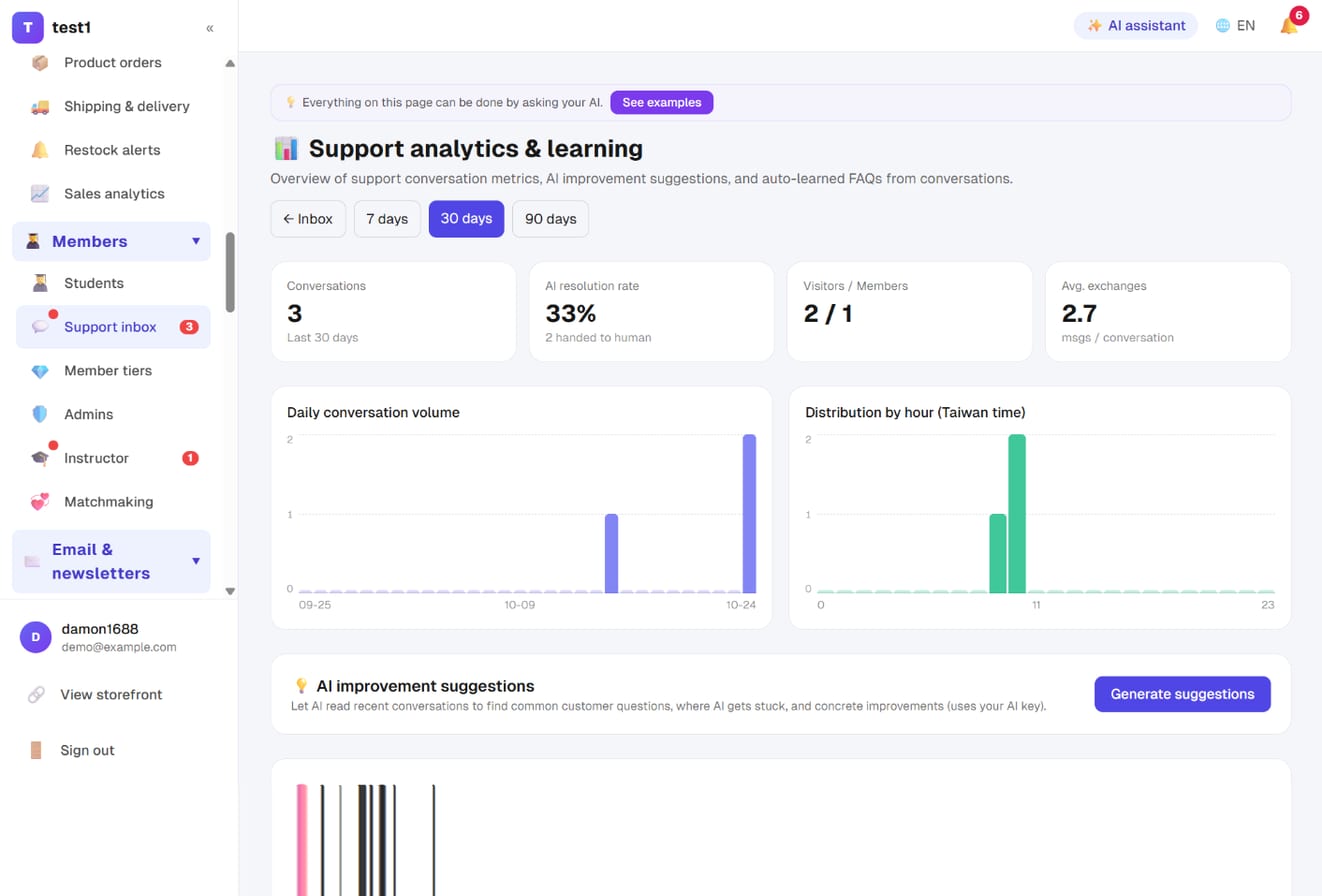
Step 12: Support analytics — resolution rate and hourly distribution
Top right of the inbox, "Analytics & learning": conversations, AI resolution rate (share not handed to a human), visitor/member split, daily volume, distribution by hour. "Generate suggestions" has the AI read recent conversations and point out what customers keep asking and where it gets stuck.
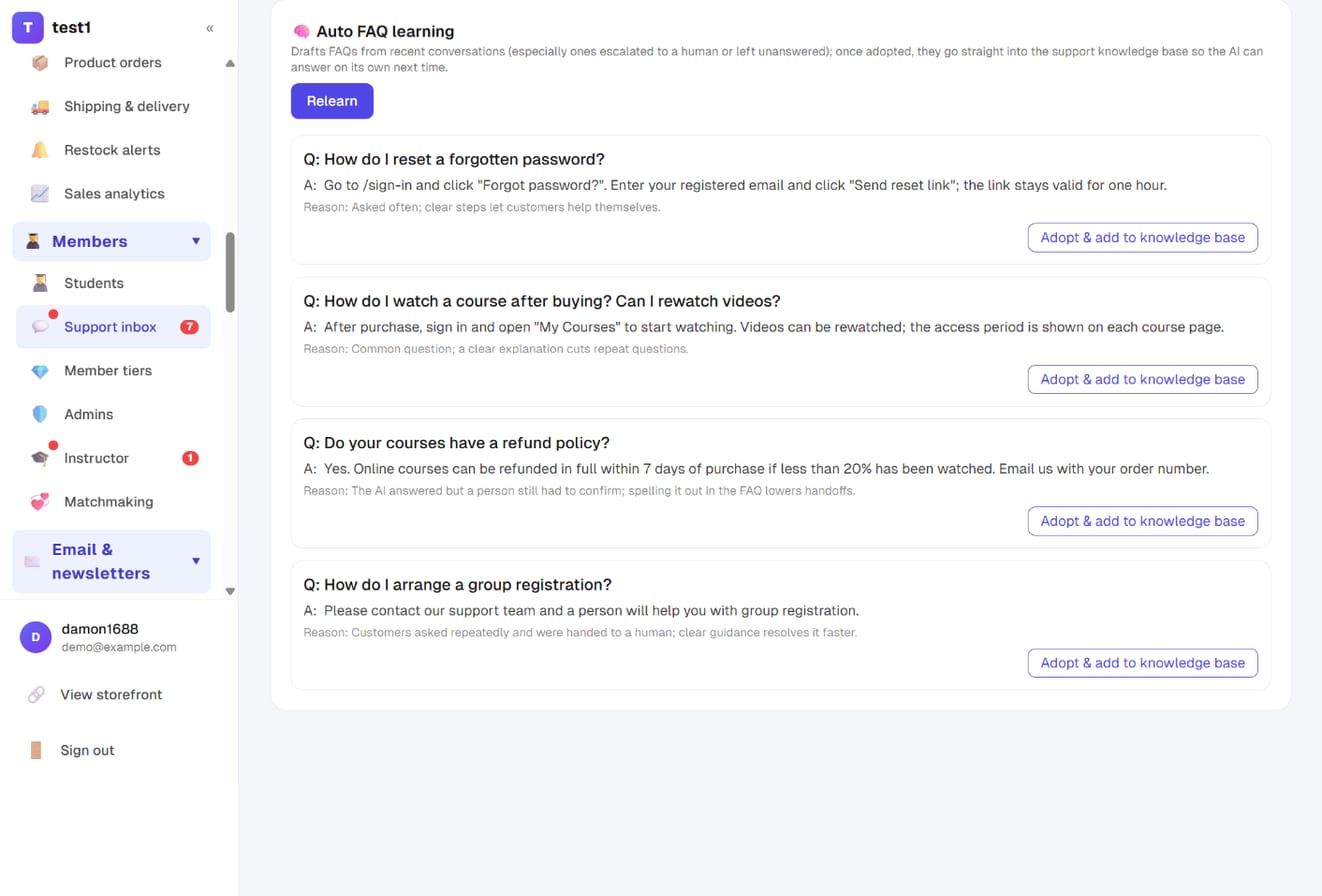
Step 13: Auto FAQ learning — turn unanswered questions into knowledge
Further down the same page, "Auto FAQ learning" → "Learn FAQs from conversations": the AI reads recent conversations (prioritising handoffs, unanswered and repeated questions) and drafts Q&As from the human replies, each with a reason. If a draft looks right, click "Adopt & add to knowledge base" and the AI answers it itself next time. This is the only way the AI "learns", and it deliberately needs your click — it never writes its own answers into the knowledge base.
What the AI answers from
For every message the system hands the AI four layers of material, in priority order:
- Support knowledge base — written by you, wins over everything
- Public site content — included when ticked, refreshed as soon as you edit
- Student guide — built in, shared by every site, filtered by your features
- Course and product catalog — published titles, prices and links, looked up live
Signed-in members additionally get their own orders and courses; the AI only ever sees that person's data. The AI itself has no memory: conversations don't affect each other and it doesn't learn on its own — use step 13 for anything worth keeping.
About "also subscribe to the newsletter"
Where visitors leave an email there's an "also subscribe" box. Only visitors who tick it join your list, tagged with source "support"; everyone else is stored only as the contact for that conversation and never gets marketing email. If confirmation emails are on, they still have to click the confirmation. Under "Settings → Support bubble" you choose whether the box starts ticked, or hide it.
Before switching to "ticked by default": your list grows faster, but so do unsubscribes and complaints, and the sending domain's reputation is shared. There is no "add them without showing the box" option — the server only accepts consent the visitor sent themselves.
FAQ
Will the AI make things up? It only answers from the four layers above. When the material doesn't cover it, it says so and hands off rather than inventing an answer. The fuller your knowledge base, the fewer handoffs.
How is it billed? Through your own AI key, settled with the provider; the platform adds nothing. Each message carries only an overview plus the relevant full text, so cost doesn't balloon as your site grows, and consecutive questions from the same visitor hit the provider's cache at about a tenth of the price.
Can I keep it human-only? Yes: leave the key empty, or let visitors switch to "Real person" in the widget.
A visitor wasn't asked for an email? Once left on a device it's remembered; the widget shows "Saved xxx" with a "Replace" link.
Can support see students' personal data? The AI can access only the signed-in member's own orders and courses, never other accounts. Conversations are stored per site, isolated, and purged after the retention period you set.