
Coupons
Create discount codes, limit what they apply to and how often, and control stacking with member pricing.
Marketing → Coupons. Customers enter the code at checkout to get the discount.
Create a coupon, step by step
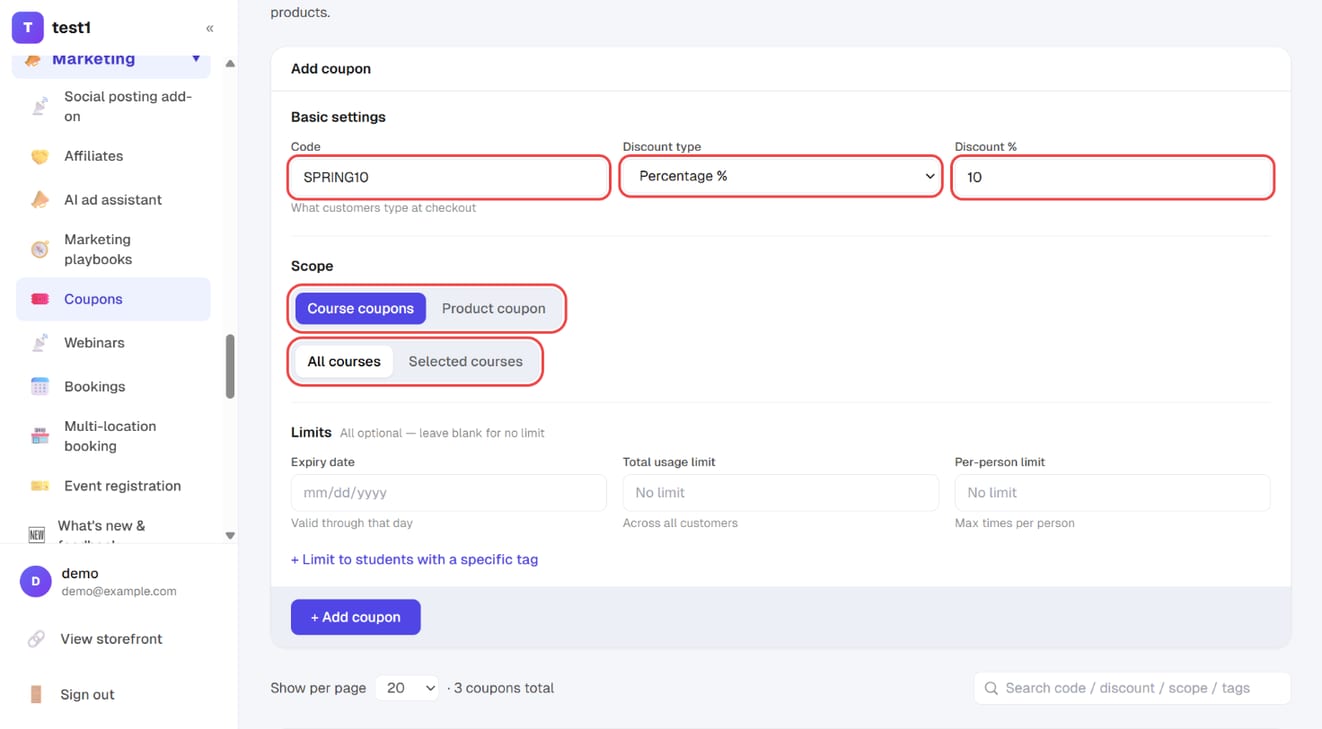
Step 1: Code, discount and scope
In the left menu, click "Marketing → Coupons". Under "Add coupon":
- Code: what customers type at checkout, e.g.
SPRING10 - Discount type: percentage or a fixed amount, then the value
- Scope: "Course coupons" or "Product coupon"; then all courses (or products) or only selected ones
Step 2: Limits, then add it
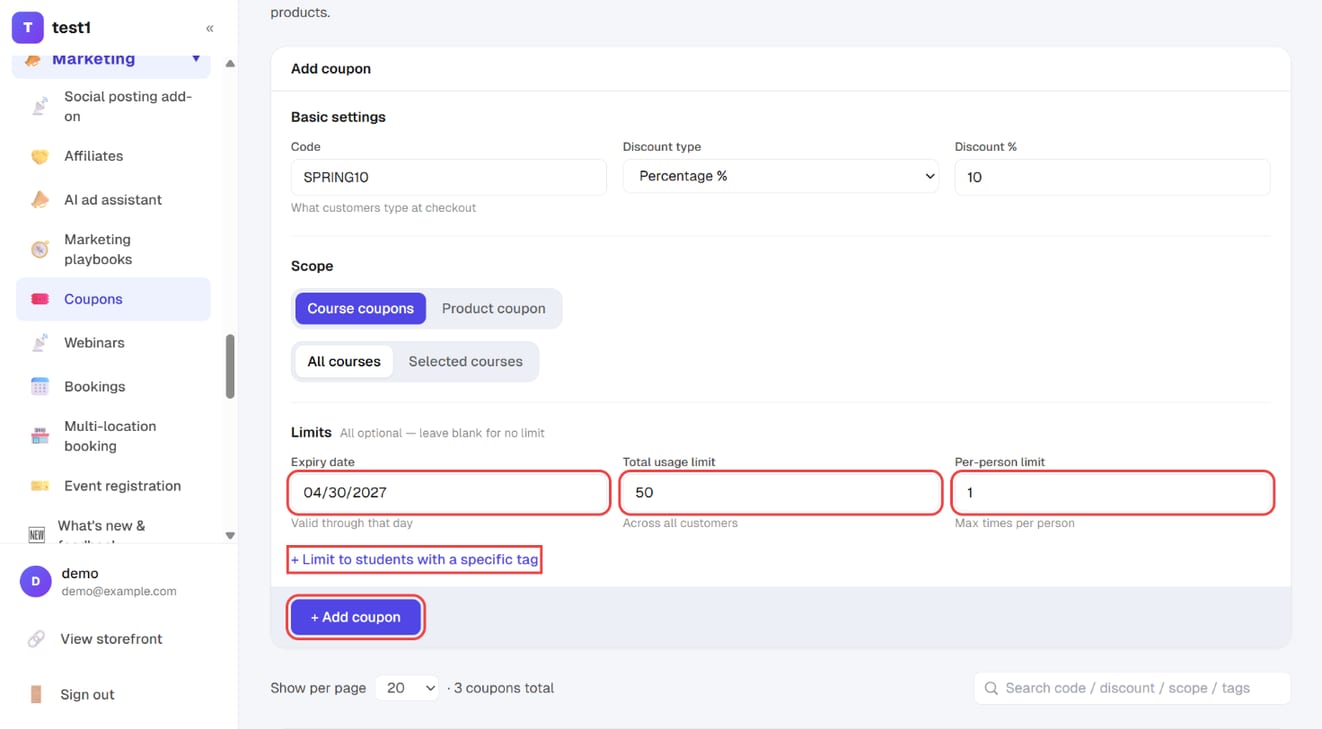
All limits are optional — leave a field blank for no limit:
- Expiry date (valid through that day), Total usage limit (across all customers), Per-person limit
- "+ Limit to students with a specific tag" restricts the code to people with that tag
Click "+ Add coupon".
Step 3: Track and manage it in the list
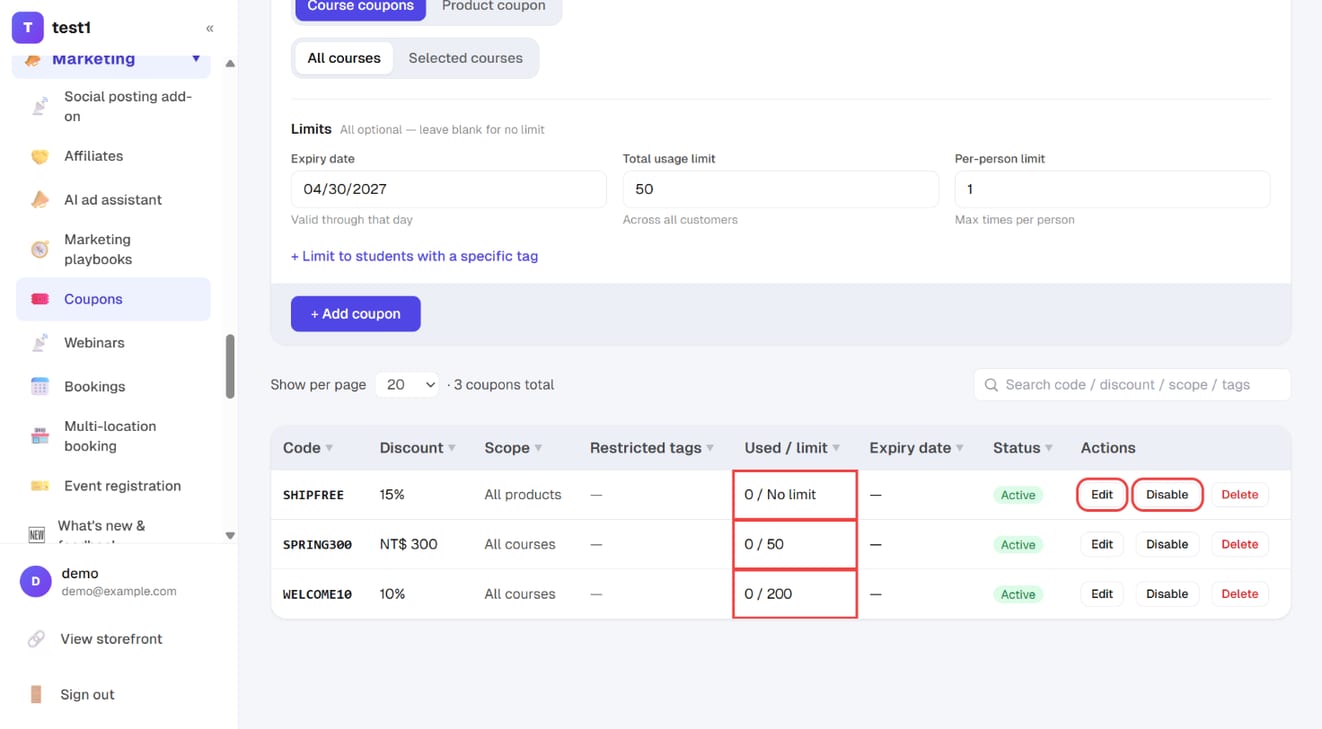
The list below shows each code with Used / limit; "Edit" changes it and "Disable" stops it working without deleting it.
Two kinds, and they don't mix
| Kind | Applies to |
|---|---|
| Course coupon | Course checkout |
| Product coupon | The cart checkout for physical products |
They're deliberately separate: the two checkout flows are different, and one code discounting both would make the totals impossible to reconcile.
Discount type
- Percentage: e.g.
10takes 10% off (enter 1–99) - Fixed amount: takes a set amount off
What it applies to
Course coupons can be limited to specific courses; leave it unset and the code works on everything.
Product coupons can be limited two ways:
- Specific products: only the ones you pick
- Product types: a whole category, so products you add to that category later are covered automatically
For seasonal promotions, limiting by product type saves a lot of work — you don't have to come back and edit the coupon every time you add a product.
Limits
| Setting | Notes |
|---|---|
| Maximum uses | Leave blank for unlimited; expires automatically once used up |
| Expiry date | Valid through to the end of that day |
| Required tag | Only contacts carrying that tag can use it |
| Active / inactive | Switch it off any time without deleting it |
The "required tag" is genuinely useful: to run a subscriber-only discount, issue a code tied to that tag — anyone else who gets hold of the code still can't use it.
Stacking with member pricing
If you use membership tiers with their own discounts, each coupon decides individually:
- Can stack: the member price is applied first, then the coupon on top
- Exclusive: at checkout the system automatically applies whichever is better for the customer
The default is exclusive. Think this through before a big promotion — stacking on top of a high membership tier can discount far more deeply than you intended.
FAQ
Can codes contain non-Latin characters?
Technically yes, but don't. Most people type these on a phone; uppercase letters and digits (SPRING10) are hardest to get wrong.
If I change the discount on a code that's already been used, do past orders change? No. Each order records the amount that was actually discounted at the time.
How do I see how many times a code was used? The usage count is on the list. To see who used it, check your orders.
A customer says the code is invalid. Check in order: (1) is it deactivated, (2) has it expired, (3) has it hit its usage limit, (4) are they using a course coupon on a product order or vice versa, (5) does it require a tag they don't have.