
Completion certificates
When a student finishes a course, the system issues a serial-numbered certificate that anyone can verify online — and your roster shows who has one and who doesn't.
Certificates (under "Teaching" in the dashboard sidebar). When a student completes an entire course, the system issues a serial-numbered certificate automatically and emails them about it. There is no "issue" button to press — and deliberately so.
This page is your roster: who already has one, and who is still a step away.
Set up certificates, step by step
Step 1: Switch it on for the course
In the left menu, click "Teaching → Course" and click "Edit" on the course. In the "Course info box" section, tick "Completion certificate available for download", then save.
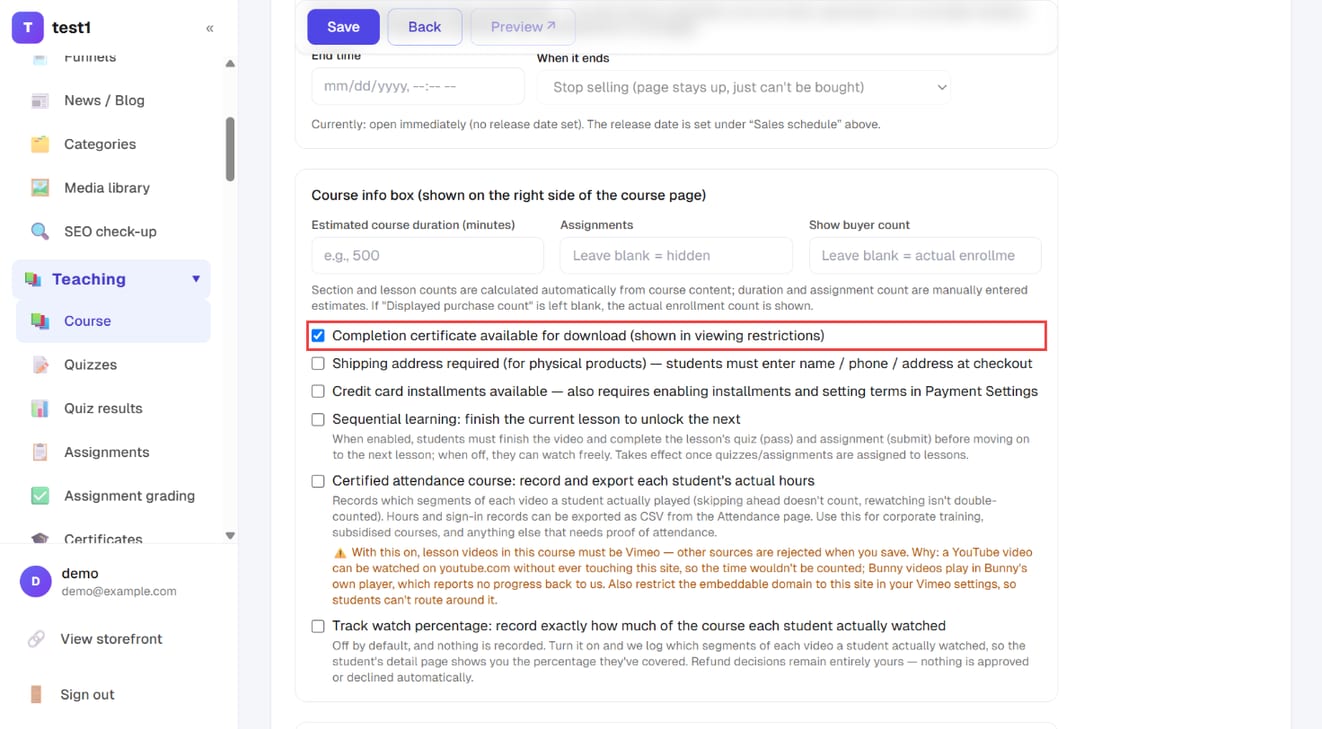
Courses without it never issue anything and never appear in the roster. You can turn it on at any time — students who already finished will see the button the next time they open the course.
Step 2: Check who has one in the roster
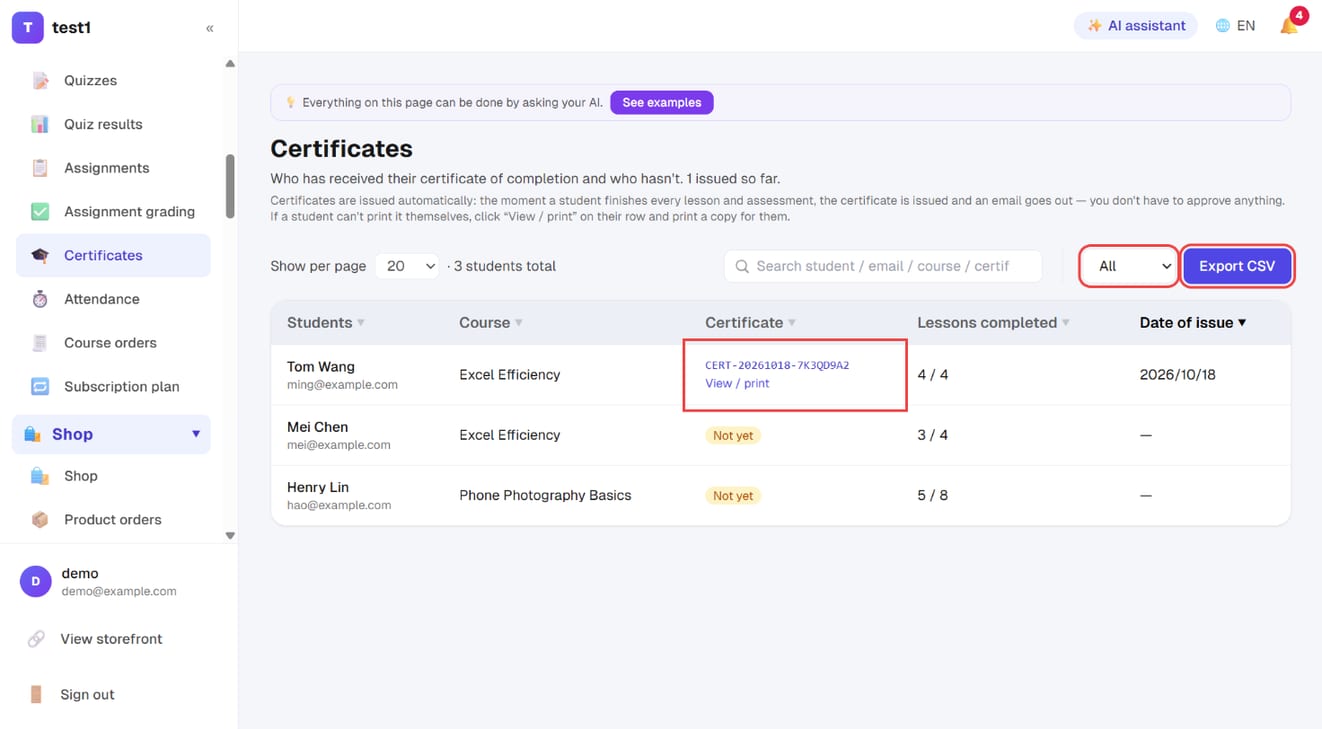
In the left menu, click "Teaching → Certificates". Use the filter (all / issued / not yet) and the search box; "Export CSV" downloads the list. An issued row shows the certificate number and "View / print".
Step 3: Anyone can verify a certificate on your site
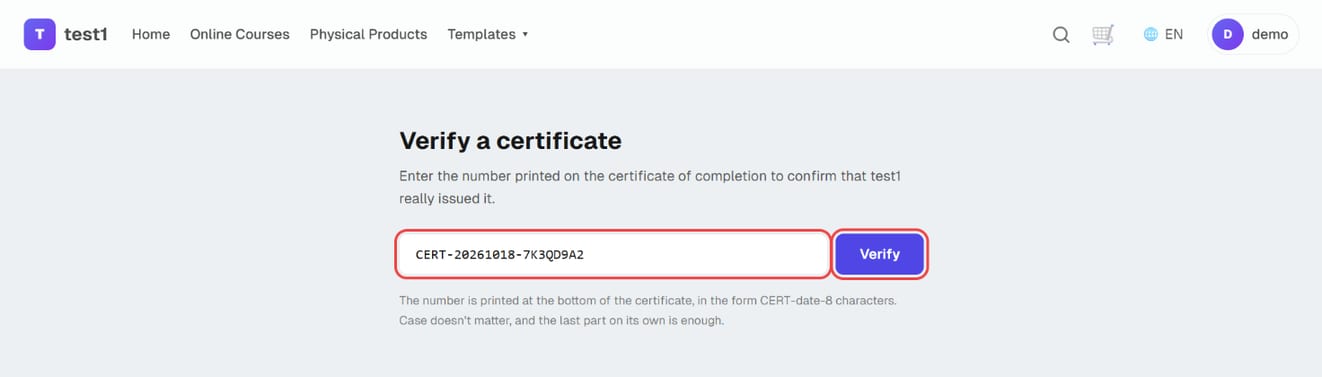
Your site has a public "Verify a certificate" page at /verify. An employer or school pastes the certificate number and clicks "Verify" to confirm your site really issued it.
What actually triggers an issue
| Item | Requirement |
|---|---|
| Lessons | Every published lesson marked complete (a course with no lessons issues nothing) |
| Quizzes | Every published quiz has at least one passing attempt |
| Assignments | Every published assignment is submitted and not returned for rework (still awaiting your grading counts) |
Drafts — unpublished lessons, quizzes and assignments — are excluded, so work in progress never blocks someone who has finished the course.
The moment of issue is when the student ticks the final "mark complete": the certificate is created and the completion email goes out right then. If the conditions weren't all met at that instant (say an assignment was returned and only later resubmitted), it is issued when the student next opens their certificate page, dated that day.
One course, one student, one certificate, forever. Rewatching lessons or retaking a quiz never produces a second one and never sends a second email.
Where students get it
- The course card in their account area and the course page: a "🎓 Completion certificate" button appears once every lesson is done
- The button inside the completion email
- Someone who isn't finished yet does not get an error page — they get a list of exactly which lessons, quizzes or assignments are still outstanding. That's deliberate; otherwise it just looks broken.
The completion email can be switched off under the student-facing tab of your notification settings, without affecting issuing itself. See Your notification emails.
What's printed is a snapshot of the moment it was issued
This is the single most important thing about the feature: once a credential is out in the world, it must not change.
| Field | Source |
|---|---|
| Student name | Frozen at issue |
| Course title | Frozen at issue |
| Issue date, serial number | Frozen at issue |
| Issuing organisation name, logo | Your current site title and logo |
So if a student later changes their name, or you rename the course, neither the issued certificate nor the verification page follows. Conversely, rebranding does change the issuer name and logo on a reprint of an old certificate.
⚠️ If a student finishes without having filled in their name, the certificate prints "(no name given)" — and filling it in afterwards will not fix that certificate. If certification is part of what you're selling, one line in your welcome email or course description asking people to complete their profile name first will save you most of the support requests this feature ever generates.
The issuer line uses your public site title — the brand your customers see — not whatever you named the site internally.
Public verification: third parties can check for themselves
Every certificate carries a serial number, a verification URL and a QR code. An employer holding the CV can confirm it without contacting you.
- Open yourdomain/verify/SERIAL — the URL printed on the certificate and encoded in the QR code
- Or open yourdomain/verify and paste the serial in
- No sign-in, no account required
- A match shows: student name, course title, issuing organisation, issue date, serial. Those five and nothing else — holding a serial number is not a right to know the person's email address or what else they studied
- Serials are case-insensitive, tolerate stray spaces and line breaks, and work even if only the second half (from the date onwards) was copied
- A certificate can only be verified on the site that issued it. That's the point: whoever issued it is the one standing behind it
- The verification page is excluded from search engines — it shows a real person's name and shouldn't be findable by searching for them
A miss doesn't return a 404. It says "no such certificate" and offers the box again, because by far the most common cause is a 0 typed as O or a 1 as I.
The roster: who has one, who doesn't
Each row is one student × one certificate-enabled course, and crucially, people who haven't earned one are listed too. The question you actually have is rarely "how many did we issue" — it's "who hasn't got one and what are they stuck on". The lesson progress beside each name is the answer.
- Filter by All / Issued / Not yet, and search by student, email, course or serial
- Export CSV (the whole filtered and searched set, not just the current page)
- Click the serial to see exactly what an employer sees
- Click View/print to open a copy identical to the student's, so you can print one for them
- Instructors only see the roster and copies for their own courses
⚠️ Printing for someone is not issuing for them. There is no way from the dashboard to produce a certificate for a student who hasn't completed the course. The value of the document is precisely that there's no back door.
⚠️ After a refund, when the enrolment is removed, an already-issued certificate remains and still verifies — it's already in the recipient's hands. There is currently no way to revoke one.
Printing notes
The PDF is produced by the browser's own print dialog, not generated on the server — which means the fonts are the ones on the reader's own machine.
- The layout is designed as one A4 page, landscape. Set orientation to landscape in the print dialog
- To keep a file, choose "Save as PDF" in the same dialog
- Leave scale at 100% ("fit to page" can push it onto a second sheet)
- To print the gold border, tick "Background graphics" in the print dialog
FAQ
I added new lessons — do existing certificates become invalid? No. Once issued, a certificate is settled and is never re-evaluated or withdrawn because the course grew. People who haven't earned one yet do have to complete the new lessons.
A student is at 100% but has no certificate. Almost always an assessment: a quiz not yet passed, or an assignment returned for rework. Have them click the certificate button — the page lists exactly what's outstanding.
Can I design my own layout or add my seal? The layout is fixed (a gold double border with your logo in the corner). What you control is your site title and logo, which are the issuer identity on the document.
Can I backdate one, or issue a replacement with an older date? No. The date is written at the moment of issue and nobody can change it. A credential you can edit isn't a credential.
A student changed their name — can I reprint with the new one? No, the name is a snapshot. Which is exactly why it's worth asking students to fill in their name before they finish.
Can one course issue two certificates to the same person? No — one per student per course, so the serial and the verification result always agree.