
Webinars
Run pre-recorded video as a live-feeling webinar, or broadcast live via YouTube Live: scheduling, chat, timed offers and replay.
There are two kinds of webinar here: automated (a pre-recorded video played as if live) and live (you actually broadcast via YouTube Live). Both share the same registration, reminders, chat, interaction cards and replay.
An automated webinar runs a pre-recorded video as if it were live: attendees register, arrive at their session time, and watch what feels like a broadcast. Under the hood it's the same video, positioned to the second based on each person's session start.
You record once and can run sessions every day — without actually sitting in front of a camera every week.
You can also run a live broadcast: same registration, chat and replay, with the video coming from a real YouTube Live stream. See the “Live broadcasts” section at the end of this page.
Setting up an automated webinar, step by step
Step 1: Open Webinars
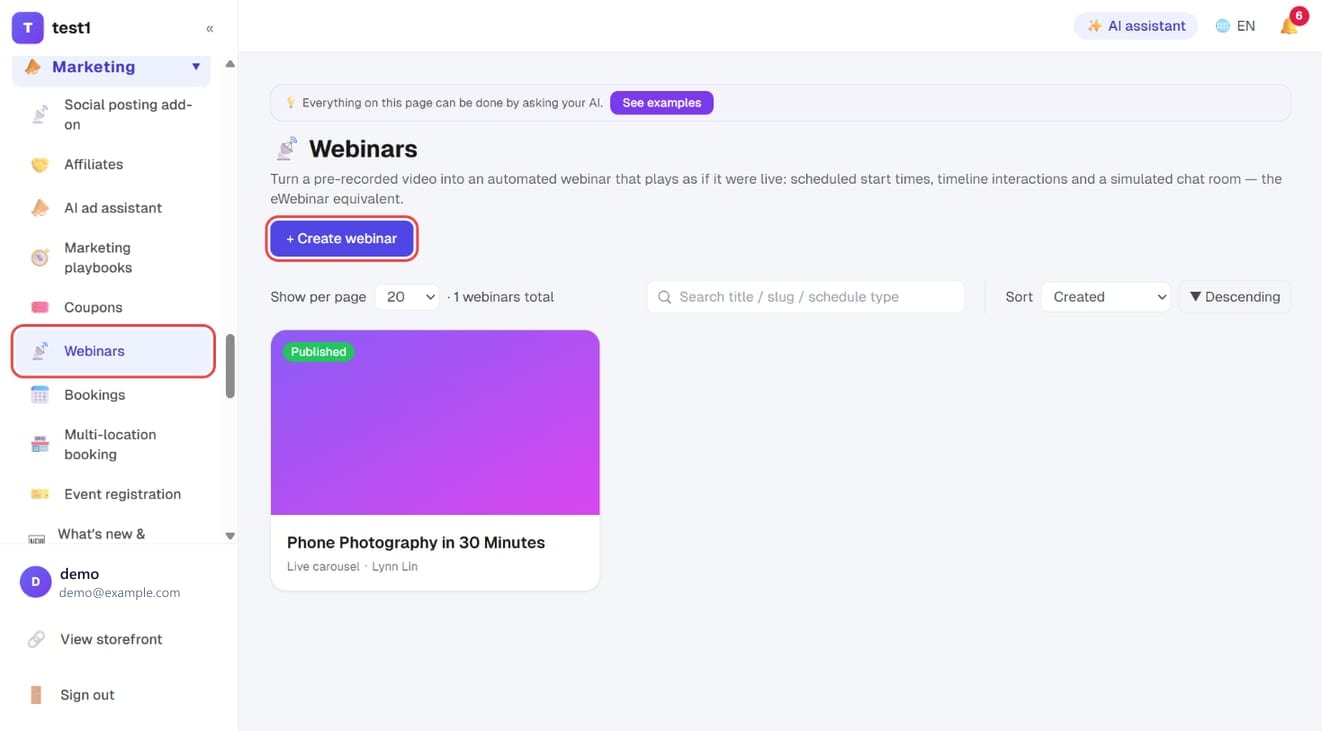
In the left menu choose Marketing → Webinars, then press + Create webinar in the top right.
Step 2: Give it a title
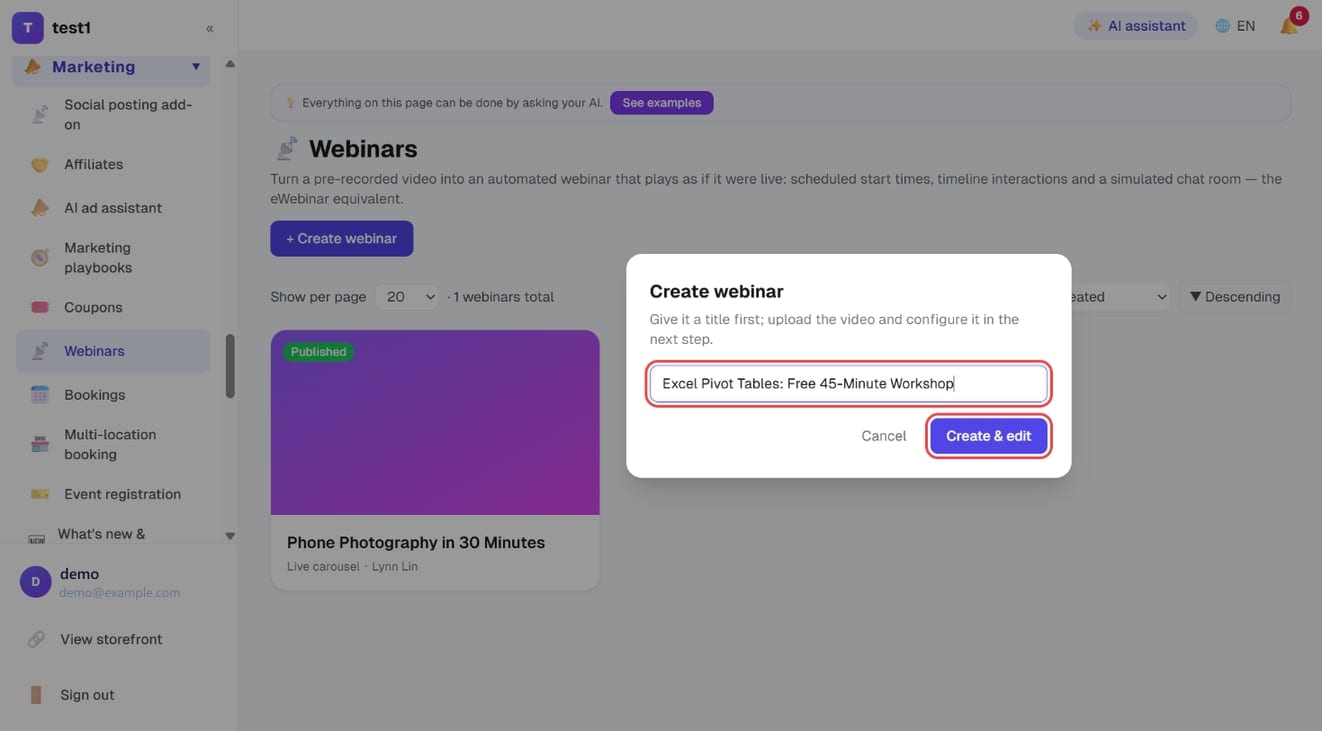
Type the webinar title and press Create & edit. The video and everything else come next, and you can change the title later.
Step 3: Fill in the basics
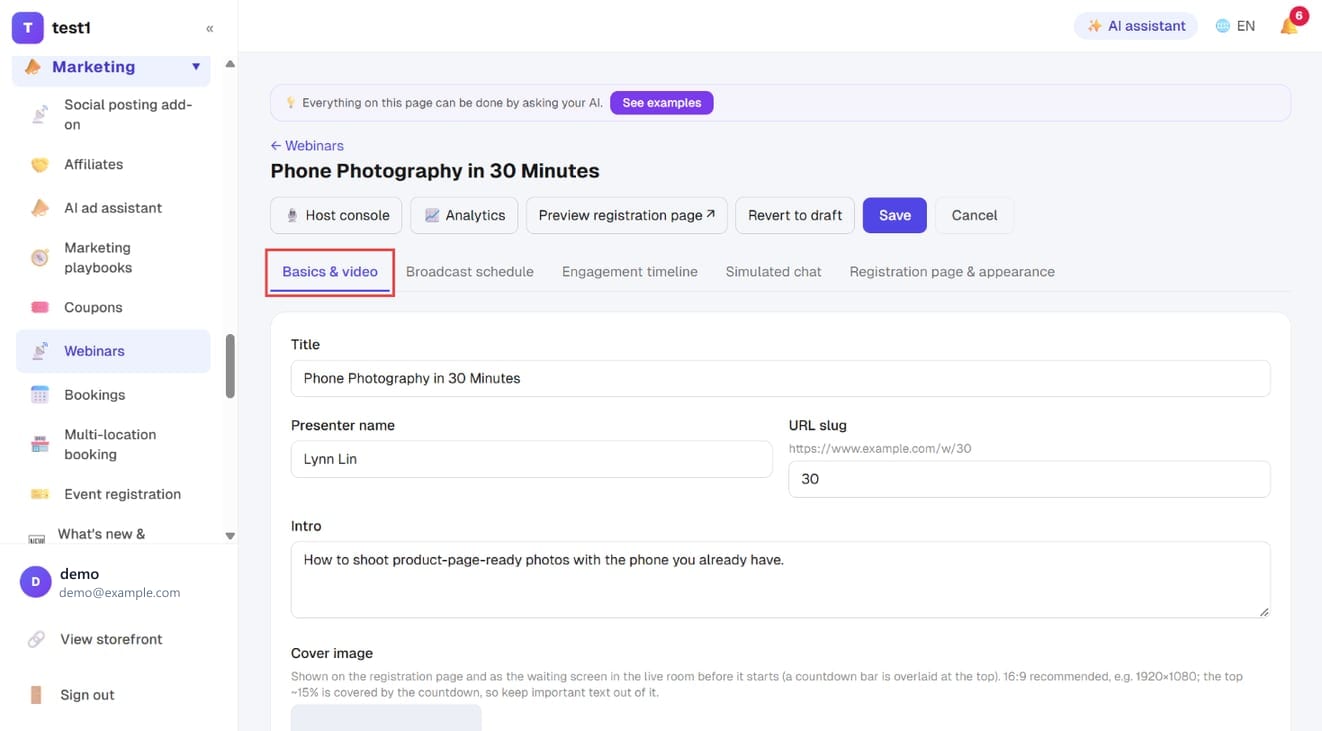
The editor opens on the Basics & video tab:
- Title, Presenter name, Intro: shown on the registration page
- URL slug: the last part of the registration page address. Enter
exceland the page isyour-domain/w/excel - Cover image: press Choose image to pick one from the media library. Use 16:9 (e.g. 1920×1080); the top ~15% is covered by the countdown, so keep important text out of it
Step 4: Pick the broadcast type and add the video
Scroll down and fill in three things:
- Broadcast type: choose Auto-webinars
- Pre-recorded video: paste a YouTube, Vimeo or Cloudflare Stream URL, or press Upload / select to upload to Bunny or pick an existing video
- Video length (minutes): the video's actual length
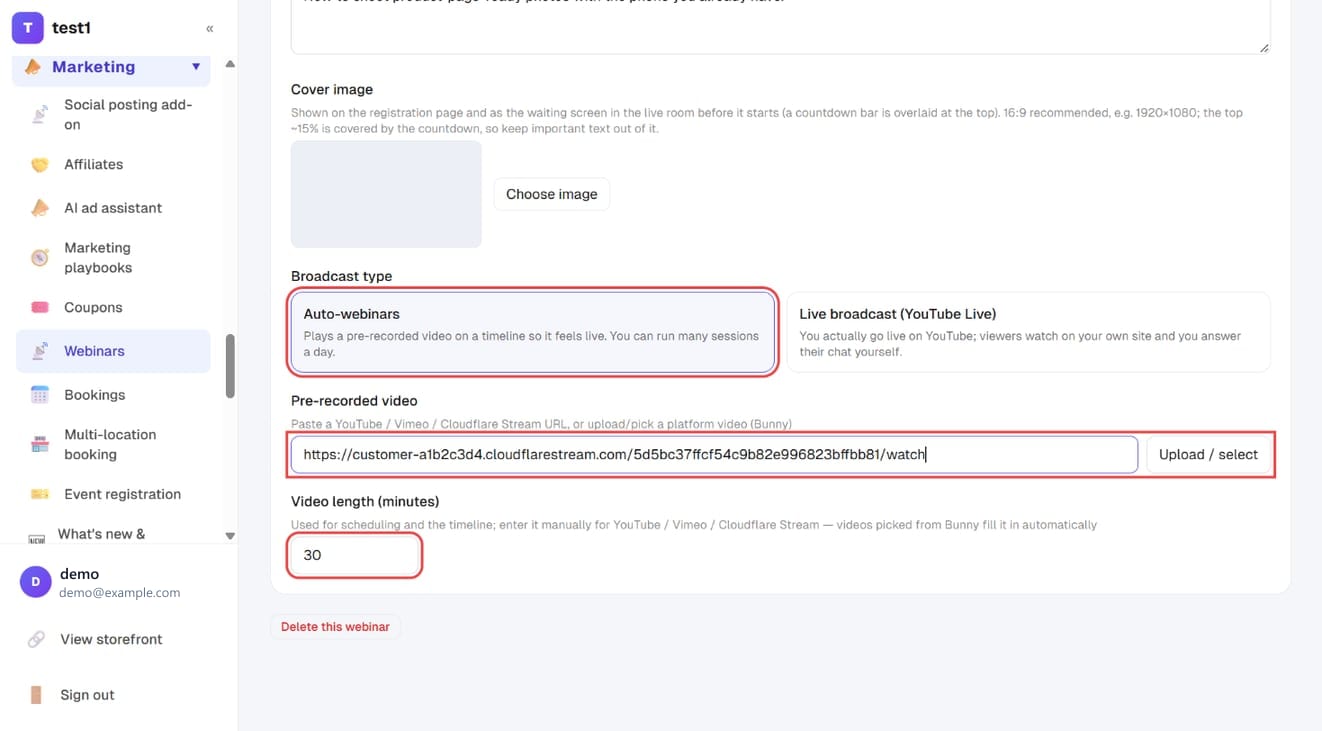
- You must enter the video length manually (videos picked from Bunny fill it in for you): it's the reference for the whole timeline. Get it wrong and every interaction card and chat message fires at the wrong moment
- Don't turn on signed URLs for a Cloudflare Stream video used here: signed videos won't play in the webinar room (signing is only for course lessons). In the Cloudflare dashboard, make sure “Require Signed URLs” is off for that video
People who arrive late are dropped in at the point the session has reached, and can't fast-forward during the broadcast — just like a real one.
Step 5: Set the broadcast schedule
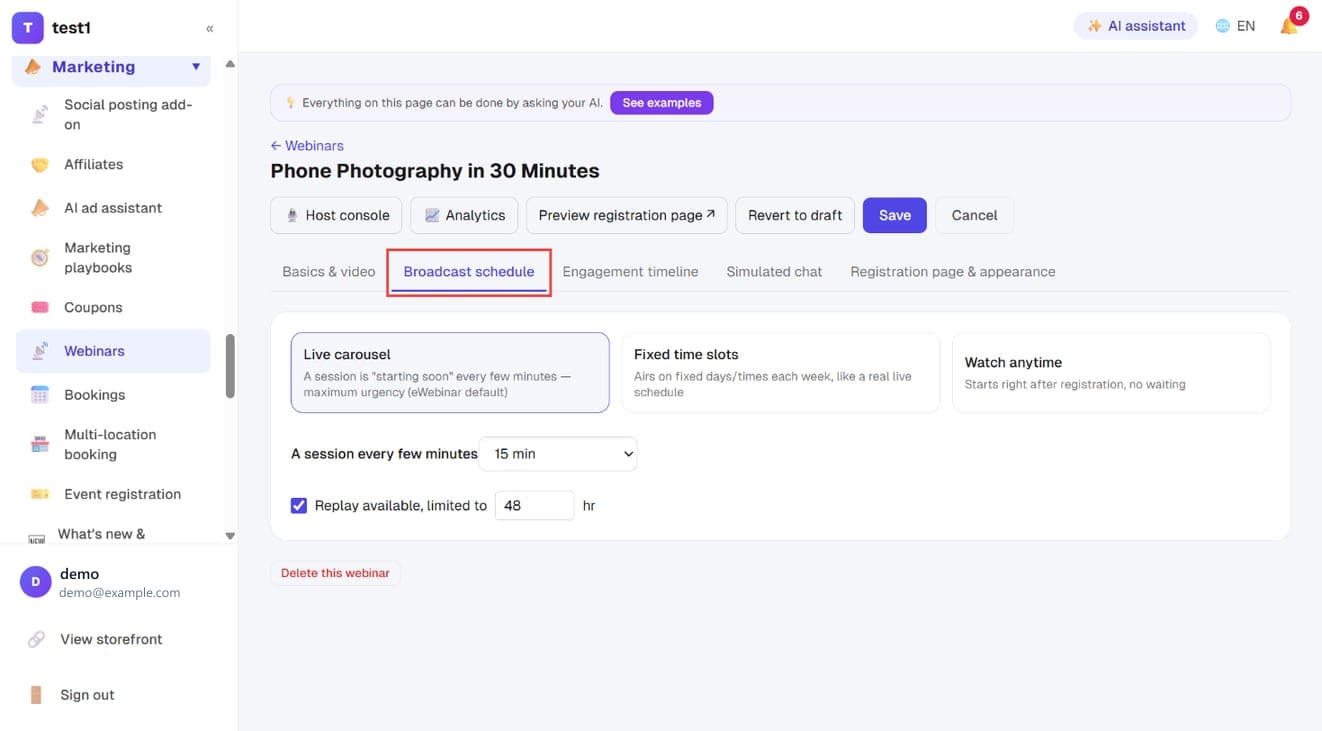
On the Broadcast schedule tab, pick one of three modes:
| Mode | Behaviour | Best for |
|---|---|---|
| Live carousel | A new session every N minutes (5/10/15/30/60) | Maximum urgency — register and it starts in minutes |
| Fixed time slots | Specific weekly or daily slots you choose | Making it feel like a real scheduled event |
| Watch anytime | Starts seconds after registering | Lowest friction, but no anticipation from waiting |
With Live carousel, also choose A session every few minutes.
Tick Replay available, limited to N hr to offer a replay. The window is counted from the end of that person's own session; after that the replay link stops working.
Step 6: Add timeline interactions (optional)
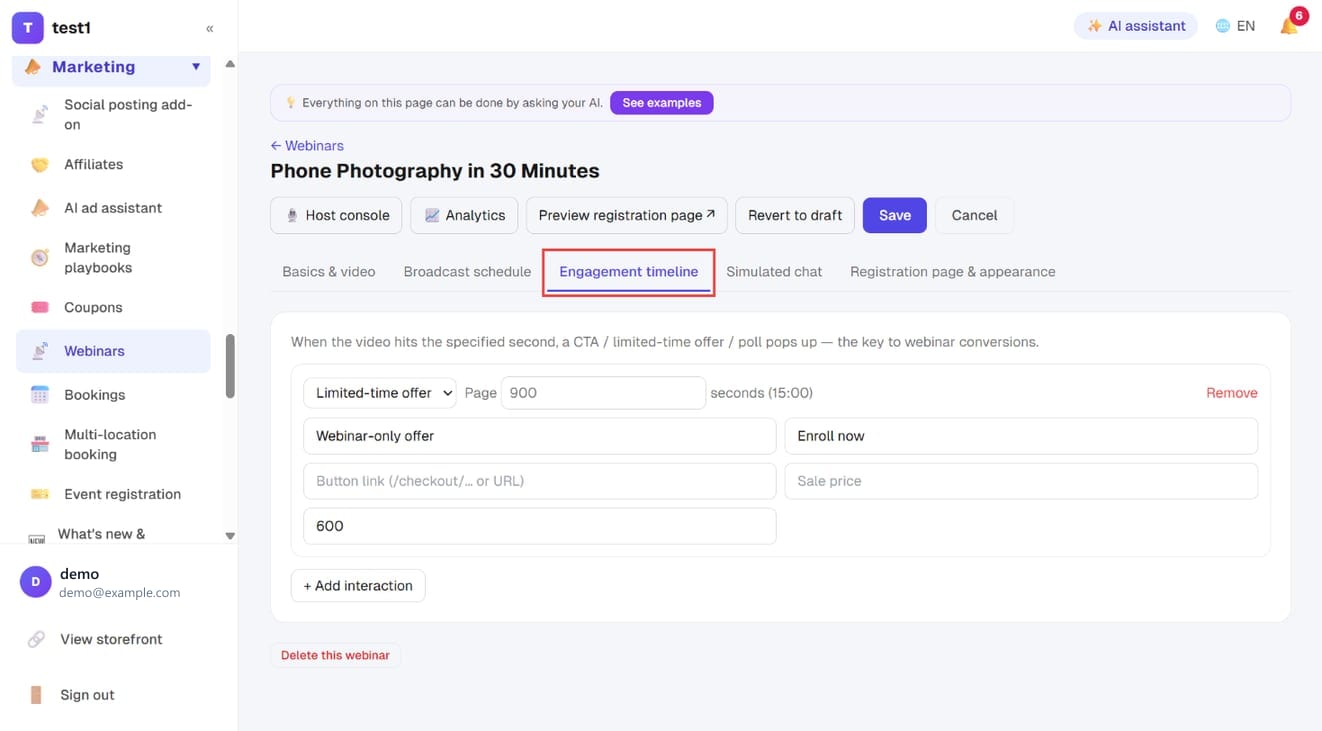
The Engagement timeline tab pops things up when the video reaches a chosen second:
- CTA button
- Limited-time offer (with an optional countdown)
- Poll
- Text prompt
- Handout download
The seconds field is the moment it appears — 900 means the 15-minute mark. Each card has its own display duration and disappears automatically. Press + Add interaction for the next one.
Step 7: Script the chat (optional)
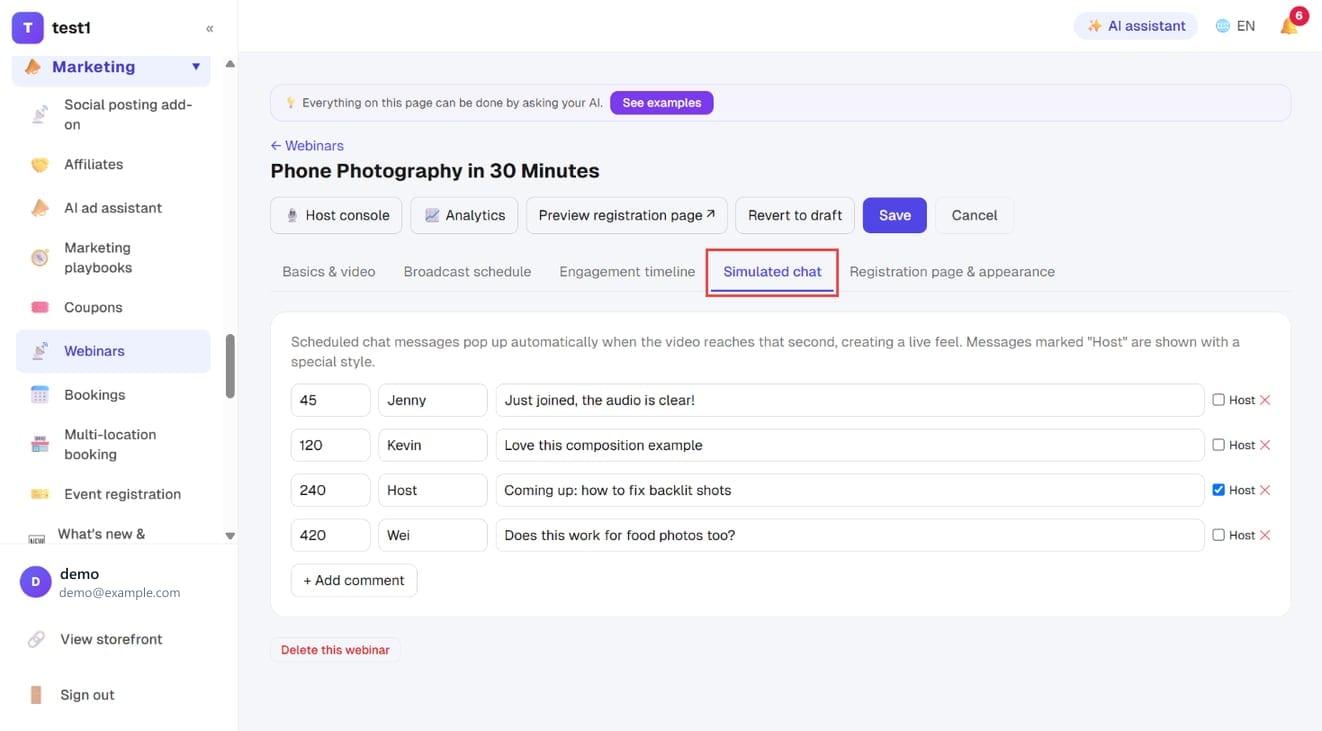
The Simulated chat tab lets you schedule messages in advance. Each row is, left to right: at what second, from whom, saying what. Tick Host on the right and the message is shown in the host style (with a gold crown).
When playback reaches that second the message appears in the chat, mixed into the same timeline as real attendees' messages. Press + Add comment for the next one.
Step 8: Registration page, appearance and reminders
On the Registration page & appearance tab:
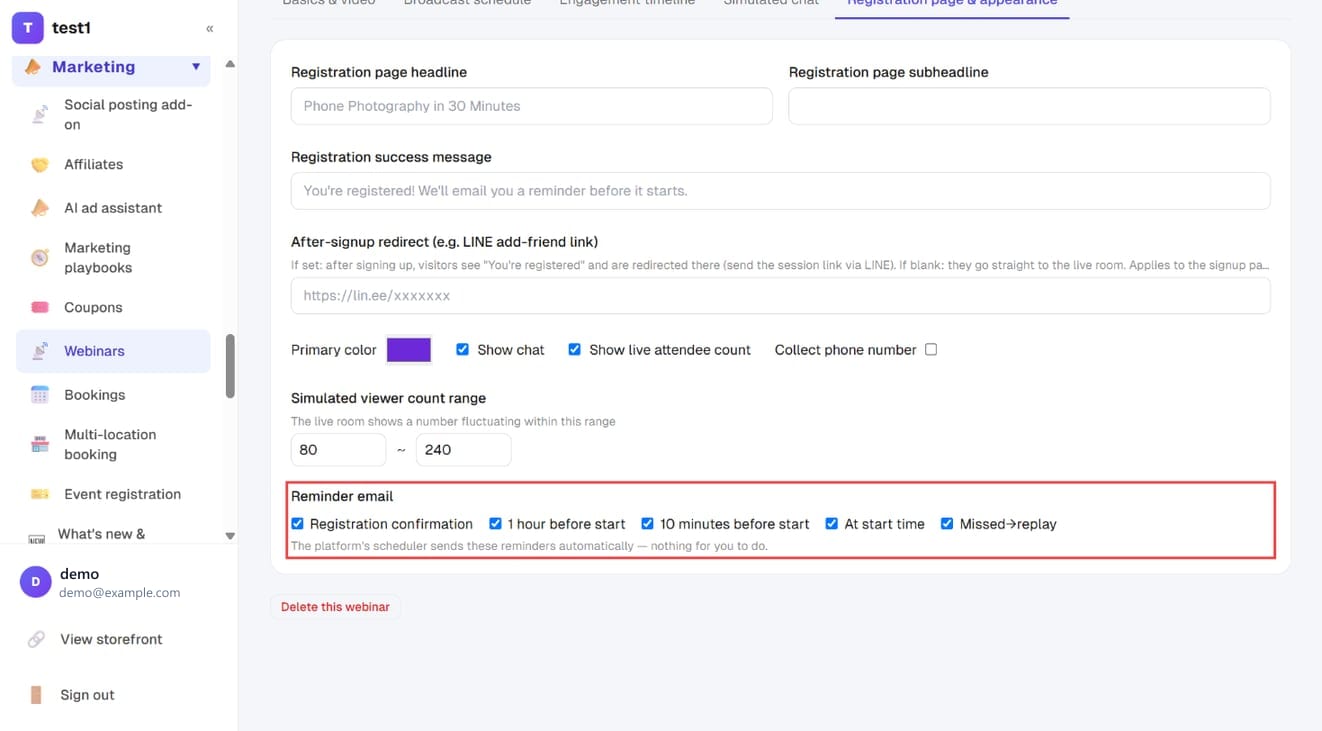
- Headline, subheadline and success message: leave blank to use the webinar title and the default text
- After-signup redirect: paste a LINE add-friend link and people are sent there after registering; leave blank and they go straight to the webinar room
- Show a “check in on LINE” completion page after signup and Registration confirmation email: opt-in extras, covered in the next step
- Primary color, Show chat, Show live attendee count, Collect phone number
- Simulated viewer count range: the on-screen number drifts naturally within it
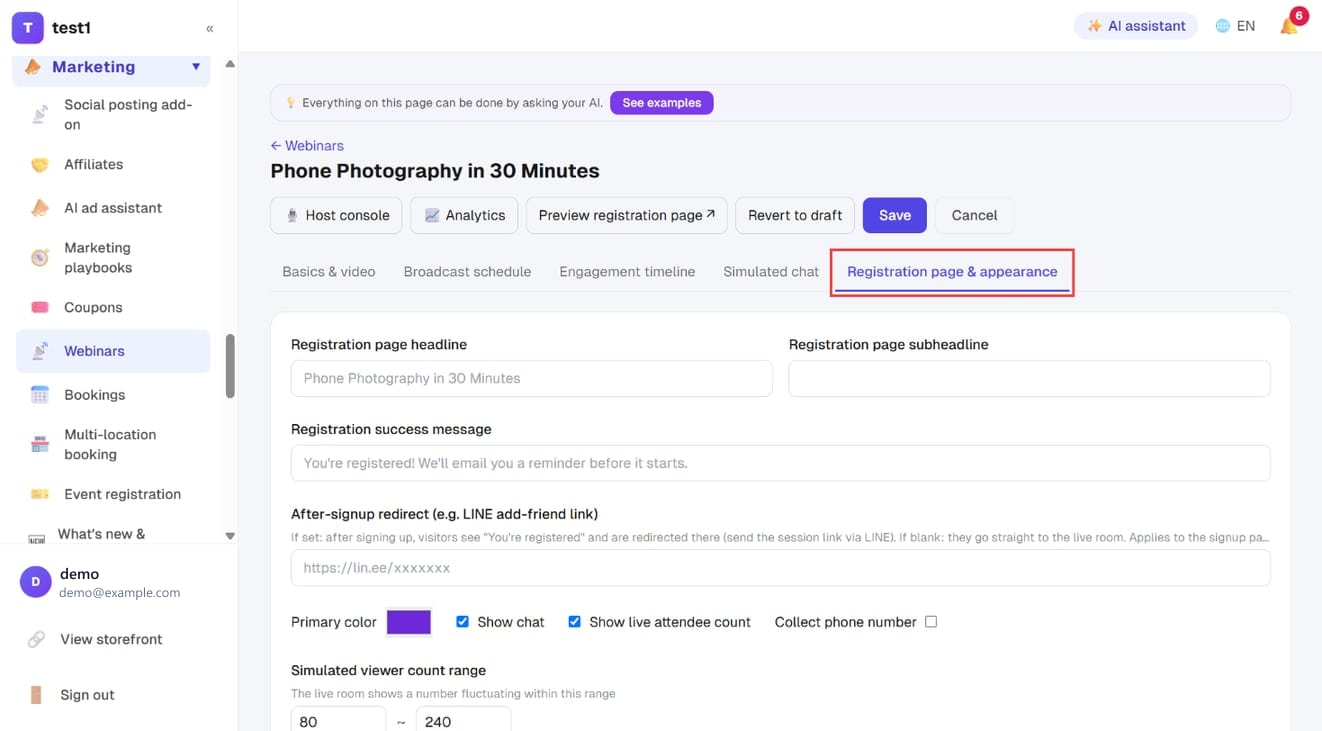
At the bottom are the reminder emails; each of the five can be switched on or off: Registration confirmation, 1 hour before, 10 minutes before, at start time, and Missed→replay (with the replay link). The platform sends them automatically — nothing for you to do.
Step 9: LINE check-in page and confirmation email (optional)
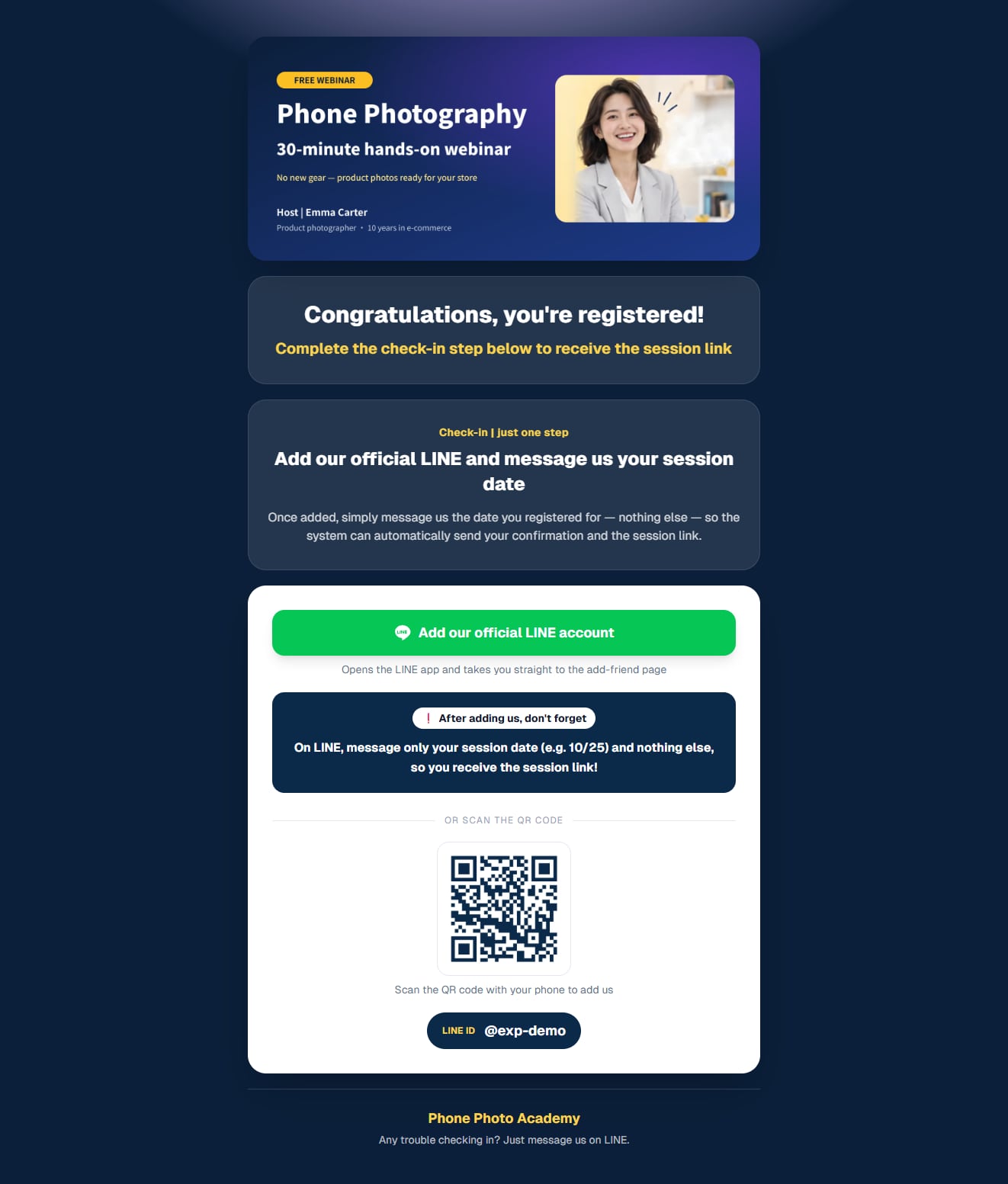
This step is for presenters who talk to their audience on LINE: instead of being redirected straight after signing up, registrants first see a page saying “Congratulations, you're registered! Add our official LINE and message us your session date”, and you send them the session link from LINE. It is opt-in — unticked, step 8's behaviour stays (redirect to the after-signup link, or straight into the webinar room). If your audience doesn't use LINE, leave it off or reword it for WhatsApp / Telegram.
1. Turn on the page and add your images
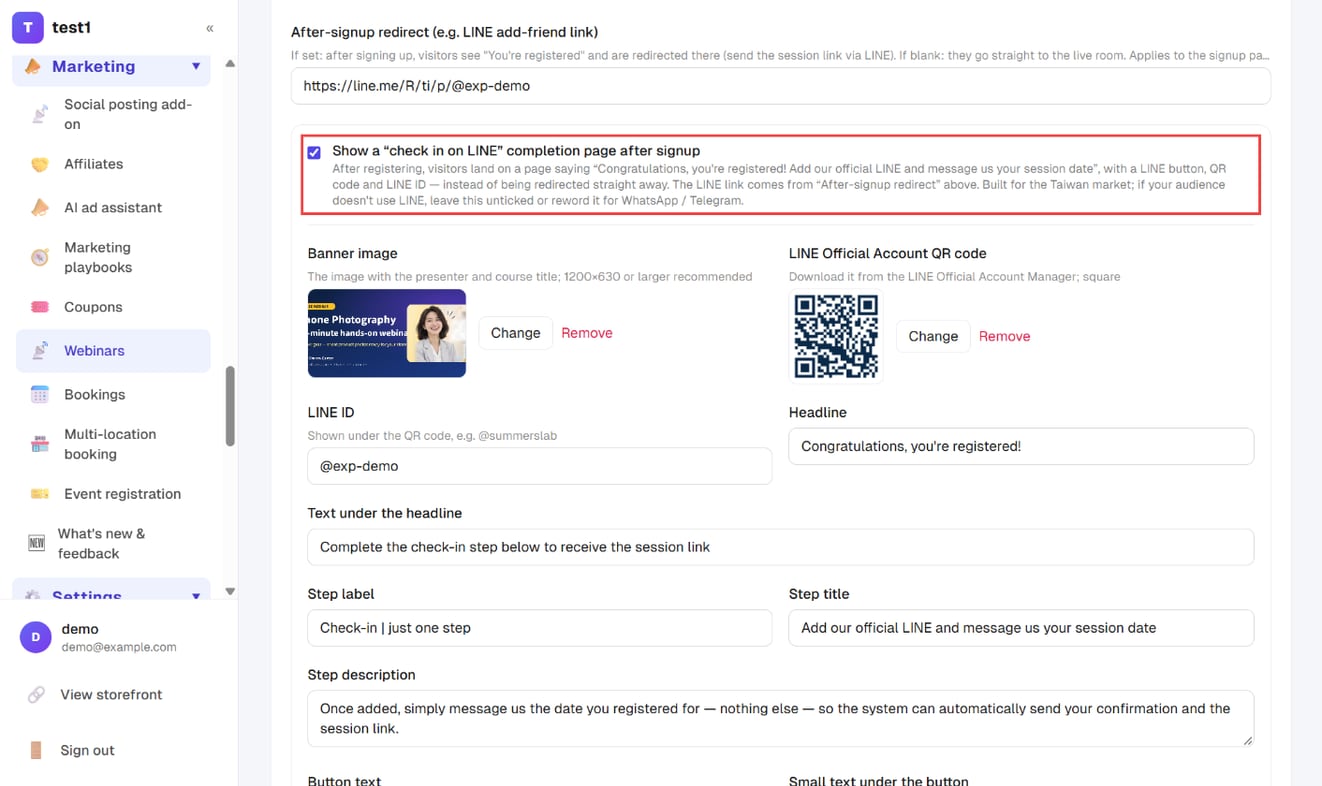
On the Registration page & appearance tab, first put your LINE add-friend link in After-signup redirect, then tick Show a “check in on LINE” completion page after signup. The full set of fields unfolds, every text already filled with default copy — just rewrite it in your own words:
- Banner image: the one with the presenter and course title, 1200×630 or larger
- LINE Official Account QR code: the square image downloaded from the LINE Official Account Manager
- LINE ID: shown under the QR code, e.g. @summerslab
- Headline, step title, step description, button text, reminder box:
{date}in the reminder box becomes each registrant's session date automatically
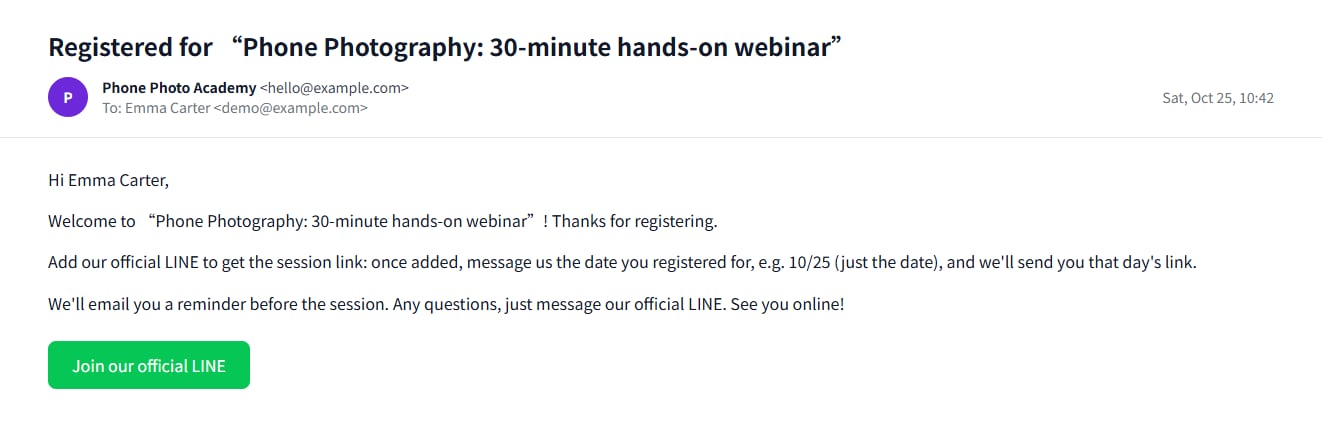
2. Edit the confirmation email (or leave it blank)
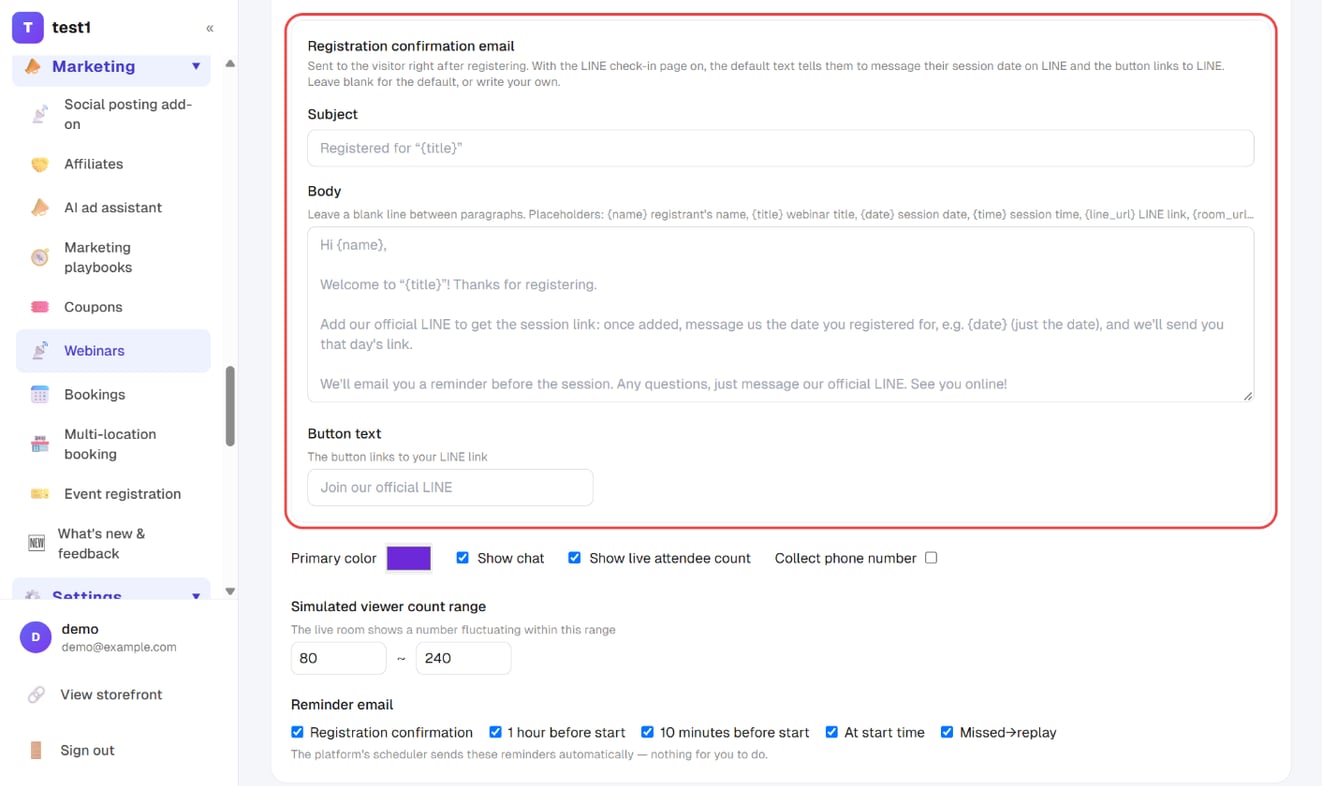
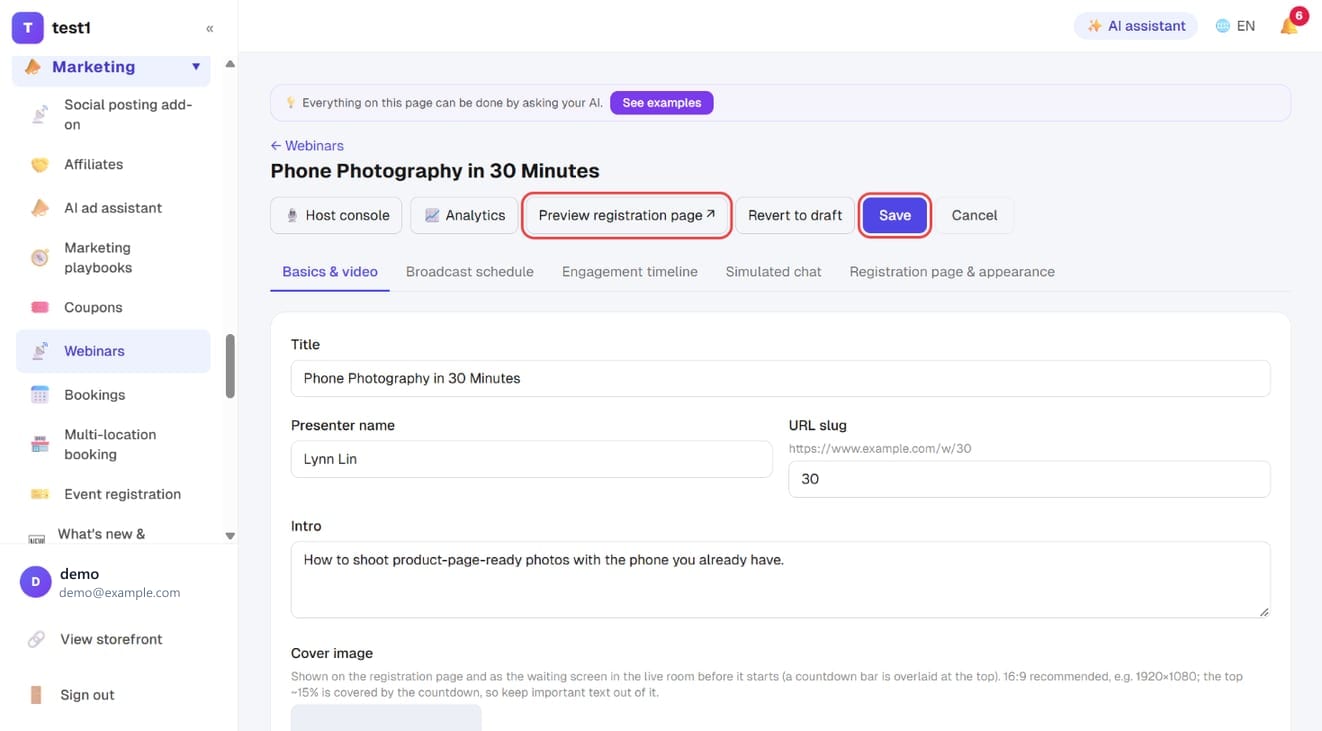
Below it is Registration confirmation email — the email sent the moment someone registers. Subject, body and button text are editable. Separate paragraphs with a blank line and use {name}, {title}, {date} / {time} (session date and time), {line_url} and {room_url}. Leave a field blank to use the grey default shown in it: with the check-in page on, it tells registrants to message their session date on LINE and the button links to LINE; otherwise it states the start time and links to the webinar room. Press Save in the top right when done.
3. What visitors see
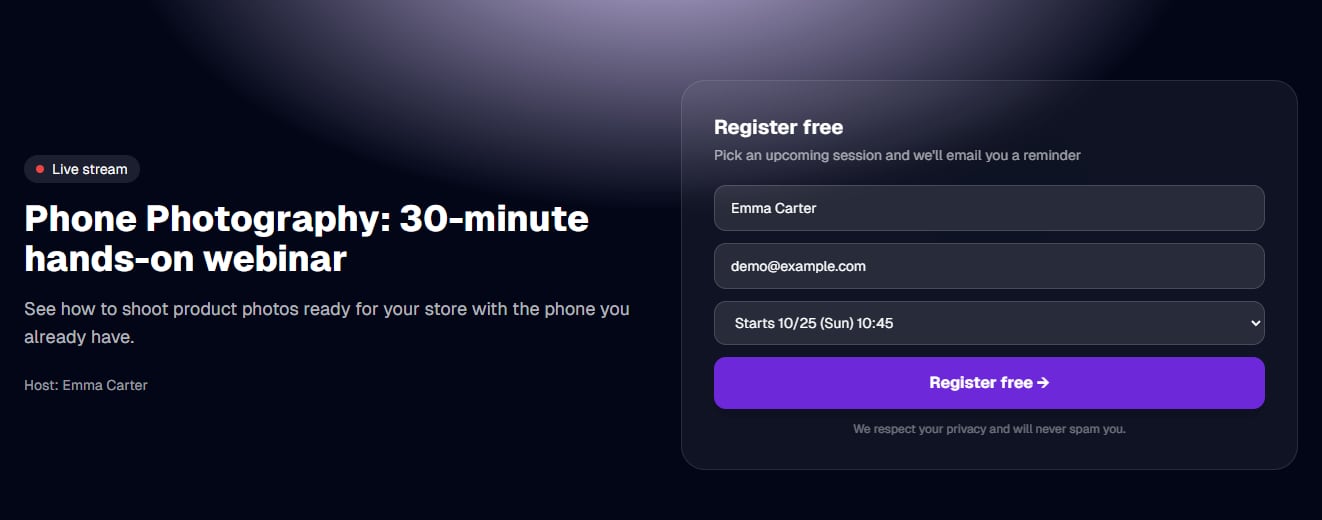
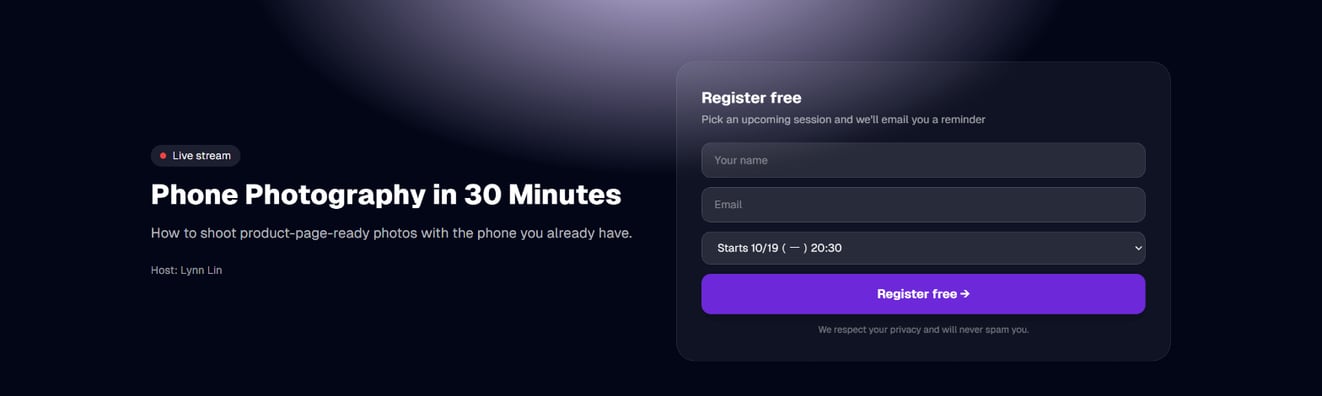
On the registration page the visitor enters their name and email, picks a session and presses Register free.
They land straight on the completion page: your banner on top, the add-LINE button and QR code in the middle, and the reminder box already shows the date they should send (10/25 in the screenshot) — they just copy it. Wait-listed visitors land here too, without a date.
At the same time they receive the confirmation email above, with the button linking to your LINE.
When the box is unticked, the page (your-domain/w/your-slug/thanks) does not exist and visitors are redirected as before.
Step 10: Save, preview, publish
Press Save in the top right. Preview registration page opens what visitors will see in a new tab.
A webinar that isn't published yet has a Publish button in the top right — registration only opens once you press it. A published one shows “Revert to draft” instead.
Step 11: Share the registration page
The registration page is your-domain/w/your-slug. Put it on your social pages, LINE, ads or newsletter.
Visitors enter their name and email, pick an upcoming session, and they're registered. Registrants automatically join your email list with a webinar tag.
Step 12: Answer chat while it runs, check the numbers afterwards
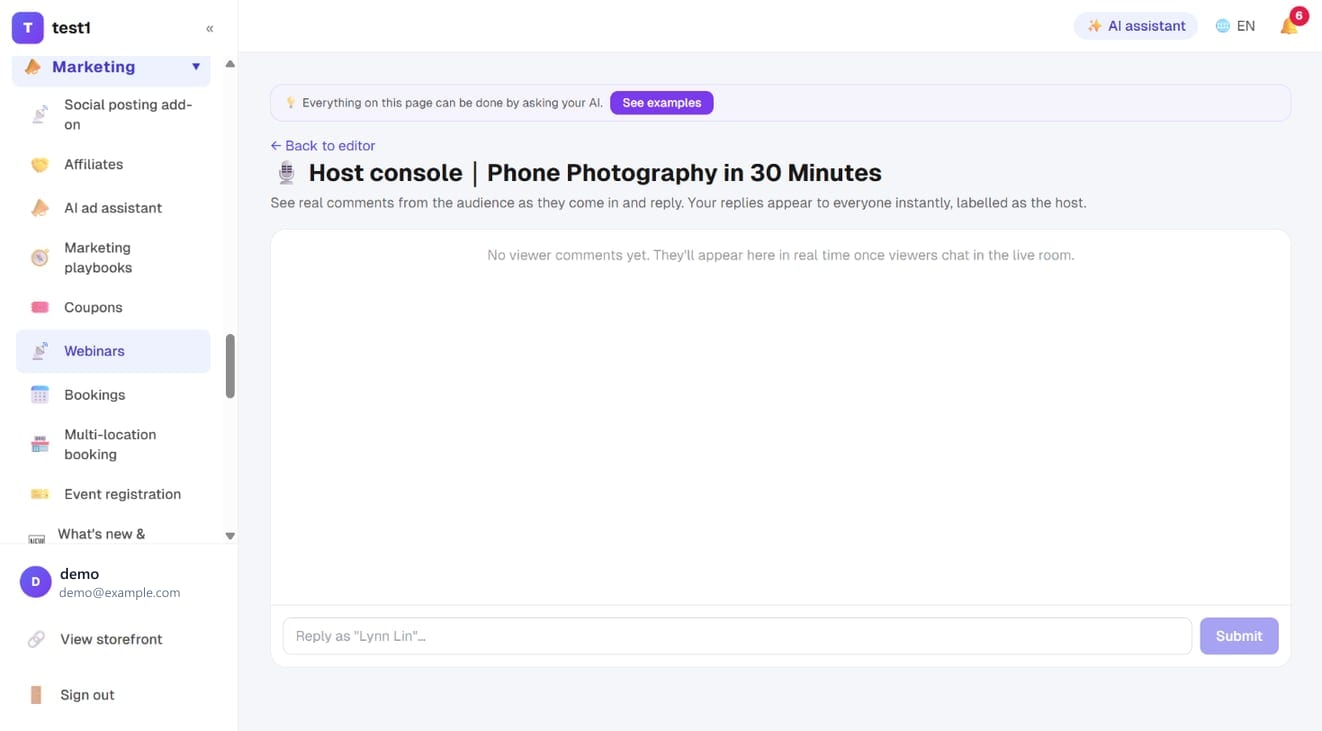
The 🎙️ Host console button in the editor shows real viewers' comments as they come in. Your replies are labelled as the host and appear to everyone instantly.
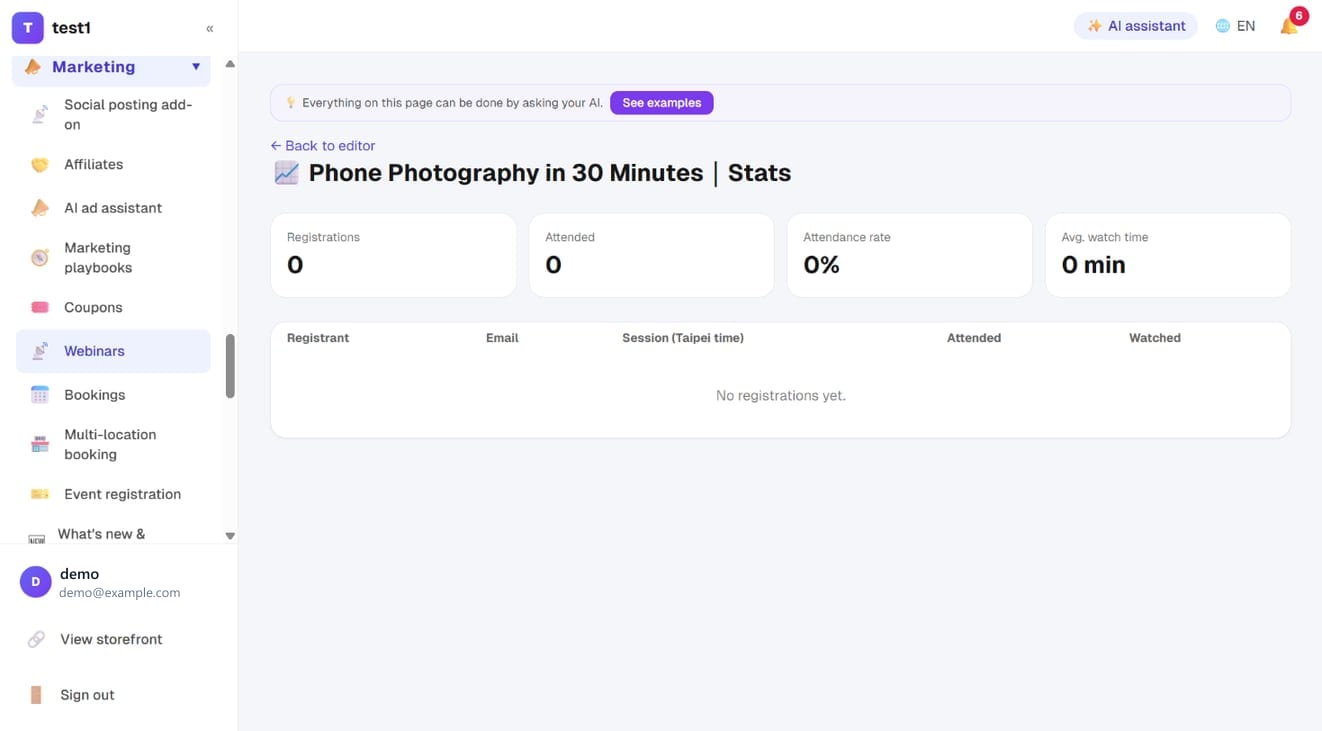
📈 Analytics shows registrations, attendance, attendance rate and average watch time for each webinar, with every registrant listed below — which is how you find where the content loses people.
Live broadcasts (YouTube Live)
Everything above is pre-recorded. If you want to actually go live — you in front of the camera, people watching on your own site, you answering their chat as it happens — switch “Broadcast type” to Live broadcast. Registration, reminders, chat, interaction cards, replay and attendance all work exactly the same; only the source of the video and the moment it starts are different.
The stream runs on YouTube Live, but viewers never see YouTube. They watch in your own webinar room, which requires registration — so the list, the offers and the replay all stay with you.
Four steps
1. Create the webinar and pick the type Under Marketing → Webinars → Create webinar, set “Broadcast type” on the “Basics & video” tab to Live broadcast (YouTube Live).
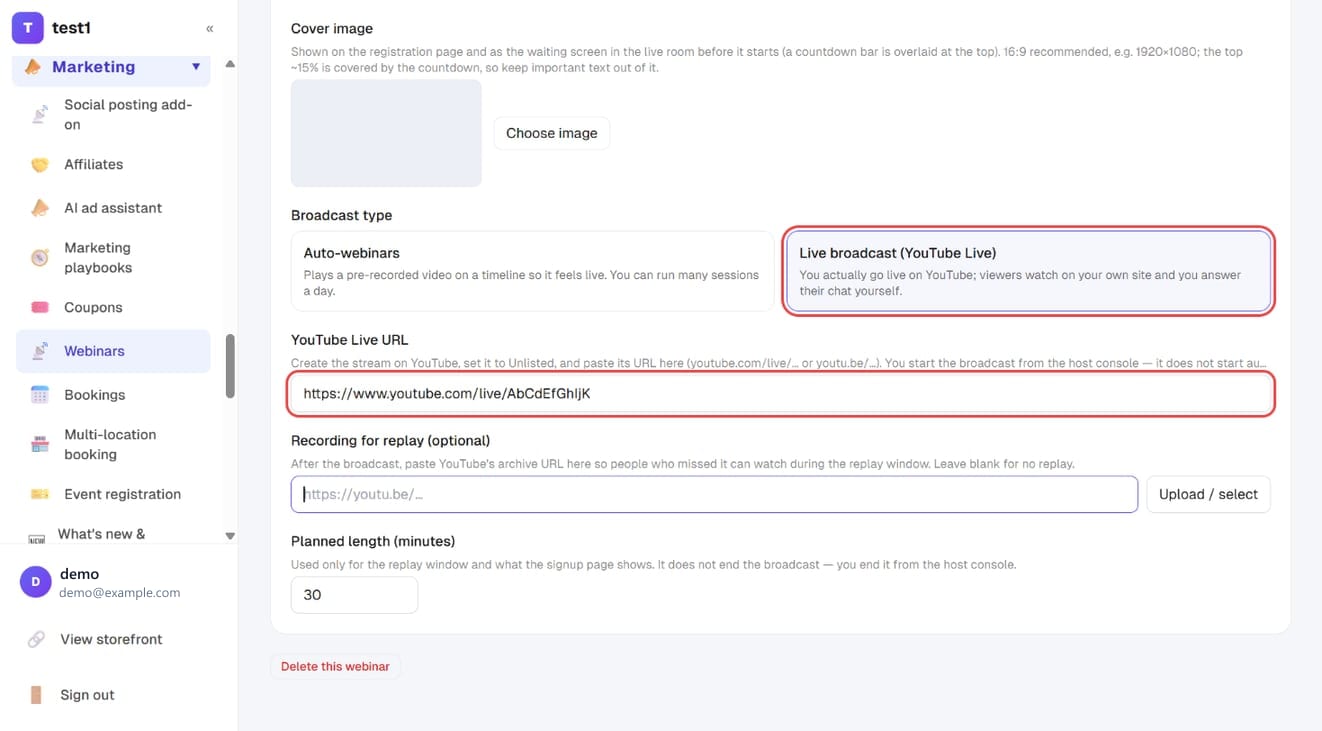
2. Create the stream on YouTube and paste its URL Create the broadcast on YouTube, set it to Unlisted (not Private — nobody else can watch a private stream), and paste the URL into “YouTube Live URL”. All three formats work:
https://www.youtube.com/live/xxxxxxxxxxx(what you get from the live page)https://youtu.be/xxxxxxxxxxxhttps://www.youtube.com/watch?v=xxxxxxxxxxx
A plain talking-head stream can be started from YouTube itself with your webcam. For slides plus a camera inset — how most webinars look — you need free software such as OBS.
3. Schedule the session Under “Schedule”, pick Specific date and set the date and time, e.g. 20 Sep 20:00. A live broadcast is usually a one-off; add more rows for a series.
Fill in “Planned length” — it only drives the replay window and what the signup page shows. It does not end the broadcast.
4. Publish and share the signup page
Hit Publish; the signup page is your-domain/w/your-slug.
On the day
- Start streaming on YouTube (or OBS) first and confirm the picture is up
- Open the 🎙️ Host console for that webinar
- Press ● Go live
The moment you do, everyone waiting in the room switches to the stream — no need to ask them to refresh.
⚠️ Don't reverse the order: press Go live before YouTube is actually streaming and your viewers stare at a spinner.
During the broadcast, from the host console you can:
- Read and answer chat — your replies are marked as host and appear instantly for everyone
- Push interaction cards — when you reach your offer, hit “Push to viewers” and the card appears on every screen. Pushed the wrong one? “Retract”.
When you're done, press ■ End broadcast and viewers move to the ended screen.
After the broadcast: replay
For live broadcasts you supply the replay yourself: YouTube keeps an archive of the stream, so paste that URL into “Recording for replay” and people who missed it can watch during the replay window. Leave it blank and the ended screen simply says there is no replay — rather than offering a button that does nothing.
Live vs automated
| Automated | Live | |
|---|---|---|
| When it starts | Automatically at session time | You press “Go live” in the host console |
| Interaction cards | Fire on the timeline (at N seconds) | Pushed by you, when you get there |
| Chat | Scripted + real messages | Real messages only |
| Viewer count | Your simulated range | The real number |
| Latecomers | Dropped in at “where it should be” | Start from now, like any live stream |
| Replay | The same pre-recorded video | The archive you paste in afterwards |
FAQ
Are viewers a few seconds behind? Yes, roughly 10–30 seconds — true of every YouTube/HLS broadcast, WebinarJam included. So chat lags: someone may be asking about what you said a minute ago. Nothing is broken; just expect it.
Will people wander off to YouTube? The room uses an embedded player with no related-video sidebar. An unlisted stream doesn't appear in search or on your channel unless someone passes the link around.
Can viewers come on stage with me? Not currently. This is one-to-many broadcasting, not a Zoom-style meeting.
The scheduled time passed and nothing appeared. Live broadcasts never start by themselves — you press “Go live”. That is deliberate: dropping people into a room before your gear is ready is worse than starting a few minutes late.
I forgot to press End. Viewers stay on the stream. Once you stop streaming, the player shows that the broadcast ended — but the ended screen and replay only appear after you press “End broadcast”.
FAQ
Is this misleading to attendees? Neither the registration page nor the room claims to be broadcasting live. Most platforms neither stress it nor deny it. If it bothers you, say plainly on the registration page that it's a recorded session — in practice the effect on conversion is usually smaller than people expect.
Can attendees post messages? Yes. Real messages appear immediately, and you can answer them from the host console.
What if I enter the wrong video length? Interaction cards and scripted chat are all triggered by seconds, so the wrong length makes them fire at the wrong time, or ends the session early. After changing it, walk through the timeline again.
Reminders aren't arriving. Reminder emails need your own email provider (Settings → Email). Also check whether that particular reminder has been switched off.