
Membership Tiers
Create tiers like VIP with their own discount, assign them by hand or upgrade customers automatically by spend.
Members → Member tiers. Create tiers like VIP, reseller, or long-time customer, each with its own discount.
Set up a member tier, step by step
Step 1: Add a tier
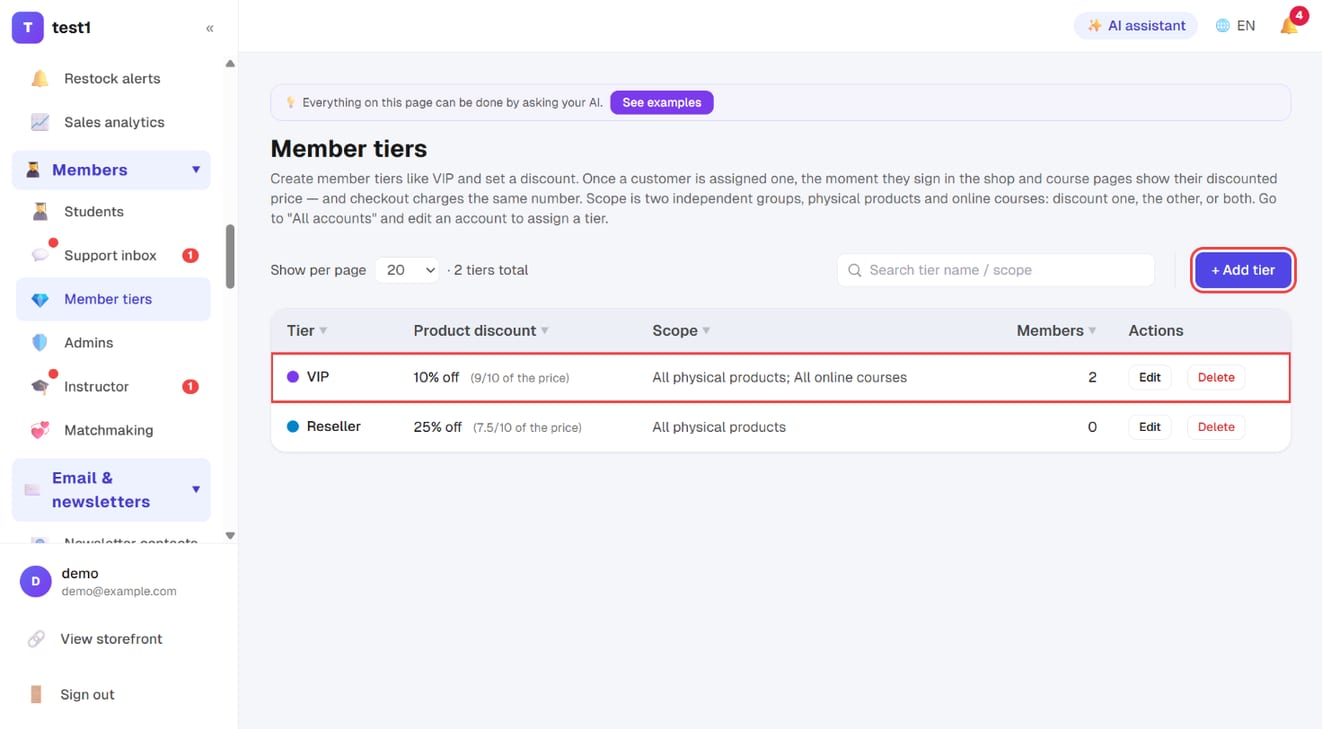
In the left menu, click "Members → Member tiers", then "+ Add tier". The list shows each tier's discount, scope and how many members hold it.
Step 2: Set the discount, scope and members
- Tier name, and the product discount slider (capped at 90%)
- Discount scope: physical products — all, specific products, specific categories, or none
- Discount scope: online courses — none, all, specific course categories, or selected courses
- Auto-upgrade threshold (optional): only if you want customers to move up by spend — see step 3 below. Leave it blank for a hand-assigned tier
- Members in this tier: "+ Add members" to assign people right here
Click "Save" at the bottom.
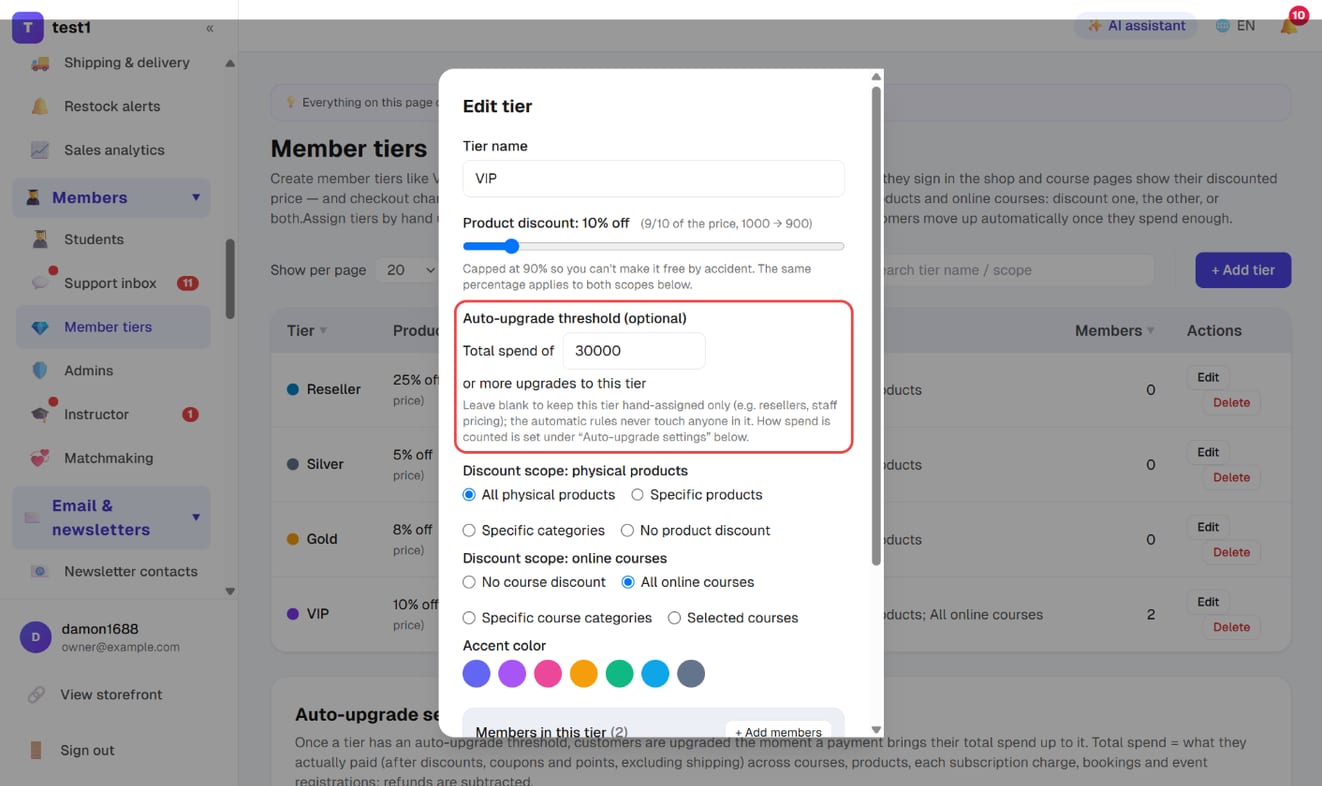
Scope is set as two independent groups — physical products and online courses. A tier can discount one, the other, or both.
Creating a tier
Each tier has:
- Name (VIP, Gold, Reseller…)
- Discount percentage
- Colour (for your dashboard)
- Sort order
- Scope (physical products): all products, specific products, specific product types, or none
- Scope (online courses): none, all courses, a course category, or specific courses (multi-select)
Scoping by product type is the useful one: a reseller tier can discount only your "wholesale" category while retail items stay at full price.
Scoping by course category matches the Category field in the course settings (see Creating a course). It beats ticking courses one by one: any course you add later with that same category picks up the discount automatically.
Assigning a customer
Add members from the tier itself (step 2 above), or go to Members → Students, edit an account and set their tier there.
From then on, when that customer is signed in they see the discounted price in your shop, on the course wall and on course pages (labelled as their tier price), and checkout charges that same number — no code to enter.
Automatic upgrades based on spend
The moment a customer's payment completes, if their total spend reaches a threshold they are upgraded automatically and their next order is priced at the new tier. If they jump past several thresholds at once, they go straight to the highest one they reached.
- What counts as spend: what the customer actually paid (after tier discounts, coupons and points) across courses, physical products (shipping excluded), each subscription charge, bookings and event registrations. Refunds are subtracted
- A customer you assigned by hand to a tier that has a threshold still moves up when they reach a higher one, but the automatic rules never move a hand-assigned customer down
Step 3: Set an auto-upgrade threshold on each tier
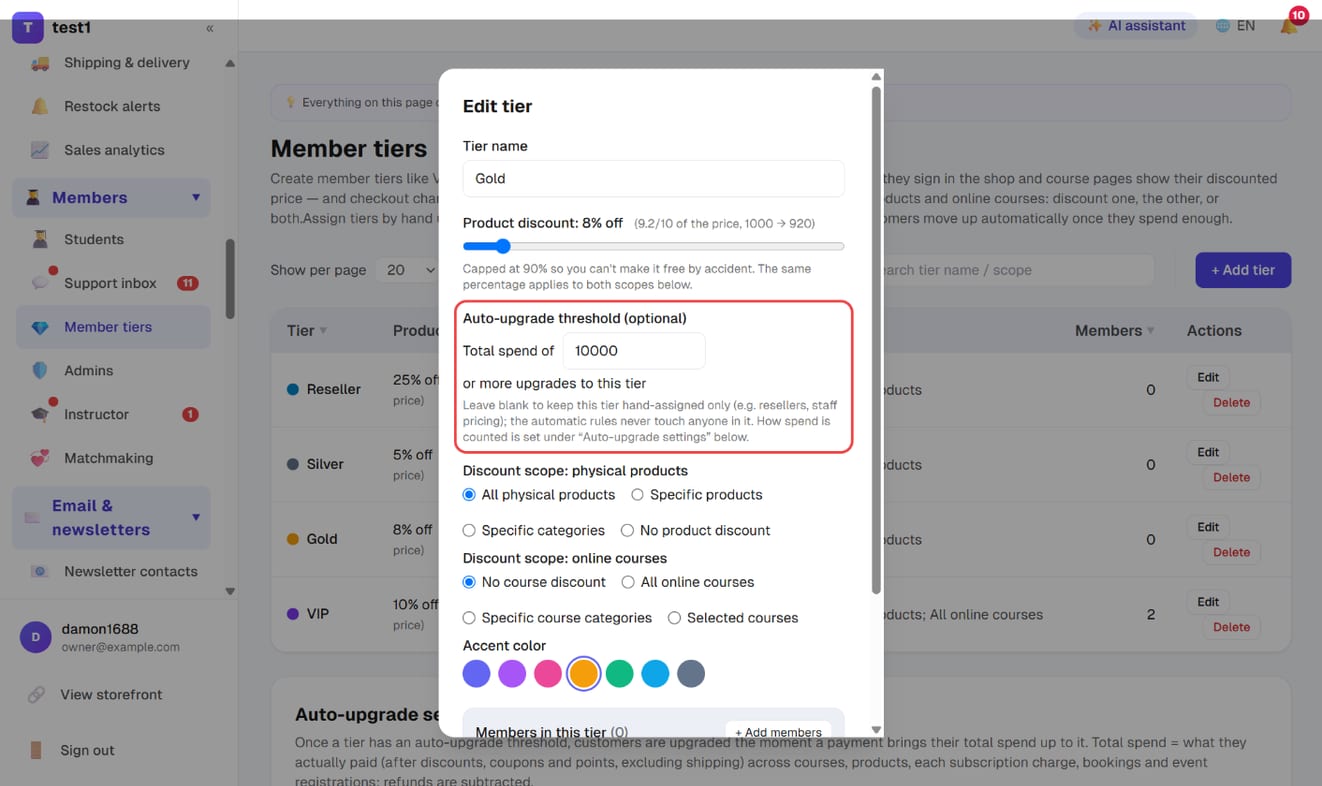
In the Member tiers list, click "Edit" on a tier you want customers to reach automatically, fill in "Auto-upgrade threshold (optional)" and click "Save" — for example Silver 3,000, Gold 10,000, VIP 30,000.
- Leave the threshold empty and the tier stays hand-assigned only (resellers, staff pricing). Anyone currently in such a tier is never touched by the automatic rules
- Once saved, the list's "Auto-upgrade threshold" column shows "Spend ≥ 3,000"; tiers without one show "Hand-assigned only"
Step 4: Choose how spend is counted, and the upgrade email
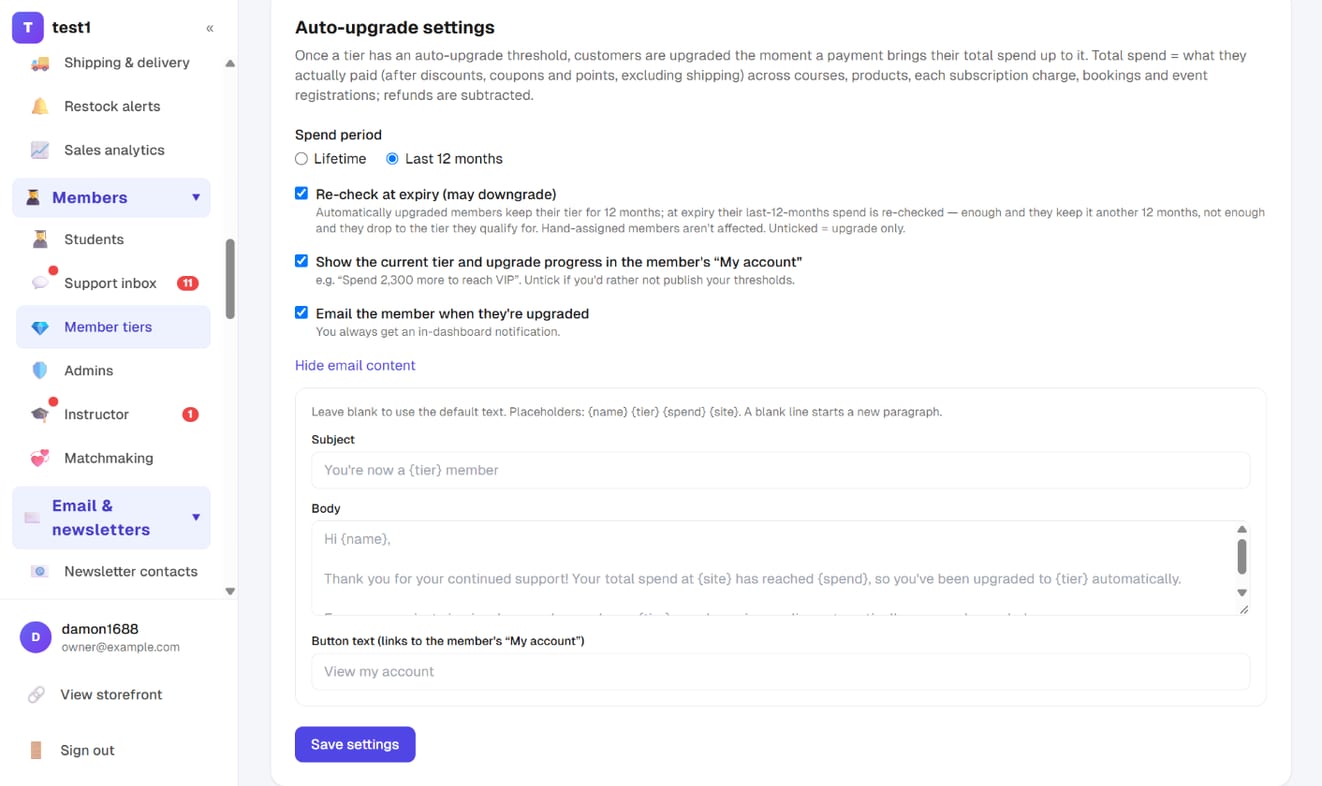
Scroll down to "Auto-upgrade settings":
- Spend period: lifetime (default) or the last 12 months
- Re-check at expiry (may downgrade): only available with "last 12 months". Customers who were upgraded automatically keep their tier for 12 months; at expiry their last-12-months spend is re-checked — enough and they keep it for another 12 months, not enough and they drop to the tier they do qualify for. Unticked = upgrade only, never downgrade
- Show the current tier and upgrade progress in the member's "My account", e.g. "Spend 2,300 more to reach VIP". Untick it if you'd rather not publish your thresholds
- Email the member when they're upgraded: click "Edit email content" to change the subject, body and button text, using {name}, {tier} (new tier), {spend} (total spend) and {site} (your site name); leave them blank to use the default text. You always get an in-dashboard notification
- Click "Save settings"
Step 5: Apply to existing customers
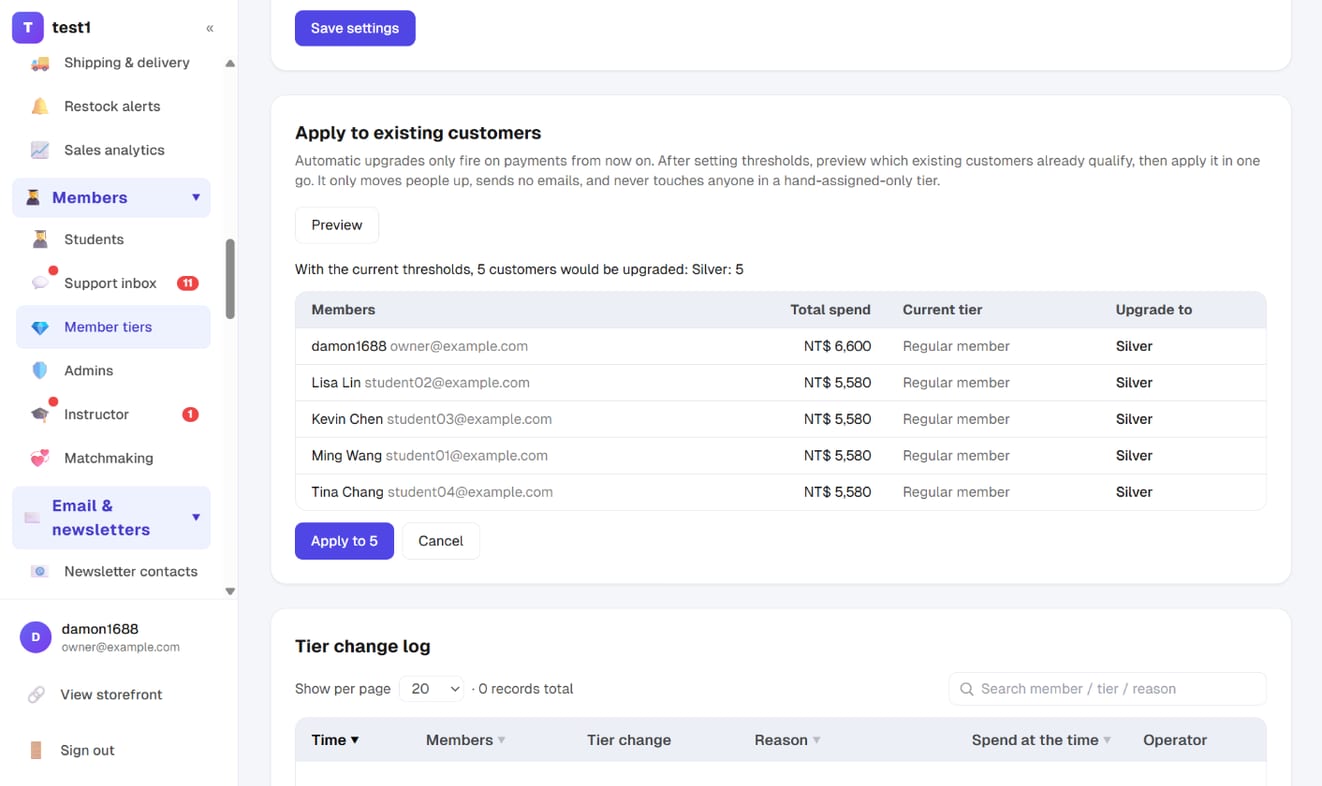
Automatic upgrades only fire on payments made from now on. Right after setting thresholds, go to "Apply to existing customers" and click "Preview": it lists everyone who already qualifies, with their total spend, current tier and the tier they'd move to. If the list looks right, click "Apply to …".
This catch-up only moves people up, sends no emails (hundreds of "you've been upgraded" emails at once tend to land in spam), and never touches anyone in a hand-assigned-only tier.
Step 6: Check the tier change log
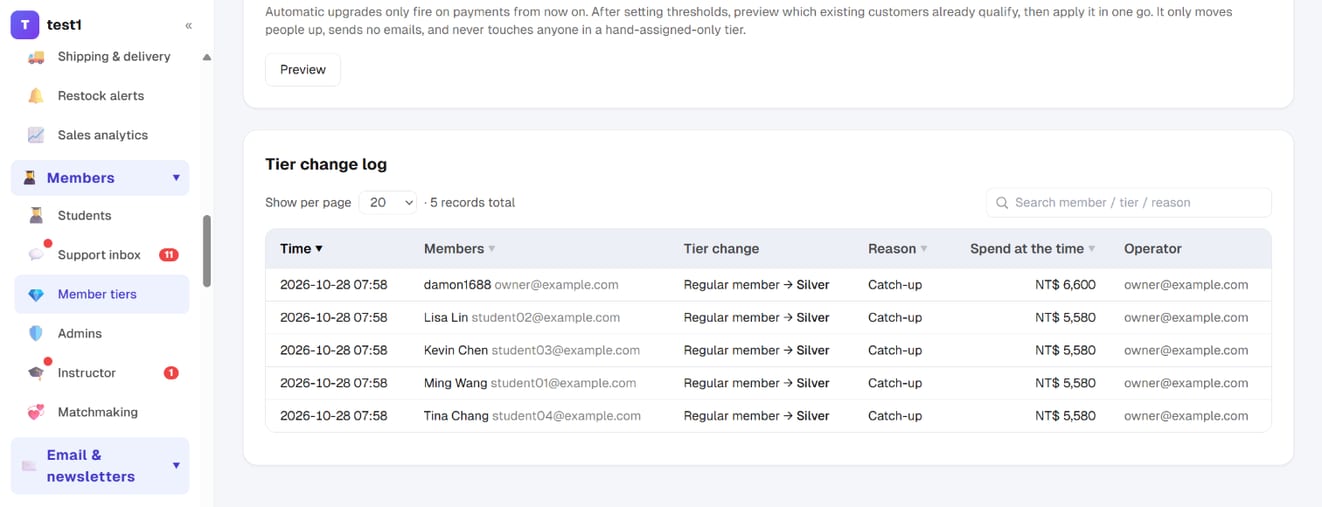
Every tier change — automatic upgrade, expiry downgrade, manual assignment, catch-up — is recorded in "Tier change log" at the bottom of the same page: time, member, tier change, reason, spend at the time and who made it. You can search and sort it.
Step 7: Find your best customers in the Students list
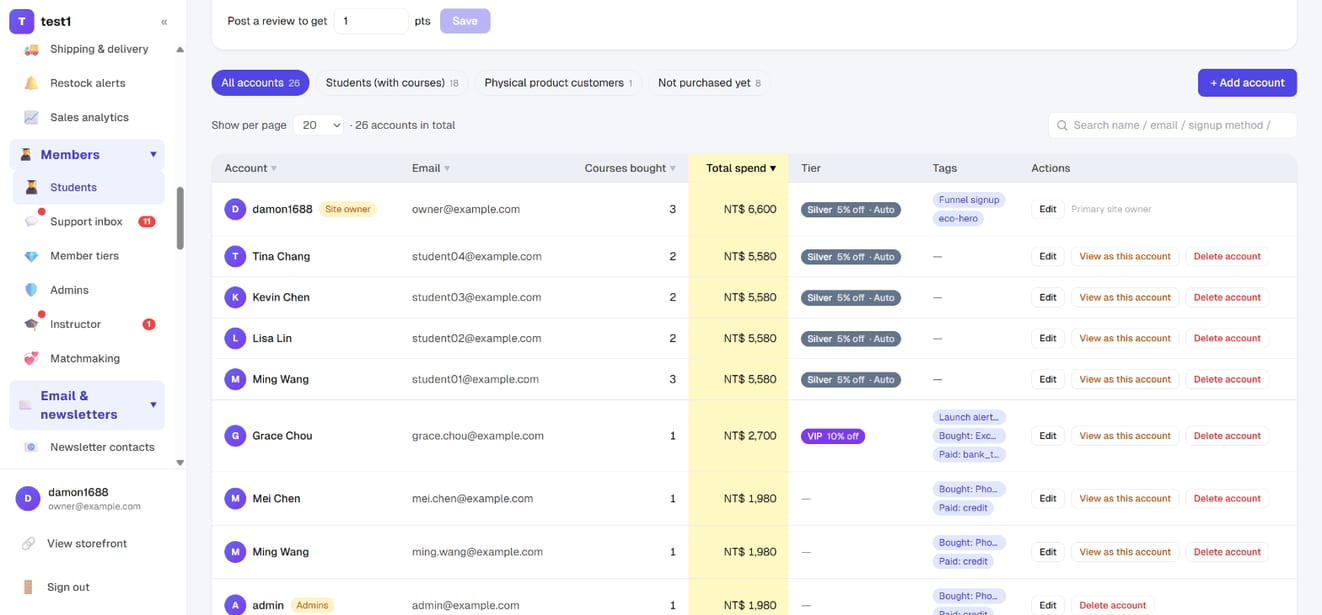
The "Members → Students" list now has a "Total spend" column — click its header to sort from highest to lowest. A tier badge marked "Auto" means the customer got there by spending; no mark means you assigned it by hand.
Step 8: What members see in "My account"
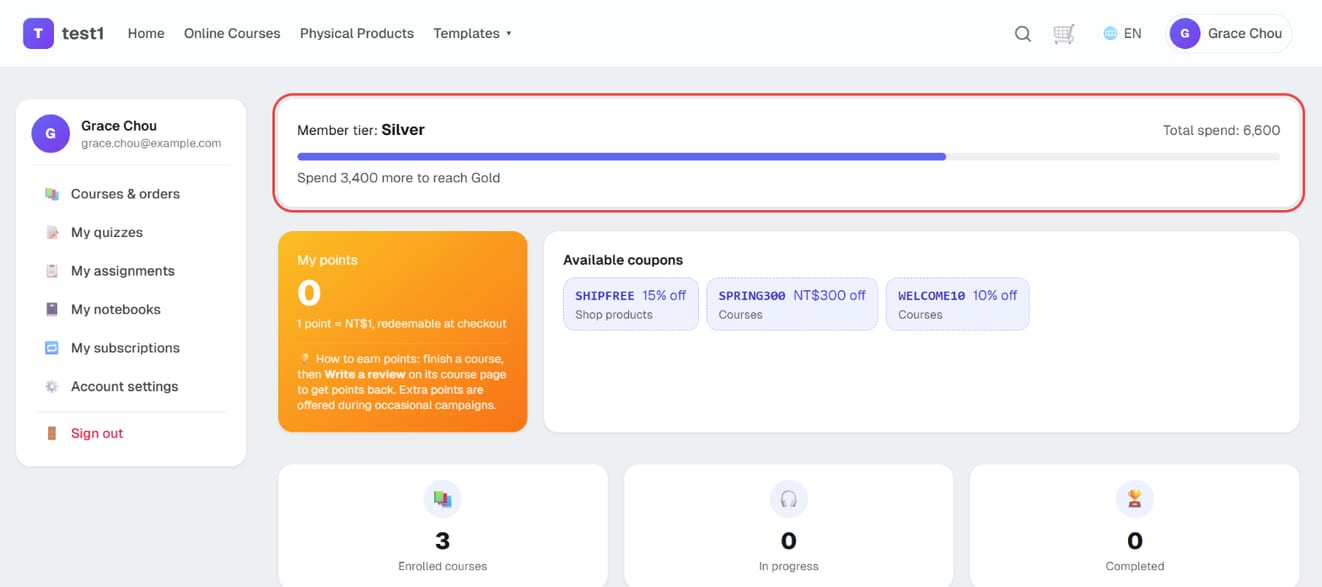
If you ticked the upgrade-progress option in Step 4, members see a tier card at the top of "My account" (they click their name in the top-right corner after signing in):
- Current tier, e.g. "Member tier: Silver"
- Total spend: shown as spend over the last 12 months if that's the period you chose
- Progress bar and the gap: "Spend 3,400 more to reach Gold". Members already on the top tier see a thank-you line instead
- If "re-check at expiry" is on, an extra line shows how long the current tier is valid
How it interacts with coupons
Each coupon decides individually whether it can stack with tier discounts:
- Can stack: the member price applies first, then the coupon on top
- Exclusive (default): checkout automatically uses whichever is better for the customer
Think this through before a promotion: a high tier plus a stackable coupon can discount far more deeply than you intended.
FAQ
Do signed-out visitors see member pricing? No. The discount is tied to the account, so they have to be signed in.
Can customers be upgraded automatically based on spend? Yes — see "Automatic upgrades based on spend" above. Set a threshold on a tier and it starts working; tiers without a threshold stay hand-assigned.
Does an expiry downgrade wait for a scheduled job? No. The tier is re-checked the next time the customer browses, checks out or opens "My account" after it expires. So for a customer who hasn't been back in a while, the dashboard keeps showing their old tier until they return.
Does a refund downgrade the customer? The refund is subtracted from their total spend, but by default tiers only go up, so it won't downgrade them. If you've turned on re-checking at expiry, the reduced total is used when their tier expires.
Can someone hold two tiers? No, one tier per account.
Do subscription courses get the discount? No. A subscription course charges what its plan says each period; tier discounts do not apply to it.