
Forms & Lead Capture
Build forms, set pop-up triggers, and embed them on your own pages or an external site.
Forms are how visitors become contacts. Build one under Website → Forms and you can place it on any page of your site, or embed it on a completely separate website you own.
Build a lead form, step by step
Step 1: Create a form
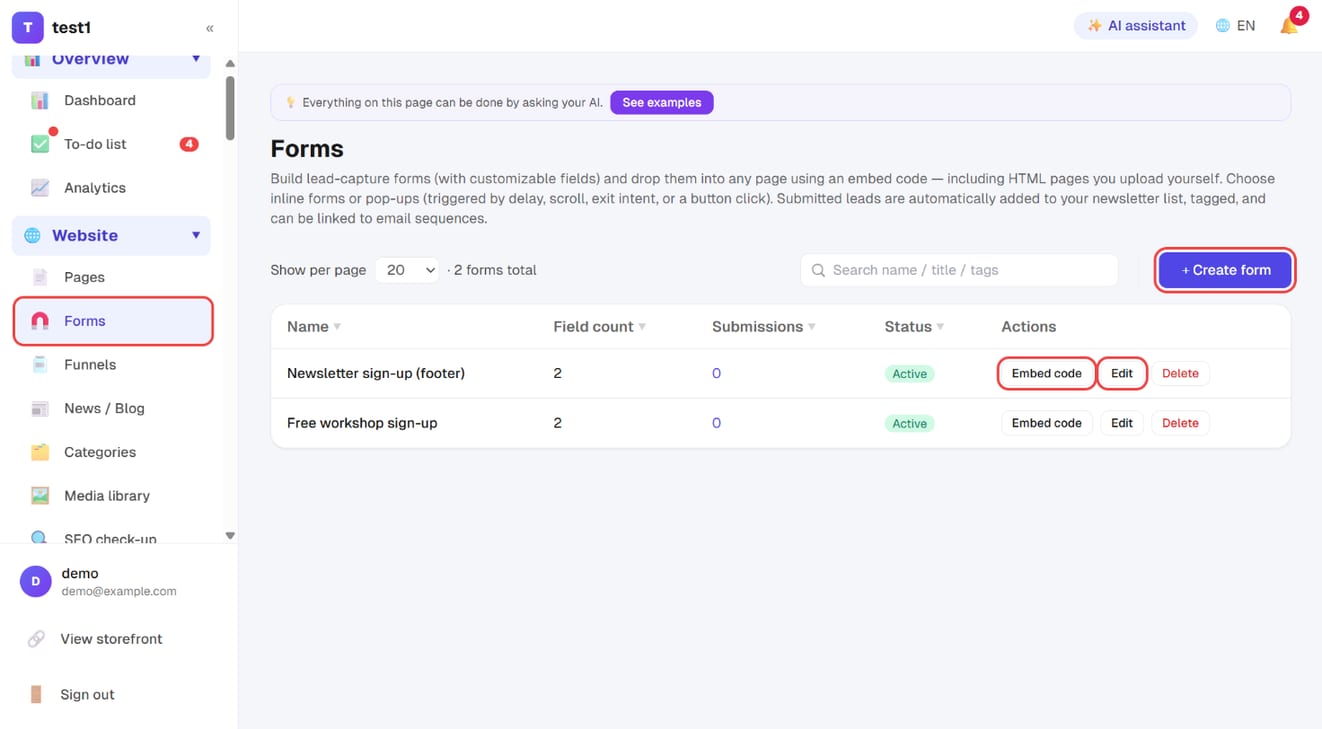
In the left menu, click "Website → Forms", then "+ Create form" at the top right. For an existing form, "Edit" changes it and "Embed code" gives you the snippets to paste.
Step 2: Name, tags and fields
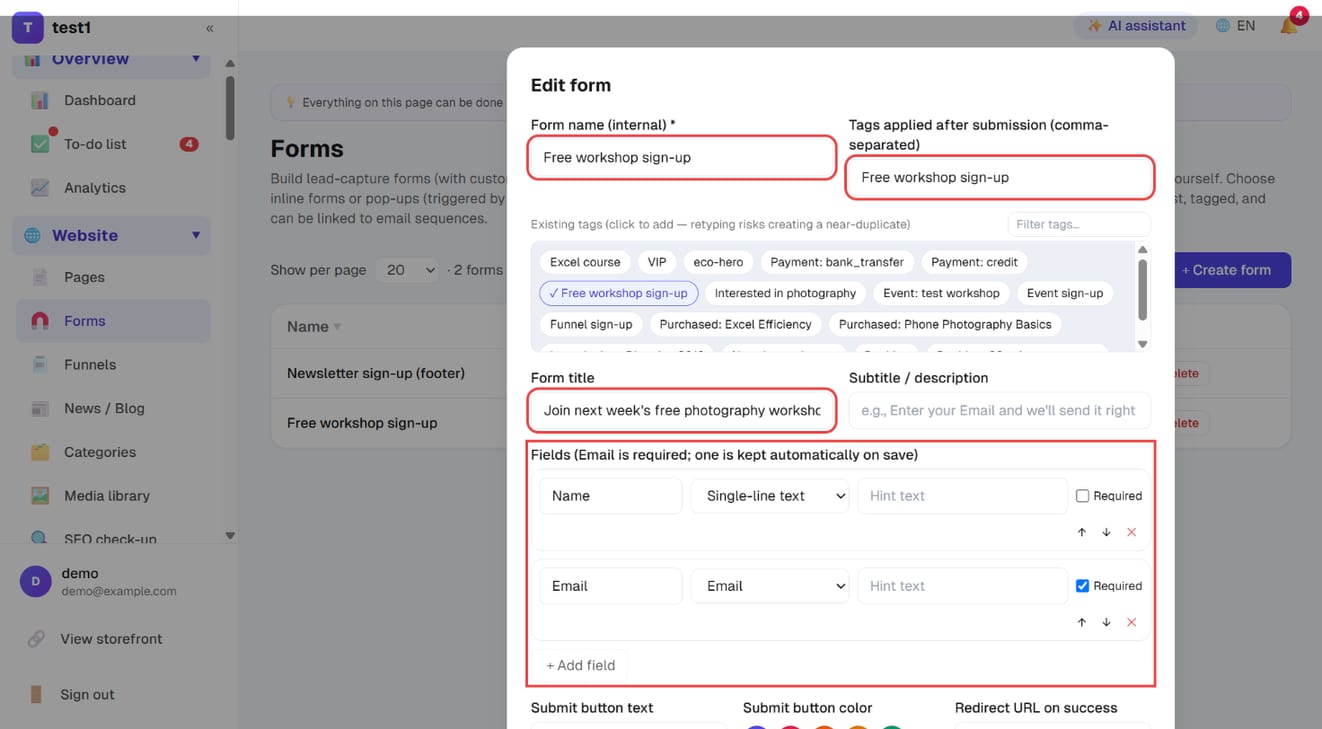
- Form name (internal): for you to recognise it
- Tags applied after submission: everyone who submits gets these tags — the basis for segmenting and triggering sequences. Click an existing tag below to add it, so a typo doesn't create a near-duplicate
- Form title and Subtitle / description: the copy visitors see
- Fields: Email is required (one is kept automatically on save); "+ Add field" adds name, phone and so on, each with a type, hint text and required option, reordered with ↑ ↓
Step 3: After-submit behaviour, pop-up and notifications, then save
Scroll down:
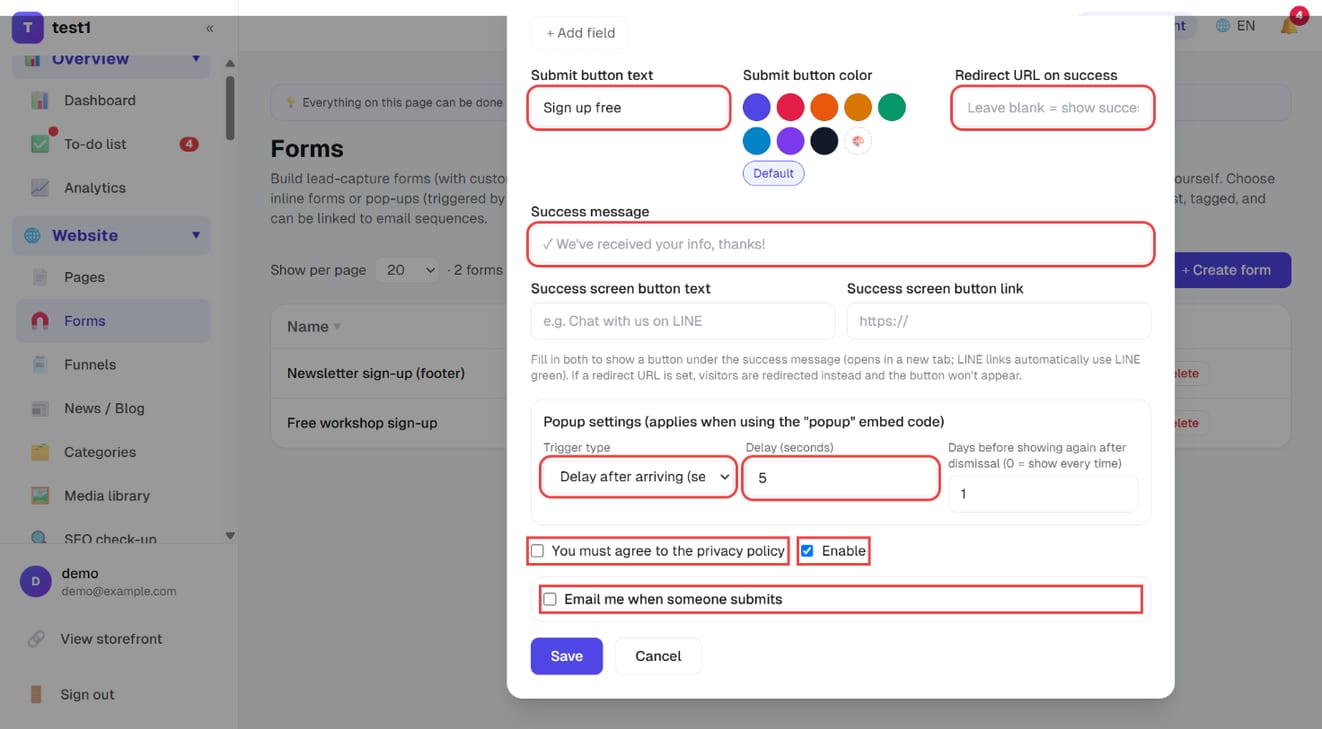
- Submit button text and colour
- Redirect URL on success: blank = show the success message; filled in = go straight there (a thank-you page, a download link)
- Success message, plus an optional success-screen button (e.g. "Chat with us on LINE")
- Popup settings: trigger type (delay after arriving / scroll percentage / exit intent / button click only), delay in seconds, and how many days before it shows again after being dismissed
- You must agree to the privacy policy, Enable, Email me when someone submits
Click "Save".
Step 4: Put it on your site
Pages on this site: add a "Lead capture" block in the page editor, choose "link a form" and pick this form. Content, fields and tags all follow the form — change it once, it updates everywhere.
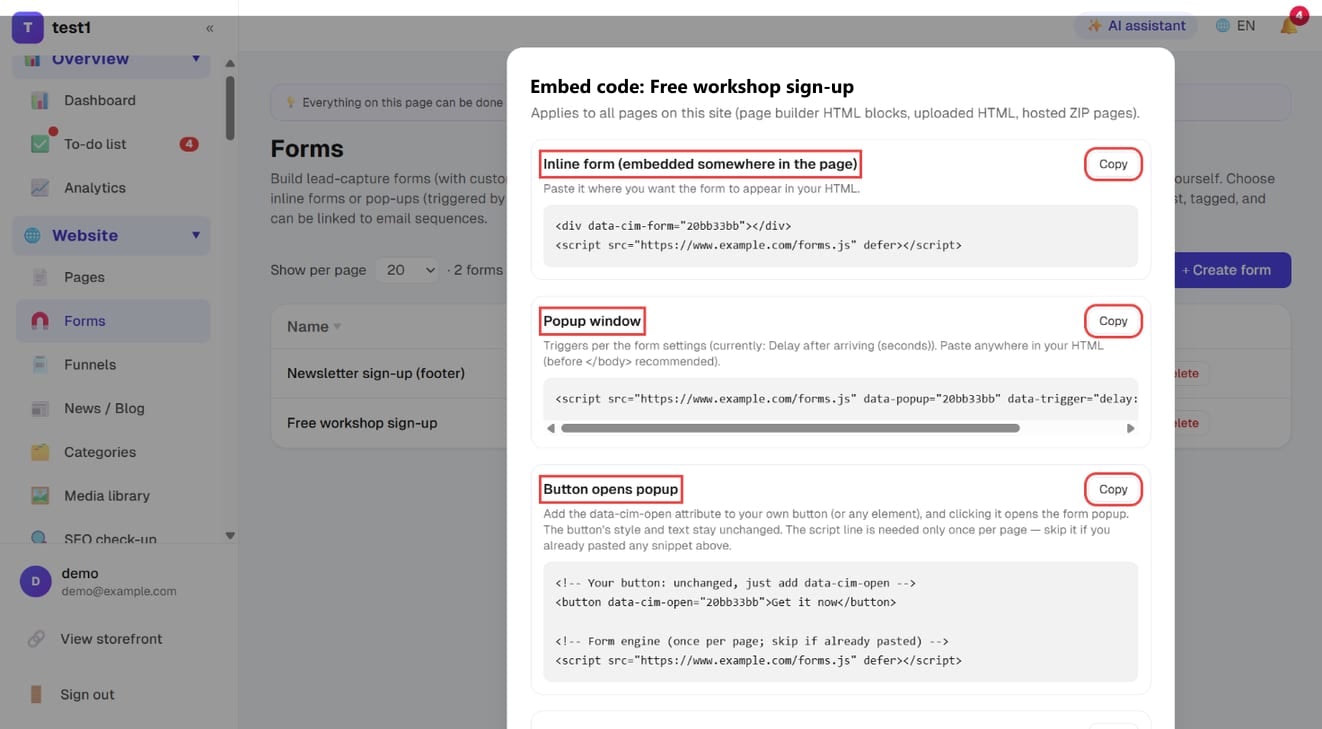
Another website or HTML page: click "Embed code" in the list and copy the snippet you need:
- Inline form: embedded somewhere in the page
- Popup window: opens according to the trigger you set
- Button opens popup: add one attribute to a button you designed yourself, and clicking it opens the form
Embedded forms pull their text in the visitor's language live — edit the copy in the dashboard and external sites update too, with no need to re-paste the code.
Building a form
Fields
Seven field types are available: single-line text, email, phone, multi-line text, dropdown (single choice), checkboxes (multiple choice), single checkbox.
Each field has a label, a required toggle, and placeholder text. The choice fields also take a comma-separated list of options.
The three choice fields differ in how many answers a visitor can give — pick the right one:
| Field | What the visitor can do | What lands in the submission log |
|---|---|---|
| Dropdown (single choice) | Pick one option from a list | The one option they picked |
| Checkboxes (multiple choice) | Every option is shown; they tick as many as they like | The ticked options in one cell, comma-separated: SEO, Paid ads |
| Single checkbox | Ticked or not (e.g. "Yes, send me the newsletter") | "是" when ticked, blank when not |
The public form labels choice fields "Single choice" or "Select all that apply", so nobody has to guess.
You almost always want the email field — it's the primary key of your list. The more you ask, the fewer people finish; only ask for what you'll actually use now.
Copy
- Heading and description
- Button text
- After submitting: show a message, or redirect to a URL (a thank-you page, a download link)
Tags
A form can apply tags to everyone who submits it. Tags drive segmentation and trigger email sequences — give each form at least one tag of its own, or you won't be able to tell later where a contact came from.
Consent
Turn this on and the form shows a required "I agree to the privacy policy" checkbox.
Where to put it
On your own pages
In the page builder, add a Lead capture block, choose "Linked form", and pick the form. Content, fields and tags all follow the form — edit once, updates everywhere.
As a pop-up
A form can open as a pop-up, with four trigger options:
| Trigger | Behaviour |
|---|---|
| Delay | Appears after N seconds on the page |
| Scroll | Appears at a percentage of page scroll |
| Exit intent | Appears when the cursor moves to leave the window |
| Click | Opens from a button you designate |
You can also set how many days before the same person sees it again, so returning visitors aren't interrupted every time.
On an external site
Each form gives you an embed snippet that works on any HTML site — including an old WordPress or Wix site, or a static page you uploaded.
The embed script is publicly cached, but the form's text is fetched per request in the visitor's language — so when you edit the copy in your dashboard, the external site updates too. You never need to re-paste the snippet.
Submissions and notifications
Every submission is stored in the form's submission log, and the person is added to your newsletter list with the form's tags.
Submission notifications can be off, sent to your site contact address, or sent to an address you specify.
FAQ
Where do I see the people who filled in a form? Two places: the form's own submission log (every field, exactly as entered), and Marketing → Newsletter list (the merged contact and their tags).
What if the same email submits twice? The submission log keeps both entries; the list keeps one contact and adds any new tags. You won't get duplicate contacts.
Do pop-ups hurt SEO? Google penalises interstitials that cover the main content immediately on arrival. Use a delay or scroll trigger rather than firing the moment someone lands.
Can a form take payment? No — forms collect information only. Use course checkout or the product cart to take money.